

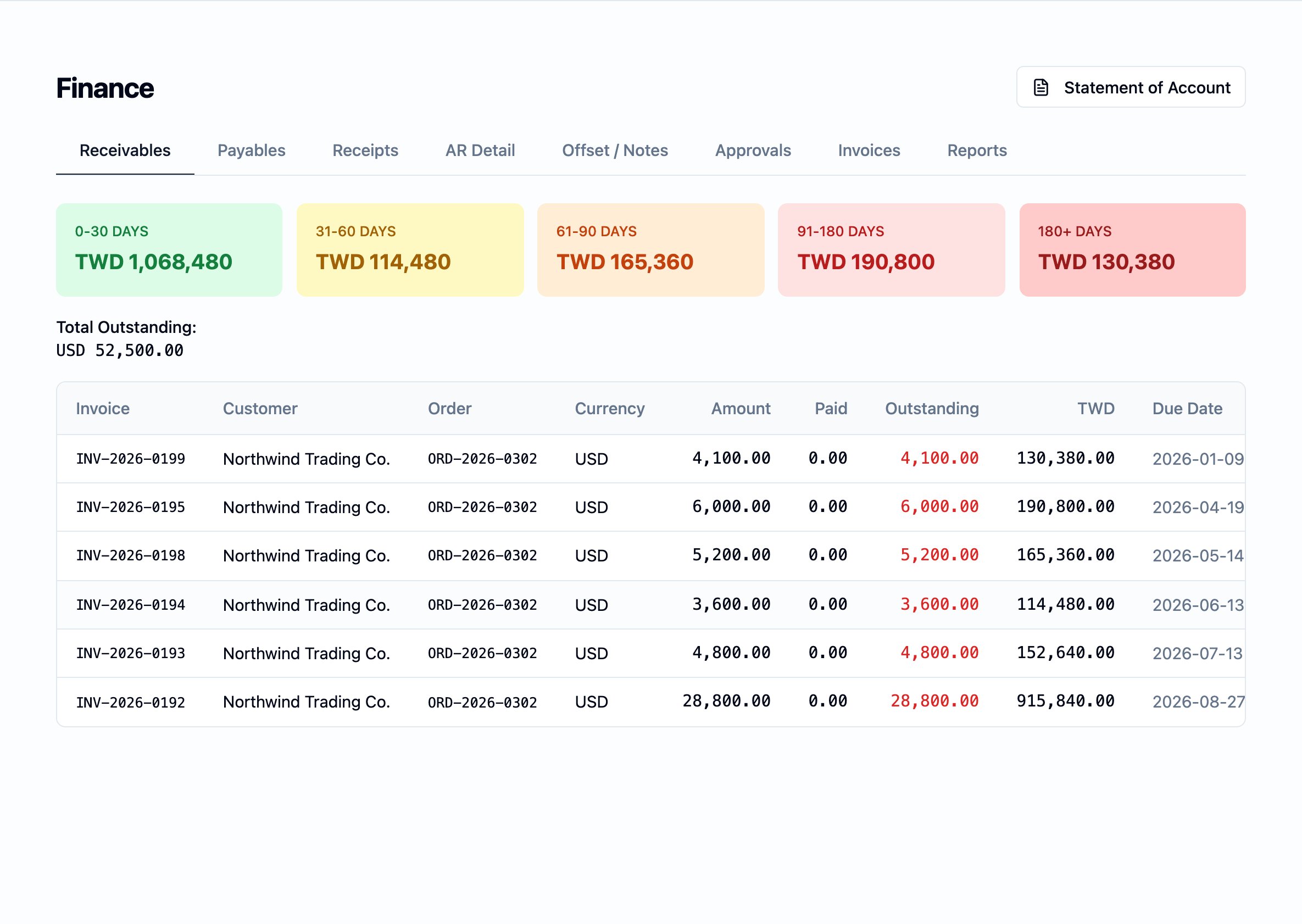
The Statement of Account is reached from the action at the top right of the Finance module; the underlying receivables — every open customer invoice the statement reconciles against — sit on the Receivables tab the action opens over.
What it is
A Statement of Account is one customer’s account history over a period: the opening balance carried in, every charge raised against the customer during the period, every receipt taken in from the customer, and the closing balance left at the end. It is the document a customer reconciles their own records against, and the document the workspace sends with a request for payment. The statement is always rendered in English and is always margin-free — it lists the gross amounts that were invoiced and settled, with no internal cost figures and no internal margin disclosure. The English-only rule applies regardless of the workspace’s display language, so a workspace running Chinese internally still sends an English statement to the customer.Why it exists
A single customer invoice answers “what was this shipment?” A Statement of Account answers a different question — “where do we stand on the whole relationship?” It is the document that summarises the running history, ties the workspace’s view of what is owed to what the customer’s own books show, and is the trigger for collection conversations on overdue balances.How it is generated
The statement is generated from inside the Finance module:- Open the Finance module and use the Statement of Account action on the module header.
- Choose a customer from the picker.
- The statement loads — opening balance, the per-period activity, the closing balance.
- Export as PDF, Excel, or CSV.
The opening, charges, and closing summary
At the top of the statement, three figures summarise the period:
The figures are stated in the workspace’s reporting currency, at the rate
each underlying document was booked at.
The transaction table
Below the summary, a single table lists every entry posted to the customer’s account during the period. The columns, in the order they appear on the statement, are:Date— the date the entry happened: the issue date of an invoice, the payment date of a receipt, the date a debit or credit note was raised.Type— the kind of entry. A charge entry, a receipt, a debit note, a credit note, a deposit application.Reference— the document’s own number. The invoice number for a charge, the receipt reference for a receipt, the debit-note or credit-note number for a note entry.Order No.— the internal order number the entry was raised against.Customer PO No.— the customer’s own purchase-order number, taken from the order header. Shown alongside the workspace’sOrder No.so the customer can reconcile the entry against their own books without re-keying. A row with no customer PO on the underlying order is shown blank.Season— the order’s season.Style No.— the style on the line the entry was raised against. A row whose underlying order carries more than one style shows the first style with a+Nindicator naming how many other styles share the entry; the full list reads out as a tooltip on hover.Due Date— the date the customer is contracted to settle the entry by; drives the row’s aging on every page that ages this document. See Aging buckets.Currency— the entry’s own currency.Amount— the entry’s amount in its own currency.Outstanding— for charge entries, what is still owed on the entry in its own currency. Blank for receipts and applied deposits — those entries close balances rather than open them.Charge— the running-balance debit posted by this entry to the receivables side of the finance ledger, in the workspace’s reporting currency. Every charge raised entry — customer invoices and debit notes — fills this column; the period’s total for this column is theTotal Chargesfigure above the table.Receipt— the running-balance credit posted by this entry, in the workspace’s reporting currency. Customer receipts and applied credits fill this column.Balance— the customer’s running outstanding balance after the entry, in the workspace’s reporting currency.
How “Charge raised” reads on the statement
The Statement of Account is the customer-facing place the workspace’s inherited finance vocabulary — charge raised, entry, the three sides of the ledger — shows up directly under a column header. See the finance ledger for the umbrella model.- Every charge raised against the customer fills a
Chargecell. A customer invoice raised for a shipment, a debit note charged to the customer for something owed back — both post a charge-raised entry to the receivables side of the ledger, and both surface on the statement under theChargecolumn. - The period’s total of the
Chargecolumn is theTotal Chargesfigure above the table. The two are the same number, read two ways: the column adds row-by-row, the summary figure is the same sum stated up front. - A receipt does not fill the
Chargecolumn. A customer receipt is recorded the same way an applied credit or applied deposit is — it fills the neighbouringReceiptcolumn and reduces the runningBalance. - An entry posted as part of the period’s history is permanent. A later correction is a new entry, with its own row on the statement; the earlier row is not edited away. See the finance ledger for the rule that no entry is ever overwritten.
How currency is presented
The statement is denominated in the workspace’s reporting currency. Each entry that originated in a foreign currency is shown with its document currency and the document’s amount in that currency (Currency and
Amount columns), alongside the converted figures in the running-balance
columns (Charge, Receipt, Balance). The rate that does the conversion
is the rate that was in effect on the document’s date, never today’s rate.
A customer whose order activity crosses currencies sees the same per-entry
currency in their own column, and a single running balance in the
workspace’s reporting currency — the right view for a statement that is
asking for payment in the workspace’s money.
Where it sits in the workflow
- Upstream. A Statement of Account reads the same charges, receipts, and deposit applications that surface on the Receivables board — both views read the same finance ledger.
- Downstream. The statement is the document the workspace sends to a customer when asking for payment. The customer’s response is a receipt recorded on the Receipts (收款) tab; the next statement reads the updated balance.