

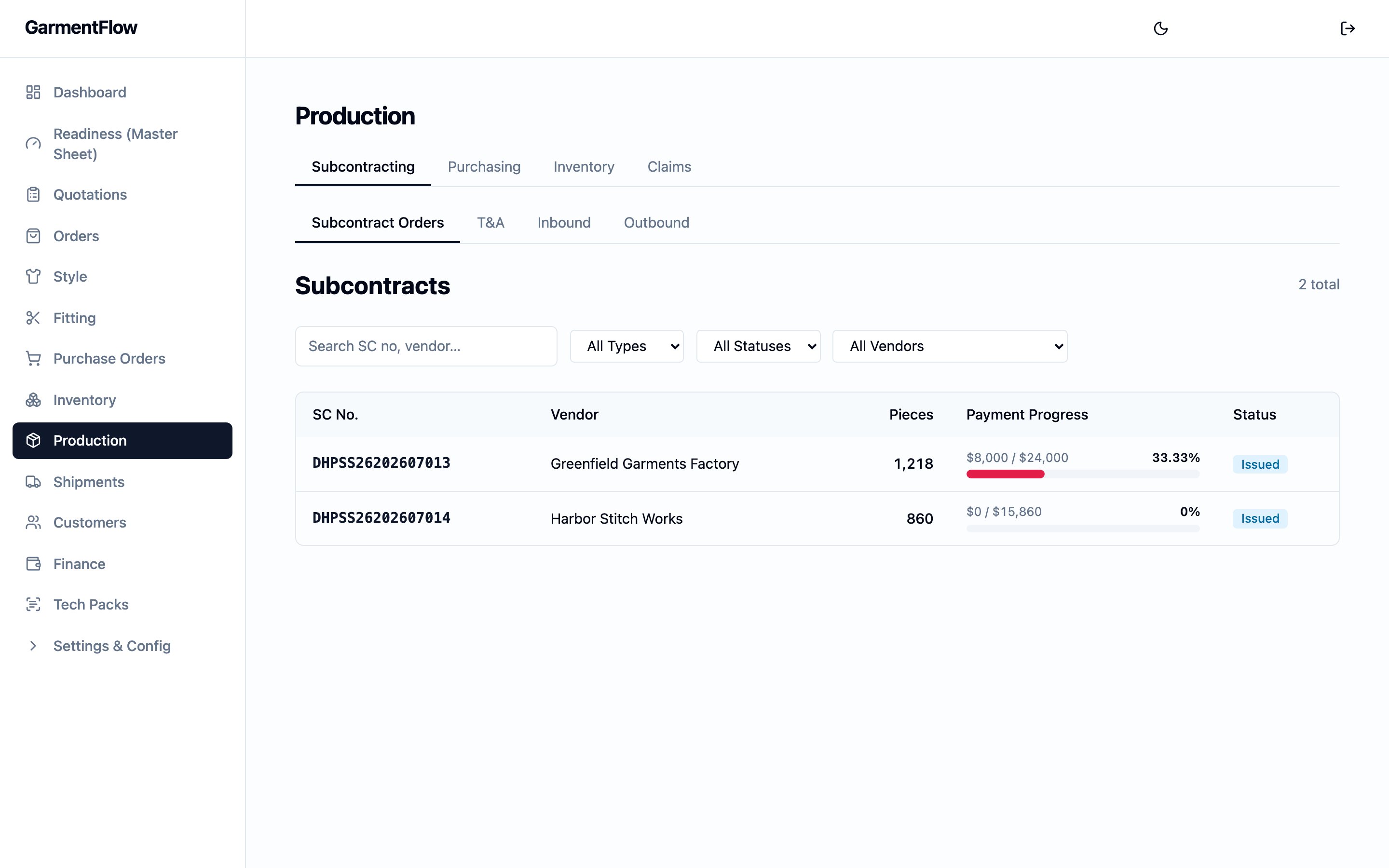
The Production hub on the Subcontracting tab — factory orders across customer orders, with the payment-progress bar and the issued status on each row.
Watch a purchase order fill itself from the BOM — items, quantities, unit prices, and vendor pulled straight through.
Three records, three jobs
Three records carry the word “production” in their name or in conversation, and the page reads them differently. Keep the distinction.- Factory order (委外單) — the outsourcing contract you raise with a garment factory. One factory order can span several customer and several , each style carrying its own per-piece factory price. This is the defining object of the Production hub, and the rest of this page develops it.
- Production order — the per-order operational tracker that lives on the order detail. One production order per customer order, with its own cutting, sewing, QC, and ready milestones. Distinct from the factory order — the factory order is the contract; the production order is the order team’s own status record. The deep behaviour lives on the Order module guide.
- (MO, 製造單) — the per-style production-spec workbook the factory works to. The MO is a multi-tab factory Excel — order quantities, the approved ’s per-colorway color matrix, the finalised grading grid, the per-stage sample measurement comparison, and the customer’s brand-tab library attachments (packing, production notes, sample review, style detail) — rendered from one of the workspace’s PMS templates, picked on the Style MO create wizard. The MO is owned by the style, not by the Production hub — see Build a manufacturing order (MO) for the workflow and style vs. order vs. MO for the model.
- A factory order (委外單) goes to a garment factory for cut-make-trim work on finished garments — one type out of the three you keep in your Vendors directory.
- A purchase order (採購單) goes to a material supplier — the fabric mill or accessory supplier vendor types — for fabric or trim. Both carry a number and an obligation, but they are different contracts to different parties for different things.
The hub and the order detail
The Production hub is the cross-order workspace — open it from the main navigation to see every factory order, every purchase order, every inventory movement, and every claim across the tenant. Inside the hub, four tabs split the work:- Subcontracting — factory orders, the per-factory-order T&A schedule, the recorded receipt of finished goods from the factory, and the customer-facing commercial shipment list (the same list the Shipments module shows). The sidebar’s Subcontracts entry opens the same cross-order factory-order list — same records, same filters — under the platform’s secondary name for the factory order (the 外包 / 委外 record); the canonical coverage is the Factory order (委外單) section below.
- Purchasing — material purchase orders, receipts of materials, and issuances to the factory.
- Inventory — read-only balance views for fabric, trim, and finished goods. Your administrator may enable these views.
- Claims — material claims and garment claims. Your administrator may enable claims.
Factory order (委外單)
The factory order is the contract you raise with a garment factory for cut-make-trim work on one or more customer orders. It is the central record of the Production hub — the page the style vs. order vs. MO concept callout points to for the 委外單, and the surface every downstream production behaviour in the platform hangs off.What it is
A factory order records who is making, what, at what factory price, for which destinations, on what schedule, and against which payment terms. One factory order can cover many customer orders and many styles at once — consolidating everything going to one factory into a single contract is the point of the document. The factory order lives in the Subcontracting tab of the Production hub; the order detail’s Subcontracts sub-tab is the per-order slice of the same list.Why it exists
An OEM factory rarely runs a single customer order in isolation. The same factory takes work from several orders in a season; one customer order often runs several styles, each cut at a different per-piece price; and the goods coming back from the factory often go to several destinations. The factory order pulls that variety into a single contract so the team sends one document to the factory, tracks one schedule, reads one payment-progress bar, and works from one auto-seeded outbound-shipment skeleton.When it is used
- When work is being placed with a factory, raised from the Subcontracting tab against the factory, the orders it covers, the styles on those orders, and the per-style factory prices.
- Once issued, as the contract the factory signs, the schedule the team works to, and the payment-progress bar finance reads.
- As the run lands, as the record the team books the finished-goods receipt against — and from which the per-leg outbound shipments are seeded.
How a factory order is built
A factory order is detailed down to one row per (order × style × destination), so quantities stay correct even when the document spans many orders shipping to several places.- Orders. Every customer order the factory order covers is linked on the header. Each link snapshots the customer’s own work-order number for the order, so the factory sees the customer’s reference alongside yours.
- Styles. Every order’s styles that this factory order is making sit under the orders, each carrying its own factory FOB — the per-piece factory price for that style. One factory order can mix styles at different per-piece prices because the FOB is per-style, not per-factory-order.
- Destinations. Under each (order × style), one row per destination carries the quantity going to that destination, plus a flag for whether the row is retention (held back from the contract value until a separate release). The destination text is entered on the line — it is the destination as agreed with the factory, not auto-pulled from the customer order.
Identity
Factory-order no.— the factory order’s permanent business identifier. Assigned by the platform when the factory order is created and never changes. The format is a tenant-configurable scheme your administrator sets up; the platform assigns a sequential number against that scheme.Factory— the garment factory the work is going to. Required. Picked from your Vendors directory.Season— the selling season the work belongs to. Used on the contract document and in the numbering scheme.Currency— the contract currency. The per-style FOB and the payment-progress bar are read in this currency.
Status
A factory order moves through five statuses, set by the team as the work progresses.- Draft — the factory order is being built. The orders, styles, destinations, and quantities are still editable.
- Issued — the factory order has been sent to the factory. The first time you issue a factory order, the platform also seeds the outbound shipment skeleton (see Issuing seeds the outbound skeleton below).
- Confirmed — the factory has confirmed the work.
- Delivered — the goods have come back from the factory.
- Cancelled — the factory order has been cancelled. The record stays on file as the audit trail.
The contract
Once the factory order is issued, you can convert it into a contract document — a generated PDF showing the per-line amounts and the subtotal — and upload the factory’s signed copy back against the same record. The contract carries a separate status alongside the factory order’s own:- None — no contract document has been generated.
- Converted — the contract PDF has been generated and is available on the factory order.
- Signed — the factory’s signed-back copy has been uploaded against the factory order.
Production T&A
Each factory order carries a production T&A schedule covering the span from the signing of the contract through to the finished-goods receipt. The schedule is per factory order — not per customer order, not per production order — because the schedule moves with the work to the factory, and the factory order is the contract that work is placed under. The milestones on the schedule come from your tenant’s configured T&A list. A typical configuration covers the signing of the contract, the arrival of fabric, the arrival of trim, cutting, sewing, finishing, final QC, and the receipt of finished goods back from the factory. Your administrator sets the milestone list and the at-risk window. Each milestone carries a planned date and an actual date. The planned dates are anchored on the backward schedule from the order’s ship date (see Order — backward scheduling). The actual dates are recorded by the team as the work happens. The page flags each milestone as on time, at risk, or late by reading the planned date, the actual date, and today against the at-risk window, so the schedule is an early-warning view of whether the run will land on time.The material-arrival gate
Your administrator may enable a material-arrival check on the start of production. When the check is on and a factory order’s materials have not all been received against its purchase orders, recording the cutting milestone’s actual date is held and the shortfall is shown — which BOM line is short, how much was required, how much was received, and the coverage percentage. This is the platform’s way of stopping the factory from cutting before fabric is in. The gate is a guard with an escape valve. When you need to start anyway — a receipt not yet keyed, a small shortfall the team accepts — you can override the hold by recording a reason. The override and the reason are kept on the factory order for accountability; once the override is in place, the cutting milestone’s actual date saves. The check reads the same material receipts that feed the inventory balances, so it reflects what has actually arrived. It fires only when there is demand to check against — a current BOM on the styles and at least one purchase order tied to those BOM lines. With no demand, the gate does not fire.Issuing seeds the outbound skeleton
The first time a factory order moves from Draft to Issued, the platform also creates the outbound shipment skeleton — one draft outbound shipment per distinct (customer order × destination) on the factory order. The outbound shipments are the per-leg outbound records on the order: the records the team works as the run is shipped out, and the records whose shipped status draws the finished-goods record down. The outbound shipments are seeded as drafts and the team fills in the actuals as the legs are worked. The order detail’s Outbound sub-tab is the per-order view of the same shipments. The customer-facing commercial shipment that carries the carrier, the bill of lading, and the commercial invoice is a different record — see Shipments.Payment progress
Each factory order shows a payment-progress bar for what has been paid against the contract. The bar reads from the Finance side:- The contract value is the sum of
Qty × Factory FOBacross every non-retention destination row on the factory order. Retention rows are excluded so the bar can reach 100%. - The paid value is the sum of any deposits booked against the factory order plus any vendor payments recorded against the factory order’s vendor invoices.
Where a factory order sits
A factory order is the commercial layer of one or more customer orders’ bulk runs. It cross-references the order (via the linked-orders header), the order’s styles (via the linked styles, each carrying its own factory FOB), and — through the order’s style line — the MO that owns the production spec the factory works to. The factory order is not the spec; the MO (製造單) is. The factory order is the contract that commercialises the work to make to that spec. The same factory order can carry many styles, each pointing at its own per-order MO via the style line. The binder is the order’s style line, not a direct link between the factory order and the MO.Purchase order (採購單)
A purchase order goes to a material supplier for fabric or trim. Purchase orders are split into two lists in the Purchasing tab of the hub — fabric purchase orders and trim purchase orders — each numbered automatically in its own sequence.Raising a purchase order
A purchase order is raised against a supplier with the materials needed, the quantities, the unit prices, the payment terms, and any notes. A purchase order may be linked to a customer order and one of its styles, so the buying is traceable back to the demand it serves. A purchase order can also carry a read-only reference to a factory order, which surfaces the factory order’s aggregated material need on the purchase-order form — you see how much fabric or trim is needed across every (style × destination) on the factory order, so you can buy against real demand. The reference is one-way: the purchase order reads the factory order’s need, but never writes back to it. Payment terms and the in-form notice list are picked from per-tenant lookups your administrator maintains, so the values stay consistent across purchase orders.Linking to the BOM
Each purchase-order line carries an optional link back to a BOM line on the order’s style, picked through a BOM-line picker on the line. The link is what lets the receipts against the purchase-order line accumulate as coverage on the BOM line, which the material-arrival gate (above) and the readiness view both read off. The pricing side of the line reads against the style’s cost sheet for margin analysis on the order.Status
A purchase order moves through Draft, Issued, Partially received, Received, and Cancelled.- Draft — being built.
- Issued — sent to the supplier.
- Partially received — some material has been received against the purchase order; receipts accumulate as deliveries arrive.
- Received — all material has been received.
- Cancelled — the purchase order has been cancelled.
Purchase order → proforma invoice
Your administrator may enable converting a purchase order into a with editable quantities — useful when the supplier invoices a different quantity than you ordered. The conversion produces a PDF and never mutates the original purchase order; the most recent proforma invoice is shown on the purchase order. For the broader mental model of how converting one document into another works, see documents and the conversion chain.The inventory ledger
Every material or finished-good event in the hub — a receipt, an issuance, a return, an adjustment — posts a row to one running ledger. The balance views read this ledger; the platform never stores a separate balance figure to keep in sync. The mental model lives on purchasing, receipts, and inventory. The four day-to-day surfaces in the Production hub are:- Receiving materials (收料) — recording a against a purchase-order line. A purchase order can carry several receipts — each one accumulates against the line, so the full quantity doesn’t need to be recorded in a single entry.
- Issuing materials (出料) — recording an issuance against fabric or trim balances for the factory’s run.
- Receiving finished goods — recording a finished-goods receipt against a factory order. This surface lives on the Subcontracting tab rather than on Purchasing, because the receipt is against a factory order, not a material supplier. Finished-goods receipts carry the per-size breakdown, so the balance is readable down to each size.
- Outbound shipments from the factory order — the per-destination outbound shipments the factory order’s first issuance seeded; the team records actuals against each as the run is shipped out. The customer-facing commercial shipment is a separate record — see Shipments.
Balance views
Your administrator may enable the balance views. When they are enabled, the hub’s Inventory tab shows three read-only views:- Fabric stock — on-hand fabric, one balance per item.
- Trim stock — on-hand trim, one balance per item.
- Finished-goods stock — on-hand garments, with a per-size breakdown so the balance is readable for a style down to each size.
Claims (客訴)
Your administrator may enable the claims module. When enabled, the hub’s Claims tab tracks quality issues in two kinds:- Material claims — a problem with fabric or trim. Linked to the source purchase order, the supplier, and the material in question.
- Garment claims — a problem with finished goods. Linked to the factory order, the order style, and the shipment.
Production order — the order’s operational tracker
On the order detail, a production order is the per-order operational tracker that the order team works as the floor work progresses. Opening it on an order automatically flips that order’s commercial status to production (the only place the platform writes the commercial status itself; see order lifecycle). A production order is distinct from the factory order. The production order is one record per customer order, the order team’s own status record, with its own cutting, sewing, QC, and ready dates and a status that moves from planned through cutting, sewing, and QC to ready. The factory order is the contract with the factory; the production order is the order team’s view of where the work is up to on that one order. A production order also carries a non-blocking warning at create when no approved exists for the order — see samples and fitting for the per-style fitting record. The team can acknowledge the warning and proceed; the acknowledgement records that the team knowingly started without an approved PP sample. The create is not refused either way. The deep behaviour of the production order — its fields, its lifecycle transitions, and its place in the order’s two-dimensional lifecycle — lives on the Order module guide and on the order lifecycle concept page. The Production hub does not restate it.Business rules
- One factory order can span several customer orders and several styles. The header carries multiple orders; each order’s styles that the factory order is making sit under it, each with its own per-piece factory FOB.
- Every style on a factory order must belong to one of the linked orders. A style cannot be added that isn’t on a linked customer order; the platform refuses the line.
- The factory-order quantity grain is (order × style × destination). One row per destination per style on the factory order — that is the grain the quantities live at and the grain the outbound-shipment skeleton is seeded against.
- A factory order can be deleted only while it is in Draft. After it has been issued, cancel it instead.
- Issuing seeds the outbound shipment skeleton. Moving a factory order from Draft to Issued for the first time creates one draft outbound shipment per distinct (customer order × destination) on the factory order.
- The contract is a one-shot conversion. Once the factory order has been converted into a contract document, a second conversion is refused with the original on file.
- Retention rows are excluded from the contract value. The payment-progress bar reads the contract value across non-retention destination rows only, so retention does not block the bar from reaching 100%.
- One production order per customer order. A second production order on the same customer order is refused.
- Opening the production order flips the order’s commercial status to production. The platform writes the commercial status itself in the same write that creates the production order.
- Material claims and garment claims do not cross categories. A claim’s source references are validated against its category; the platform refuses a mixed claim.
- Claims are a tracking record. Resolving or closing a claim does not itself create a finance or inventory event.
- Inventory balances are read off the ledger, not entered. A balance is the running sum of receipts, returns, issuances, and adjustments for the item; the ledger is the source of truth.
- A purchase order’s factory-order reference is read-only. The purchase order reads the factory order’s aggregated material need but never writes back to it.
- Factory orders and material purchase orders go to different parties. Factory orders go to a garment factory for cut-make-trim work; purchase orders go to a material supplier for fabric or trim. Both are AP-bearing but they are different contracts.
Related pages
- Style vs. order vs. MO — the distinction the factory order extends with a contract layer.
- Order — the customer commitment whose Production, Purchase Orders, Subcontracts, and Outbound sub-tabs are the per-order slices of the hub.
- Order lifecycle — the order’s two parallel lifecycle dimensions, and the production-flip rule.
- Vendors — the directory of garment factories, fabric mills, and accessory suppliers every factory order, purchase order, and subcontract is raised against.
- Shipments — the customer-facing leg of the shipment journey.
- Finance — the AP side the payment-progress bar reads.
- PMS Templates — the workspace’s library of factory Excel templates the MO create wizard picks from to generate the PMS document.
- Grading — the per-order-style grading table whose finalised version renders on the MO workbook’s Grading tab.
- Build a manufacturing order (MO) — the eight-tab workbook, the seven upstream inputs it reads from, and the create-and-issue flow.
- Generate the factory work order — the second form of the MO document, the A4 PDF that composes the OEM’s cover with the source tech pack’s own pages for the factory to work from.
- From tech pack to work order — how the receiving side of a brand’s tech pack becomes the working style the factory order commercialises.
- Purchasing, receipts, and inventory — the mental model behind the ledger.
- Documents and the conversion chain — the broader pattern for converting one document into the next.