

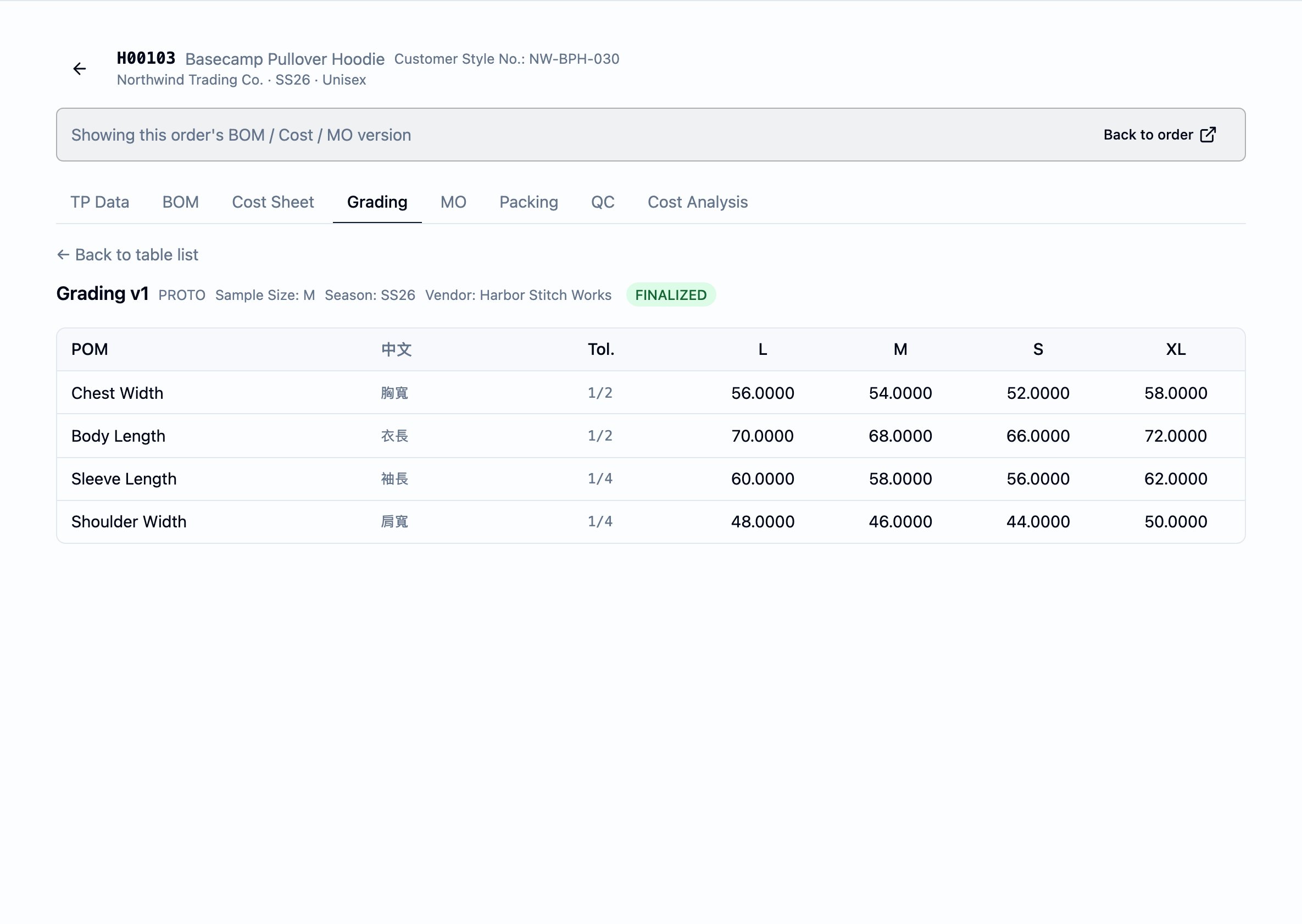
A finalised grading table opened to the POM × size grid — one row per point of measurement, one column per size, the tolerance alongside, and the header carrying the version label, sample size, season, and vendor.
Watch a grading table up close — points of measurement, sizes, and tolerances in one finalised grid.
What it is
A grading table is a reference document, not a calculation. The platform stores the figures the team enters or imports; it does not derive sizes from a base size, does not compute increments, and does not validate a measurement against the tolerance. The grid is what the team has agreed — brand spec, factory counter-proposal, or the team’s own target — read back exactly as it was entered or imported, on every screen that reads it. A grading table lives per style, per order. A style on two orders has two grading tables — one per order — because each order may run the style through a different size set, season, or factory, and the grading table is the size-scaling reference for that order’s bulk run. The order is the scope; the style is the subject. Each grading table carries a version. The team finalises one version at a time and supersedes it with a new draft when the spec changes — the same versioning shape used by the and the cost sheet, so the team can iterate on the grading reference without losing the version a finished sample was graded against. The finalised version is the one the workbook’s Grading tab renders from.Why it exists
A style does not ship in one size. The team agrees the chest, sleeve, and body figures at a sample size, and then runs every other size off that agreement — a 3 cm step up the chest, a 1.5 cm step on the sleeve, and so on. The grading table is where that agreement is written down once, kept on the order, and read by everyone downstream: the factory grading the pattern, the QC team measuring the bulk sample, the merchandiser comparing two rounds, and the the MO issues to the factory. Without one canonical grading table per order, the size figures live in an email thread, get re-typed onto every fitting comment, and disagree by the time the bulk sample is measured. The grading table is the team’s agreed reference — one place, one version, read by everything that needs it.When it is used
- When the team accepts a brand-provided grading sheet for a new development — the file the customer sends is imported as the brand- provided baseline.
- At every fitting round where measurements need to be re-set — Proto, Fit 1, Fit 2, Fit 3, Size Set, PP, SMS — each round opens a new draft version of the grading table, the team revises the figures, and finalises before the next round.
- At MO issuance, where the finalised grading table binds into the MO workbook’s Grading tab — POM rows × size columns with tolerance, rendered into the workbook the factory receives.
- When measuring a bulk sample, where the team records the actual figures into a separate measured-actual version and compares it to the target version side by side.
Dependencies
A grading table depends on:- The order’s style — the grid lives on the order’s per-style record, so the style must already be on the order.
- The workspace’s POM Library — the points of measurement the grid is built from. Every grading table draws its POMs from this library; the tolerances follow the library record onto the table.
What depends on it
- The workbook’s Grading tab is rendered directly from the finalised grading table — POM rows down the side, the size columns across, and the per-POM tolerance, exactly as the table reads on the Grading sub-tab. The binding is finalised-only: a style with no table, or a table still in Draft, leaves the tab with its header block only. Multiple grading rounds as separate dated tabs are not yet supported — the finalised grading is what renders on the single fixed Grading tab. See Build a manufacturing order (MO) for the wider tab-by-tab picture.
Versions and statuses
Every grading table is a versioned record with three statuses:- Draft — the version is editable. POMs, sizes, measurements, tolerances, and annotations all open for change. A draft is the only state the grid accepts measurement edits in.
- Finalised — the team locks the version for measurement edits. A finalised version is the one the MO workbook’s Grading tab renders from; it can still gain annotations (per-POM notes), but the measurement cells are read-only.
- Superseded — a later version of the same grading table has been finalised, retiring this one. Superseded versions stay readable on the table list and remain eligible for the side-by-side comparison view — the history is preserved.
Version type
Each version carries aVersion Type that labels what the version
represents. The platform’s options are:
BRAND_PROVIDED— the customer-supplied baseline grading sheet.PROTO,FIT_1,FIT_2,FIT_3— measurements taken or set at the named development round.SIZE_SET— the size-set run’s measurements.PP— the pre-production sample’s measurements.SMS— the salesman-sample run.BULK_TARGET— the target the bulk run is graded to.MEASURED_ACTUAL— the figures measured off a finished sample.COMPARISON— a version held for the side-by-side comparison view.OTHER— anything else the team needs to capture.
The grid
POM rows
Each row is one point of measurement, carried from the POM Library:POM— the English name of the point (Chest Width,Sleeve Length), picked from the library when the row is added.中文— the optional Chinese name of the same point, carried over from the library record.Tol.— the tolerance the team works to, as the inch fraction recorded on the library record. Shown alongside every row so the team can read the tolerance at a glance. The platform does not validate measurements against this tolerance — it is a reference value the team reads, not a check the system enforces.
Size columns
Every column to the right of the tolerance column is a size:- The default canonical template ships with XS, S, M, L, XL as a starting size run.
- Size labels are data, not a fixed enum. A team that grades in
numeric sizes (
48,50,52) or that runsXXL,XXS,2XL, or any custom label simply enters that label. The grid grows the column. - The team adds a size by typing a label and pressing Add size. Every POM row gains an empty cell for that size; the team fills the cells in.
Annotations
Each POM row can carry annotations — short notes against the point that record a direction (Increase, Decrease, Note) and an optional
date. Annotations are append-only and the most recent one shows in the
row’s comment indicator. They are a discussion record against a
specific point of measurement, not a measurement; they survive
finalisation and remain visible on superseded versions.
Header fields
Each grading table version carries header fields the team fills in at creation:Version Label— the team’s free-text name for the version (Bulk Target v1,Brand sheet from 2026-04-12). Required.Version Type— one of the values above. Required.Sample Round— the round this version corresponds to (PP,Fit 2). Optional.Base Size— the base size of the grading run (M,52). Optional.Season— the season the table belongs to. Optional.Vendor— the factory the table is graded with. Optional.Description— a free-text note on what the version captures.
Importing a grading sheet
A grading table can be created from an Excel or PDF sheet via the Import action on the table list. The workspace ships a canonical grading template the team can hand to a brand or a factory — a CSV with the columns:POM— the point of measurement.TOL +/-— the tolerance.- One column per size the team grades to (the default template ships
with
XS,S,M,L,XL, but a tenant whose size run differs simply renames or adds size columns).
- Pick a mapping spec and upload the file. The mapping spec tells the platform which header is the POM column and which is the tolerance. Every other non-empty column is treated as a size column — so the import handles size sets the workspace did not anticipate without any per-tenant configuration.
- Review the rows. The dialog shows the parsed POMs, the tolerance, and one cell per detected size. The team can edit the rows in place before committing.
Comparing versions
When two or more versions of a grading table are finalised or superseded, the table list shows a Compare tables action. The comparison view places two versions side by side:- Table A (Target) — the target the team is comparing against (a bulk target, a brand-provided baseline, an earlier round).
- Table B (Actual) — the version being checked (a measured-actual, a later round, the actual sheet returned from a factory).
Status and transitions
- Draft → Finalised. The team locks the version through the Finalize action on the version’s editor. The measurement cells become read-only; the version becomes the one the comparison view shows and the MO workbook’s Grading tab renders from. Annotations remain open.
- Finalised → Superseded. A later version of the same grading table becoming Finalised supersedes earlier finalised versions. The superseded version stays readable, remains eligible for the comparison view, and continues to carry its annotations.
- No reopen. A finalised or superseded version cannot be returned to draft. A change is captured as a new draft version that supersedes the prior finalised one.
Business rules
- A grading table is per order-style. A style on two orders has two grading tables. The order is the scope; the style is the subject.
- The grid is a reference, not a calculation. The platform stores the figures the team enters or imports; it does not derive cells, does not compute increments from a base size, and does not validate a cell against the row’s tolerance.
- Size labels are data. The team enters whatever labels the style
runs — alpha (
XS–XL), numeric (48–56), or anything else — and the grid grows the column. - Tolerances ride with the POM. A POM’s tolerance is set on the POM Library and carries onto every grading table the point is added to.
- Versions are first-class. Every grading table is versioned; only one version is current-finalised at a time, and superseded versions are preserved for the comparison view.
- Draft is the only editable state. Measurement edits, size edits, and POM additions only happen on a draft. Finalised and superseded versions are read-only for measurements (annotations stay open).
- The MO workbook reads the finalised version. The workbook’s Grading tab renders from the finalised grading table — POM × size with tolerance — when one exists; a style with no table, or a table still in Draft, leaves the tab with its header block only.
- Comparison requires two finalised or superseded versions. The comparison view excludes drafts so the diff is always between figures the team has agreed.
Best practices
- Import the brand sheet as the first version. The customer’s grading
sheet is the agreed starting point — import it as the
BRAND_PROVIDEDbaseline, finalise it, and supersede it with subsequent rounds. The history of how the team got from the brand baseline to bulk target is then on the version list. - Match the version type to the round. Use
PROTO,FIT_1–FIT_3,SIZE_SET,PP,SMS,BULK_TARGET, andMEASURED_ACTUALhonestly so the comparison view’s pairings make sense — aMEASURED_ACTUALagainst aBULK_TARGETreads cleanly months later. - Keep the POM Library tidy. The grid reads its POMs and tolerances from the library — if the team is reaching for one-off POMs often, that is a signal to widen the library so future grading tables draw from a shared vocabulary.
- Use annotations for discussion, not for measurements. A measurement change goes in a new draft version; an annotation captures the reason the change is needed.
- Finalise before MO issuance. The MO workbook’s Grading tab renders only from a finalised version — leaving the target as a draft leaves the tab header-only on the file the factory receives.