

.ai)
file, or a Techpacker .tpv export, and becomes a working
with its BOM, size specification, images, instruction-page attachments and a
proposed QC checklist. You confirm the pack on a review screen beside its own
pages before anything is written to the style.
Tech pack ingestion is optional. Your administrator may enable it on
Feature settings, and it is available on certain
plans. If your workspace does not show the Tech Packs entry in the
sidebar, the capability is not enabled on your account.
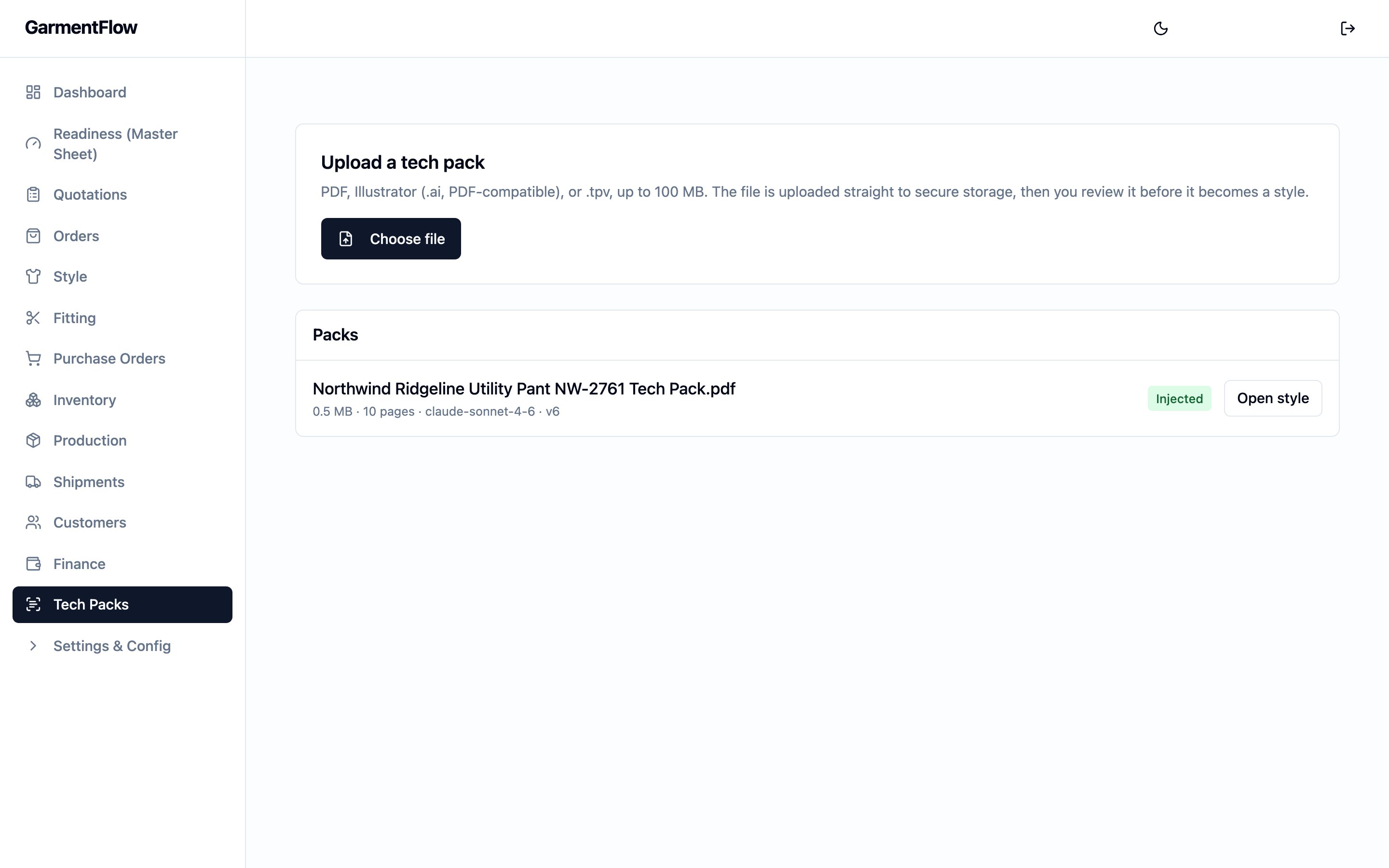
The Tech Packs module — an Upload a tech pack card above the list of packs the workspace has received, each row showing its status and where it lives now.
What this module is
A tech pack in GarmentFlow is the brand’s file, held in secure storage, whose content becomes the receiving side of a style. The module is the place a pack is uploaded, reviewed, confirmed, and injected — never a place the file is edited. When a pack is a PDF or an Illustrator export, the system reads it and proposes fields, image matches and QC checks; when it is a Techpacker.tpv
export, every field is read straight from the file with no proposal step
between it and the review screen.
The trust model does not change with the source: the system proposes, you
confirm; nothing lands on a style without review. The review screen shows
every proposed field beside the page it came from, every proposed image
match, every proposed QC check. What you confirm is what is written; what you
reject or edit is what is written; nothing bypasses the confirmation.
Why it exists
A tech pack is how a brand hands its design to an OEM. Without ingestion, the merchandiser reads the pack on one screen and types its fields into a new style on another — a work day per pack for a jacket, longer for a technical piece, and every re-key is a new chance to disagree with the source. The module removes the re-key while preserving the review the merchandiser was already doing: the same reader now confirms proposed fields on the pack’s own pages instead of retyping them from scratch. The receiving side keeps going past the pack’s data. The majority of a real pack is instruction — how the garment is stitched, where its labels sit, how it folds, how it is packed. Those pages are classified and attached where the factory reads them, and their tolerances and instructions are turned into a proposed that lands on the style’s QC tab and prints on the factory .The .tpv distinction
A Techpacker .tpv export is a structured file the brand’s PLM has already
written out — it states, rather than depicts, everything a reader would
otherwise recover from a printed pack. GarmentFlow reads a .tpv file
rather than interpreting it. Every field lands on the review screen from the
file directly; no field is proposed and no field carries a confidence score
because none is inferred. The review screen still asks you to confirm the
identity, the material-master matches and any per-line adjustments, but the
image-classification and page-section proposals never exist for a .tpv
pack — there are no page renders for them to run against.
The QC checklist is still proposed: measurement checks come from the pack’s
own tolerance table, which a .tpv carries in full, so those checks are
ready to import the same way they would be from a PDF pack. The
construction, labels, packaging and folding checks — the half that reads
off instruction pages — is simply empty on a .tpv pack, and you add
anything the pack did not spell out by hand on the review screen.
A .tpv pack has no page renders (there is no PDF to render), so the review
screen shows the fields on their own and the factory work order’s body is
generated from the pack’s data rather than composed over its pages.
Core business objects
- Tech pack — the brand’s file (PDF,
.ai, or.tpv) and everything the system read from it, until it is injected into a style. - Style — the reusable product record a tech pack becomes on inject. A tech-pack-originated style carries the pack’s identity, colorways, BOM, size specification, instruction-page attachments and QC checklist from the moment of injection.
- BOM — the style’s bill of materials, seeded from the pack and linked to your existing where the pack’s codes match.
- Work order (製造單) — the A4 PDF produced from an order-bound of a tech-pack-originated style. Composes the OEM’s cover with the pack’s own pages.
Where it sits in the workflow
- Upstream. A brand emails a tech pack, or an operator drops a
.tpvexport exported from the brand’s PLM. Uploading it is the first action in this module. - Downstream. An injected pack becomes a working style. From that style, the team runs the same commercial and production flow every other style follows — samples and fitting, quotation, order, MO, factory work order, shipment.
Key workflows
- Import a tech pack — upload, review, confirm, inject.
- Generate the factory work order — turn the confirmed pack and an order-bound MO into the printable A4 PDF a factory works to.
Key concepts
- From tech pack to work order — the connected flow across the receiving side, from the file the brand sent to the document the factory works from.
- The style-centric model — why a pack becomes a style, not a per-order artifact.
- BOM, cost sheet, and artifact versions — the version model the injected BOM and size specification participate in once the style is running.