

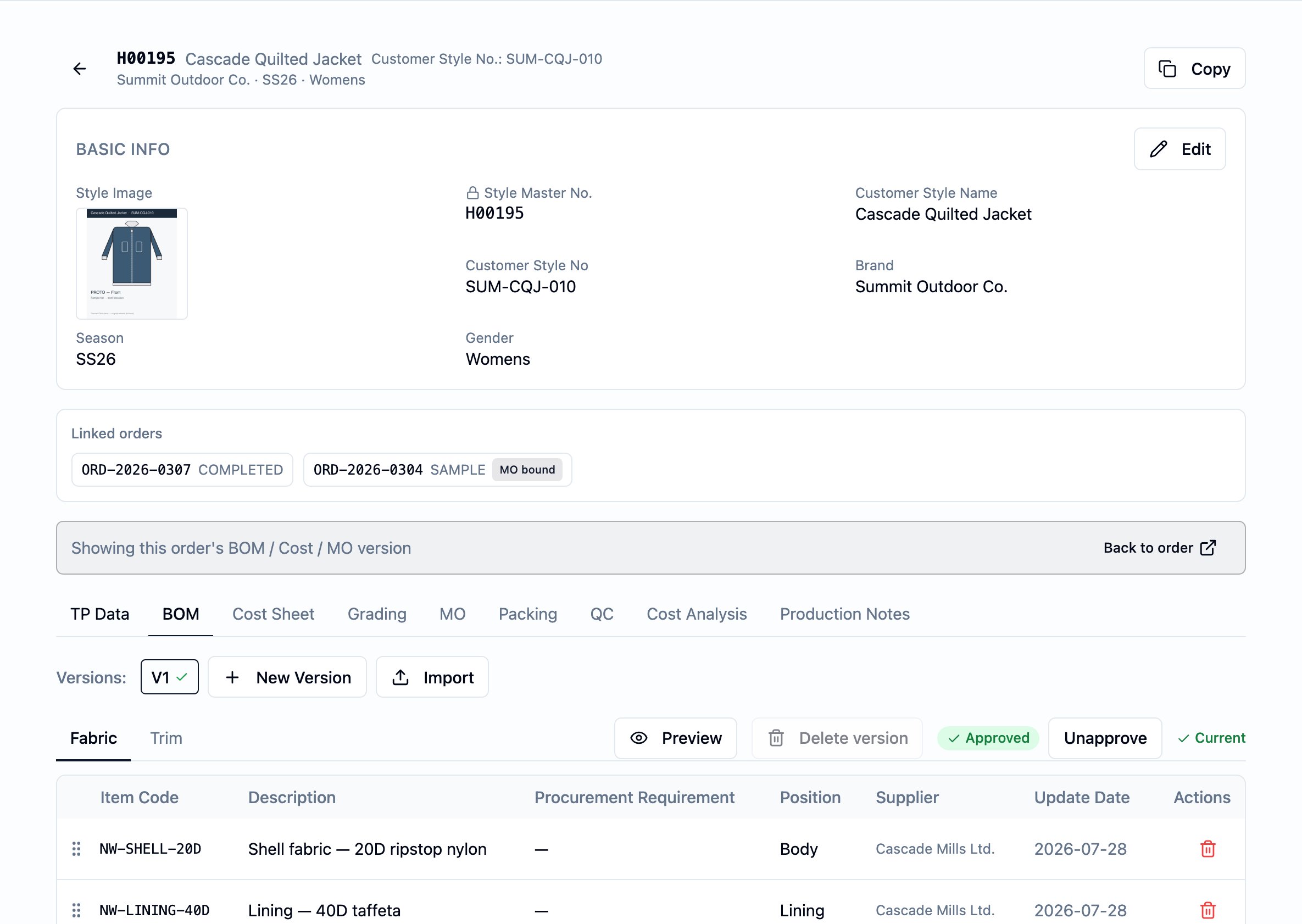
The BOM tab on a style — the version picker on the left, the Fabric and Trim sub-tabs, and the per-piece material list with each line's supplier and update date.
What it is
A BOM is per-style, per-version. One BOM is one revision of the style’s material list — every line on it is one fabric or one accessory that goes into a single piece. The header carries the version’s identity and approval state; the lines carry the materials. Each line names one material, where it sits on the garment, how much of it the piece uses, and where it comes from. Lines pick their material from the or so the BOM, the cost sheet, and the purchase order downstream all refer to the same record — not three free-text descriptions of it. The BOM is the single source of truth for “what the piece is made of.” The cost sheet, purchase orders, the readiness engine, and the production checks all read it.Why it exists
Apparel production runs off a settled material list. Costing needs to know what materials roll into the per-piece build-up. Purchasing needs to know what to buy, from which supplier, for which style. Production needs to know what the cutter, the trim store, and the sewing line should expect. The readiness engine needs to know whether the material side is signed off so it can tell which work is unblocked. All four read the BOM, so the BOM has to be one record everyone agrees on. Versioning lets the material list change without losing the version an earlier order was built against. Each revision is a new BOM version on the same style — a renegotiated supplier, a swapped fabric, an added trim — while the prior version stays readable for whatever order or cost-sheet version is pointed at it.When it is used
- During development, to capture the fabrics and trims as the style takes shape — the BOM is what the cost sheet copies its material lines from.
- At the start of procurement, to certify the material list so the system can generate draft purchase orders against it.
- On a reorder or a material change, to mint a new version, edit the list, and approve again — earlier versions stay intact.
Dependencies
- A style — every BOM belongs to one. See Styles.
- A fabric master record for each fabric line, and an accessory master record for each accessory line. Free-text material descriptions are permitted, but a line without a linked master has no resolvable supplier and is dropped by purchase-order generation downstream.
- BOM write permission, for the user adding versions, editing lines, or approving. Reads are open to any authenticated user in your tenant.
What depends on it
- The style’s cost sheet — the cost sheet seeds its fabric and accessory lines by running Copy from BOM against the style’s current BOM version. See Cost Sheet and Build the cost sheet.
- Draft purchase orders — an approved BOM is what the platform reads to seed a draft for each vendor. Each PO line carries the BOM line’s material, the resolved vendor, the order’s quantity for that line, and the unit price captured from the linked fabric or accessory master at approval. A BOM line without a linked master has no price source and carries no captured price.
- The readiness engine and the production-management preflight — both treat Approved as the gate that opens the material side of the work.
- The order’s pin onto the BOM — when an order’s BOM version is created, marked current, or switched, the order’s pin advances in lockstep. See BOM, cost sheet, and artifact versions.
Fields
The BOM’s fields group into the header (identity, status, audit) and the lines (each material on the piece). The header is shared across every line; the line carries the material itself.Header — identity
Version— the BOM’s version number for the style. Assigned by the platform when the version is created; starts at 1 on the first version and increases by one on each new version on the same style, and on the same order when the version is tied to one.Style— the parent style. Set when the version is created and not edited afterwards.Order— the order the version is tied to, when the BOM was created in an order context. When set, marking this version current advances that order’s pin onto the BOM. Optional; a style-level BOM has none.
Header — status and audit
Status— Draft or Approved. Set by the platform on transition; not edited directly.Approved by,Approved at— the user and time the version was approved. Set on transition to Approved; cleared if the version is reverted to Draft.Created,Last updated— set by the platform. The Last updated value is what the BOM tab labels “Update date”.
Lines — identity and display
Each line documents one material on the piece.Description— what the material is. Required, up to 300 characters.Specification— a free-text spec note. Optional, up to 300 characters.Position— where the material sits on the garment (e.g. body, collar, cuff). Optional, up to 100 characters.Status— a free-text status note on the line (for example, “qualified”, “pending sample”). Optional, up to 50 characters.Procurement requirement— a free-text procurement note on the line. Optional, up to 255 characters.Sort order— the line’s position within the version. Drag-and-drop reorder writes this.
Lines — material
Type— fabric or accessory. The line picks its material from the corresponding master, and the type drives what runs on this line downstream — only fabric and accessory lines are eligible for Copy from BOM into the cost sheet.FabricorAccessory— the material master picked for the line. A line carries one or the other, not both. The vendor, lead time, item number, and default unit price come from this record.Item code— the item number used downstream. Defaults to the master’s item number; you can override it on the line when this style buys the material under a different code.Body part— a free-text indication of which body part the material is used on. Optional.Body colorway— the structured per-line colorway list, picked from the style’s colorway list so the BOM line and the colorway it belongs to share one identity. Each entry can override the item code, the vendor, and a note.Accessory color— a free-text accessory color (副料顏色), set on accessory lines.
Lines — quantity and sourcing
Unit— the unitQty per pieceis measured in (e.g. yd, pc, m). Defaults toPCS.Qty per piece— how much of the material one piece of the style uses. Per-piece, not per-order. The cost sheet copies this in as the line’s per-piece usage.Vendor— a per-line vendor override. When set, this takes precedence over the default vendor on the linked fabric or accessory master.
Lines — captured-at-approval copies
On Approve, the platform writes a copy of the live master’s identity onto the line so the approved version stays valid even if the master changes later:Description (captured)— the live master’s description at approval.Vendor name (captured)— the live master’s vendor name at approval.Category (captured)— the live master’s category at approval.Lead time (captured)— the live master’s lead time at approval.Item number (captured)— the override if set, otherwise the live master’s item number at approval.
Lines — attachments
Line images— per-line images uploaded against the line, ordered.Body colorway— see Lines — material.
Business rules
- A BOM version is one revision of the style’s material list. Each new version on the style starts as a fresh BOM — header plus its own lines — and the prior version stays intact. New versions begin in Draft.
- A version may be tied to an order or kept at style level. When the version is created in an context, the version is tied to that order, and the order’s pin onto the BOM advances when the version is created, marked current, or switched. Without that context, the version is style-level. The two coexist on the same style.
- A line is either fabric or accessory. Each line picks one material,
from the fabric master or the accessory master, chosen by the
line’s
Type. The picker enforces the choice at the row, so the line carries a single material identity. - Approval is per version, on the order it is tied to. Because each tied order keeps its own pin onto the BOM, approving order A’s BOM version does not approve order B’s, even on the same style master. Approving from the style level approves the version without advancing any order pin.
- Approval captures the line snapshot. On the Draft → Approved transition, each line writes a copy of the live master’s identity (description, vendor name, category, lead time, item number) onto the line. The captured copies stay with the line for as long as the version stands; later edits to the master do not change them.
- Approving an already-approved version is a no-op, and so is reverting an already-draft one. Re-running either action on a version that is already in the target state does not change anything and is not an error.
- Reverting an approved version to draft does not rewind its downstream effects. Any draft purchase order already generated from the approved version stays. The advance of the order’s phase that the first approval triggered stays. Revert lets you re-enter edit mode and re-approve; it does not roll back what the prior approval already set in motion.
- A new revision is a new version, not a re-approve of the old. Open a fresh version (which begins Draft) and approve it. The prior version stays readable in history, and is no longer the current one — either for the style as a whole or for the order the prior version was tied to.
- Write actions on the BOM are restricted. Users with BOM write permission create versions, add and edit lines, reorder, and approve or revert. Reads are open to any authenticated user in your tenant.
- A fabric or accessory line without a linked master has no resolvable supplier. Free-text lines are permitted while the BOM is being put together, but the generation downstream drops a line with no resolvable vendor and reports it as skipped.
Validations
There are no save-time validations that the BOM has at least one line, or
that every line has a vendor, before approval. The gates that enforce “has
lines” and “has vendor” run downstream — draft purchase-order generation
reports the lines it had to skip, and the readiness and preflight checks fail
closed when the BOM is not yet approved.
Date logic
The BOM has one business-meaningful date:Approved at— the moment the version was approved. Set on the Draft → Approved transition by the platform; cleared if the version is reverted to Draft. The readiness engine and draft purchase-order generation both treat Approved as their precondition, not the timestamp itself.
Created— when the version was opened.Last updated— when the version was last written to. Shown on the BOM tab as “Update date”.
Target date, Effective from date, or Valid until date.
Dates that bound an order in business terms live on the
order, not on the BOM.
Status and transitions
A BOM version has two statuses: Draft and Approved.- Draft — the version is open for edit. Add, edit, reorder, and delete lines; pick masters; set quantities and vendors. New versions start here.
- Approved — the version is signed off and reads as the certified material list. The downstream consumers that gate on Approved — draft purchase-order generation, the readiness engine, the production-management preflight — are unlocked.
- (created) → Draft: a new BOM version always opens in Draft.
- Draft → Approved: a user with BOM-approval permission approves the
version. The platform sets
Approved byandApproved at, captures each line’s master snapshot (see business rule 5), records the approval event, and — when this is the first approval on the version and the version is tied to an order — advances the order’s phase from PO received to Procurement. - Approved → Draft: a user with BOM-approval permission reverts the
version to draft. The platform clears
Approved byandApproved atand records the revert event. Captured line copies stay on the lines; downstream effects already produced (draft purchase orders, advanced order phase) are not rewound.
Calculations
The BOM does not produce a per-piece total cost — the material build-up rolls up on the cost sheet, which copies its fabric and accessory lines from the BOM and applies the per-line costs there. What the BOM contributes to its downstream consumers:- To the cost sheet, on Copy from BOM: each eligible BOM line seeds one cost-sheet line — the cost sheet captures the BOM line’s description, item code, position, supplier, unit, per-piece usage, and unit cost on the cost line, taking the supplier and unit cost from the linked fabric or accessory master with the BOM line’s captured copies as fallback. From that moment on, the cost line is the source of truth for that material on the sheet. See Cost Sheet — Effect of changes.
- To purchase-order generation: an approved BOM seeds a draft per vendor. Each PO line carries the BOM line’s material, the resolved vendor, the order’s quantity for that line, and the unit price captured from the linked fabric or accessory master at approval. A BOM line without a linked master has no price source, so the PO line carries no captured price; a line with no resolvable vendor is dropped and reported as skipped.
- To the readiness engine and the production-management preflight: the status (Approved or not) is the gate; neither reads the lines’ numerical values.
Effect of changes
- Edit a line on a Draft version. The change is saved. Captured copies remain empty until the version is approved.
- Edit a line on an Approved version. The change is saved on the line, but the captured copies are not refreshed. The version is still the approved one — to refresh the captured copies against the live master, revert and re-approve, or open a new version.
- Delete a line. The line and its images and colorway entries are removed from the version.
- Change the fabric or accessory master a line points at. The live supplier shown on the BOM tab re-reads from the new master immediately; the captured copies do not change.
- Approve the version. Each line writes a copy of the live master’s identity (see business rule 5). The downstream consumers that gate on Approved are unlocked. When this is the first approval on the version and the version is tied to an order, the order’s phase advances from PO received to Procurement.
- Revert the version to draft.
Approved byandApproved atclear; captured copies stay on the lines; downstream effects already produced stay. The version is open for edit again. - Run Copy from BOM on a Draft cost-sheet version. Each fabric and accessory BOM line that is not already linked to a cost line seeds one new cost-sheet line, capturing the BOM line’s description, item code, position, supplier, unit, per-piece usage, and unit cost. The cost line becomes the source of truth for that material on the sheet from that moment. Re-running Copy is safe: lines already linked to a BOM line are left alone. See Cost Sheet.
- Generate draft purchase orders from the approved BOM. The BOM seeds one or more draft purchase orders. Each PO line carries the BOM line’s material, the resolved vendor, the order’s quantity for that line, and the unit price captured from the linked master at approval. A BOM line without a linked master carries no captured price; a line with no resolvable vendor is dropped and reported as skipped. A previously issued purchase order on this order to the same vendor is not regenerated.
- Open a new version. A new Draft version is opened on the style and becomes current; the previously current version is no longer the current one but stays readable.
- Mark a different version current. The downstream consumers re-read the new current version’s status. The per-order pin advances in lockstep when the version is tied to an order.
Best practices
- Link a fabric or accessory master on every line. Free-text lines work while you are putting the list together, but a line without a linked master has no resolvable supplier and is dropped from draft purchase-order generation. Pick the master before approval.
- Set
Qty per piecedeliberately. The cost sheet copies it in as the per-piece usage, so a placeholder value follows you into costing. - Use the per-line
Vendoroverride only when the line genuinely buys from a different supplier than the master’s default. Otherwise let the master’s vendor stand — one less moving part. - Approve only when the list is complete. The platform does not block approval of an incomplete BOM; approval just captures the line copies and opens the downstream gates. Capture only the list you are ready to defend.
- Mint a new version for a material change rather than editing the old. The platform allows edits on an approved version but does not re-capture the line copies on edit. A new version keeps the audit trail clean.
- Reorder the lines once on the version. The order you set is the order the cost sheet, the BOM tab, and downstream consumers display.