

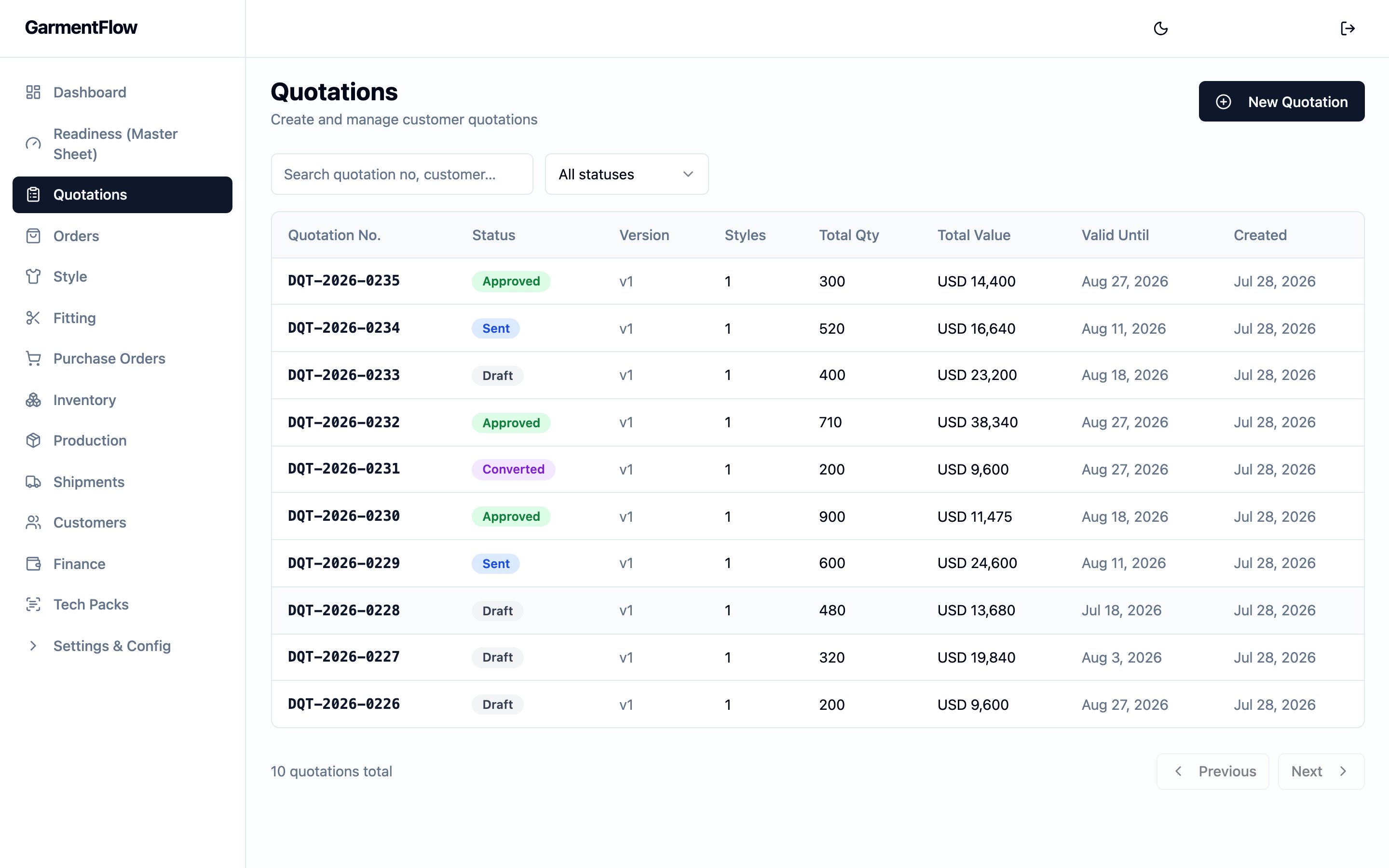
The Quotations list — every quote in the workspace, with the status, version, style count, total quantity, total value, and the validity date in one row.
What it is
A quotation is per-customer, per-currency, per-version. One quotation addresses one customer in one currency, and runs one or more style lines — each style carries the colorways, sizes, quantities, and unit prices that together make up the offer. The quotation is style-centric: each line can carry an explicit link to a master so the offer ties to a real, reusable style record rather than a free-typed code. The same quotation can run several styles, each with its own set of colorways and sizes. A quotation moves through a clear lifecycle — Draft, Sent, Approved or Rejected, and ultimately Converted when the offer becomes an order. When a customer wants changes after a quote has been sent, the quotation is revised: a new version of the quote is opened, the prior version is marked Superseded, and the chain stays in the history.Why it exists
A quote is the moment the deal stops being a conversation and starts being a proposal: prices, quantities, colorways, and validity all written down in one place the customer can sign back. The quotation gives sales a single document — branded as your own — to send the customer, and gives operations a clean hand-off into the order once the offer is accepted: every style line, every colorway, every size, every price carries forward without retyping. Versioning lets the offer evolve through negotiation while every earlier version stays intact. A revised quote is a new version on the same chain, so the history of what was proposed at each round is preserved — and the order that eventually opens is unambiguously the one approved against the specific version that was accepted.When it is used
- During sales, to put a priced offer in front of a customer before any order is opened.
- On negotiation, to revise the offer — open a new version, edit, and send again.
- At acceptance, as the hand-off into the order the customer has now committed to, and (where your administrator has enabled it) to generate a (PI) for the customer to arrange payment.
- After the customer signs back the PI, to attach the signed copy to the quotation so the commercial trail stays on one record.
Dependencies
- A customer record, picked on the quotation header. Your administrator manages the customer master.
- At least one style to quote. A line can either link to an existing style master or carry a free-typed style number — linking is preferred so the offer ties to a real style record. See Styles.
- A cost sheet on each style you intend to quote from, to set the unit prices the quotation carries. The cost sheet is the costing tool; the quotation is the offer. See Cost Sheet.
- Quotation write permission, for the user creating, editing, sending, approving, rejecting, revising, or converting a quotation. Reads are open to any authenticated user in your tenant.
What depends on it
- The that opens when the quotation is converted — the new order keeps a link back to the source quotation and inherits its customer, currency, styles, colorways, sizes, and prices. See Orders.
- The generated from an approved quotation — the PI carries the line items, prices, customer, and terms forward. See the documents and conversion chain.
- The signed-back PI that the customer returns — uploaded against the quotation, so the original offer, the PI generated from it, and the signed-back copy all live on the same record.
- The audit trail that production and finance read back through — every shipment traces back through its order, the PI, and the quotation it came from. See the documents and conversion chain.
- The post-convert money story — once an approved quotation converts to an order, the deposit and billing path runs in the Finance module, and the customer-facing settlement picture rolls up onto the Statement of Account. The customer invoices the order eventually carries are a separate commercial artifact from the quotation’s PI — see Invoices for that document.
Fields
Group the quotation’s fields by purpose. The header carries the identity, the customer, the commercial framing, and notes; each style line carries a quoted style; each size cell carries one colorway × size price.Header — identity
Quotation no.— the quotation’s permanent business identifier. Generated by the platform when the quotation is created; unique within your tenant. The format is a tenant-configurable prefix, the year, and a serial that resets each year (your administrator sets the prefix).Version— the version number on this quotation’s revision chain. The first quotation starts at version 1; each Revise opens a new version on the same chain, incremented by one. The chain is linked by a parent-version reference, not by reusing the same quotation number.Prepared by— the user who created the quotation. Set by the platform at create time; carried forward as the assigned sales user on the order when the quotation converts.
Header — customer and commercial framing
Customer— who you are quoting. Picked from the customer master. Required.Currency— the currency the prices are quoted in. One quotation is one currency; an offer in a different currency is a separate quotation. The picker offers the currencies your tenant uses (USD, EUR, JPY, TWD, CNY, GBP). Required.Validity date— the date the offer expires. After this date the prices are no longer guaranteed. Optional.Season— the selling season the offer is for, picked from the per-tenant season list your administrator configures. Tenants typically configure the list to combine year and season on a single label (e.g.2026 S/S,26 FW) so the offer carries the year on the document alongside the season. Optional.Origin— the country or region of origin (產地) the offer is for. Picked from the per-tenant origin list your administrator configures. Optional.Terms— the payment and commercial terms text that prints on the quotation. Picked from the per-tenant payment-condition list your administrator configures; the chosen entry’s label is stored on the quotation. Optional.Notes— internal-facing free text that prints as the “Remark” on the quotation document. Optional.
Header — AI cover note
AI cover note— an optional cover note drafted with AI assistance, saved on the quotation for use on the cover page of the quotation document.
Header — audit
Created,Last updated— set by the platform. Shown on the quotation for reference; theCreateddate is what the quotation document prints as its issue date.
Style line — identity and link
Each style line is one style block on the quotation, carrying the priced colorways and sizes for that style.Style master No.— the optional link to a master. Picked from the style-master picker. Linking ties the line to a real style record (and surfaces the master’s identifier on the quotation document); when left blank, the line is a free-typed one. Optional but recommended.Style No.— the customer-facing style number on the quote. Required, up to 100 characters. Independent of the master’s number, so a quote may carry a customer-specific style code even when linked to a master.Style Name— the style’s name on the quote. Required, up to 255 characters.Fabric No.— the fabric reference for the style on the quote. Optional, up to 300 characters.Sample Size— the sample size the offer references. Optional, up to 50 characters.MOQ— the minimum order quantity the offer is conditional on for this style line. Non-negative integer; optional, blank when the line carries no MOQ. Carried on the quotation line for the rendered document and is not propagated to the order on convert.No. of Colorways— the count of distinct colorways entered on this style line. Derived from the colorway names actually entered in the size rows, so it cannot drift from the data; not edited directly.
Style line — legacy descriptive fields
These fields were on earlier versions of the quotation form and are no longer offered as inputs on a new quote. The platform still carries them on style lines that already had them — on a revised quotation, and on the order line a converted quotation opens — so the descriptive detail you once recorded is not lost.Gender— the gender the style is for. Carried forward when present; not entered on new quotations.Finish— a free-text finish note on the style. Carried forward when present; not entered on new quotations.
Size cell — colorway × size
Each size cell on a style line is one colorway × one size, with its quantity and unit price.Colorway— the colorway name as written on the quote. Required, up to 100 characters. Free-text on the quotation — picking the colorway off a style master’s palette is an order-level concern.Color code— an optional colorway code, typically a hex value (e.g.#000000). Up to 50 characters.Size— the size label for this row (e.g.S,M,38). Required, up to 50 characters.Qty— the quantity quoted for this colorway × size. Integer, zero or more.Unit price— the per-piece price quoted for this colorway × size, in the quotation’sCurrency. Zero or more. The quotation’s pricing is per-size — a single colorway can carry different prices across sizes, and the totals respect them.
Attachments — signed-back PI
The customer’s signed-back attaches to the quotation, not to the order or the PI. Each attachment carries:Filename,File type,Size— file metadata. Only PDF and JPG uploads are accepted.Uploaded by,Uploaded at— who attached the file, and when.
Business rules
- One quotation is per-customer and per-currency. The customer and the currency are picked on the header and stay set across the quotation’s lifecycle. An offer in a different currency, or to a different customer, is a separate quotation.
- Edits are restricted to Draft. Header changes, line add/edit/delete, colorway and size edits, and price edits all require the quotation to be in Draft. A request to write to a quotation in any other status is refused with a “draft only” message.
- Send locks the quotation from further edits. Once you send a quotation, it leaves Draft for Sent and the platform stops accepting edits to the header, the styles, or the sizes. The way to change a sent quote is to revise it — see business rule 6.
- The customer’s response decides the next state. From Sent, the quotation moves to Approved when the customer accepts, or to Rejected when the customer declines. Both are set by the team on the quotation, not derived from another action.
- Only an Approved quotation may be converted to an order. Convert is refused on any other status, with a message identifying the current status. A quotation that has already been converted cannot be converted again.
- Revise opens a new version on the chain and supersedes the prior.
Revising a Sent, Approved, or Rejected quotation opens a
new Draft quotation linked back to the prior one, increments the
version number, deep-copies every style line and size with its
Colorway,Color code,Size,Qty, andUnit price, and copies the header (customer, currency, validity, season, origin, terms, notes). The new quotation receives its own freshQuotation no.; the prior quotation is marked Superseded in the same step. TheAI cover noteis not copied — draft it fresh on the new version when it is needed. - The quotation list hides superseded versions by default. A superseded quotation stays on the record and remains accessible by direct link or by including superseded rows in the list, so the negotiation history is preserved.
- Generating a PI does not change the quotation’s status. When your administrator has enabled quotation-to-PI on your tenant and the quotation is Approved, “Generate PI” opens a new pre-filled from the quotation. The quotation stays Approved so it can still be converted to an order.
- The signed-back PI attaches to the quotation. The customer’s signed copy of the PI is uploaded against the quotation record itself, not against the order or the PI document.
- A quotation document renders on demand. The quotation exports as a PDF carrying your tenant’s branding (logo, colors, and seller block); nothing is stored to a file store on render, so each download reflects the live quotation.
- Write actions on the quotation are restricted. Users with quotation write permission create, edit, send, approve, reject, revise, and convert quotations, and upload the signed-back PI. Reads are open to any authenticated user in your tenant.
Validations
There is no save-time validation that an Approved or Sent
quotation has at least one style line, or that every style line has at
least one size row. The form requires a style line to start with; the
team is the gate that decides the offer is ready to send.
Date logic
The quotation has one business-meaningful date:Validity date— the date the offer expires. Set by the user on the header; optional. Not propagated to the order on convert (the order carries its ownOrder dateandShip date).
Created— when the quotation was opened. Shown on the quotation document as its issue date.Last updated— when the quotation was last written to.
Sent at, Approved at, Rejected at, or Converted at date
on the quotation header — the visible signals for each transition are the
status itself and the Last updated timestamp on the row.
Multi-currency handling: the quotation carries the Currency only; no
exchange rate is recorded on the quotation. Currency conversion is an
order-time concern — the exchange rate is captured on the
order when the quotation converts.
Status and transitions
A quotation moves through a six-state lifecycle. Draft is the only editable state; every other state is locked from edit and changes only via explicit actions on the quotation.- Draft — the quotation is open for edit. Header changes, line add/edit/delete, colorway and size edits all work. A new quotation starts here.
- Sent — the quotation has been issued to the customer. Edits are refused; the way to change it is to revise.
- Approved — the customer has accepted the offer. Edits are refused; the quotation can now be converted to an order, can generate a PI (when your administrator has enabled that), or can be revised if the offer needs to change.
- Rejected — the customer has declined the offer. Edits are refused; the quotation can still be revised to open a new version with adjusted terms.
- Superseded — the quotation has been replaced by a revised version on the chain. Edits are refused; the row stays in history, accessible by direct link, hidden from the default quotation list.
- Converted — the quotation has been converted to an order. Edits are refused; the converted order is the live record of the deal from this point on.
- (created) → Draft: a new quotation starts here, fully editable.
- Draft → Sent: the user sends the quotation.
- Sent → Approved: the customer accepts.
- Sent → Rejected: the customer declines.
- Sent | Approved | Rejected → Superseded (on this quotation) AND a new Draft quotation appears on the chain: revise opens a fresh version, deep-copying the header and every line and size; the prior quotation is marked Superseded in the same step.
- Approved → Converted: the user converts the quotation to an order. A new order opens carrying the quotation’s customer, currency, styles, colorways, sizes, and prices, with a link back to the source quotation. See Effect of changes.
- Draft — full edit access (header, style lines, sizes). Send is enabled.
- Sent — edits refused. Approve, Reject, and Revise are enabled. Download of the quotation document is enabled.
- Approved — edits refused. Convert to order is enabled. Generate PI is enabled when your administrator has switched it on for your tenant. Revise is enabled. Signed-back PI upload is enabled. Download of the quotation document is enabled.
- Rejected — edits refused. Revise is enabled. Download of the quotation document is enabled.
- Superseded — edits refused. The row is read-only; the live work is on the latest version of the chain.
- Converted — edits refused. The order created from this quotation is the live record; the converted quotation stays as the source-of-offer reference.
Calculations
The quotation’s math is computed at view time from the size cells. No total is stored on the header. Per size cell:- Line total =
Qty × Unit price. Empty when either input is unset.
- Style total = sum of every size cell’s
Line totalon that style.
- Grand total = sum of every size cell’s
Line totalacross every style line. Shown on the quotation document.
Currency. No discounts,
adjustments, or per-quotation deductions apply — the figure on the
document is the exact sum of every quoted Qty × Unit price.
Effect of changes
- Edit the header or a style line on a Draft quotation. The change is saved and the next view recomputes the affected totals.
- Edit a size cell on a Draft quotation. The line total and the grand total recompute on the next read.
- Send. The quotation leaves Draft for Sent; every edit path is refused from this point. The customer can now respond.
- Approve. The quotation moves from Sent to Approved. Convert to order is enabled. Generate PI is enabled when your administrator has switched it on for your tenant. Revise stays enabled. The signed-back PI upload is enabled.
- Reject. The quotation moves from Sent to Rejected. The way to revive the offer is to revise — open a new version with adjusted terms.
- Revise. The current quotation is marked Superseded, and a new
Draft quotation opens on the same chain with the next version
number. The new quotation deep-copies every style line and size from
the prior version, and copies the header (customer, currency,
validity, season, origin, terms, notes). The new quotation receives
its own fresh
Quotation no.; the chain link to the prior row is preserved. TheAI cover noteis not copied — draft it fresh when it is needed. - Convert to order. The quotation moves from Approved to Converted. A new opens carrying the customer, the currency, every style line (with the link to its style master where the quote was linked), every colorway, every size, and every unit price from the quotation. The new order keeps a link back to the source quotation. The order’s own fields — its number, status and phase, ship date, trade term, destination, and deposit terms — are governed by the order, not by the quotation.
- Generate PI. When your administrator has enabled it and the quotation is Approved, generating a PI opens a new pre-filled from the quotation — line items, customer, currency, and terms carry forward. The quotation’s status does not change; you can still convert it to an order. The PI is the document the customer signs back for payment arrangement.
- Upload the signed-back PI. A PDF or JPG of the customer’s signed-back proforma invoice attaches to the quotation. The quotation’s status does not change.
- Download the quotation document. The quotation renders as a
one-page document showing the customer’s bill-to block, your tenant’s
seller block, the quotation header (
Quotation no., date, currency, season, origin, validity, terms, notes), and a per-style block listing each colorway with its sizes, quantities, unit prices, and totals, plus the grand total in the quotation’s currency. Downloading does not change the quotation. The render is on-demand, so each download reflects the current state of the quotation.
Best practices
- Quote with the cost sheet open. The cost sheet is where factory cost, customer price, and margin are worked out per style; the quotation is the offer. Set the unit prices on the quote from the cost sheet’s customer-side numbers so the offer stays grounded in real margin. See Cost Sheet and Build the cost sheet.
- Link each style line to its style master. Linking via
Style master No.ties the line to a real style record, so the offer (and the order it converts into) stays connected to the style’s BOM, cost-sheet history, and downstream production artifacts. Free-typed lines work, but the linkage is what makes the rest of the chain easy to follow. - Set the
Validity datedeliberately. A clear expiry tells the customer when the offer holds and reminds your sales team when to refresh it. - Revise — do not try to edit a sent quote. The platform refuses the edit, and the prior version is the record of what was actually offered at each round.
- Send only when the offer is complete. The platform does not block a send for missing prices or empty styles; the merchandiser is the gate. Walk the styles, colorways, sizes, and prices before pressing send.
- Upload the signed-back PI promptly. Attaching the signed copy to the quotation keeps the original offer, the PI generated from it, and the customer’s signed acceptance on one record — easy to find, easy to audit.