

Charge column on the customer’s
Statement of Account.
This page describes the invoice as a document: what it carries, the states it
moves through, how it relates to the ledger entry it produces, and the
void-and-reissue path the workspace uses to correct an invoice without
ever editing the original.
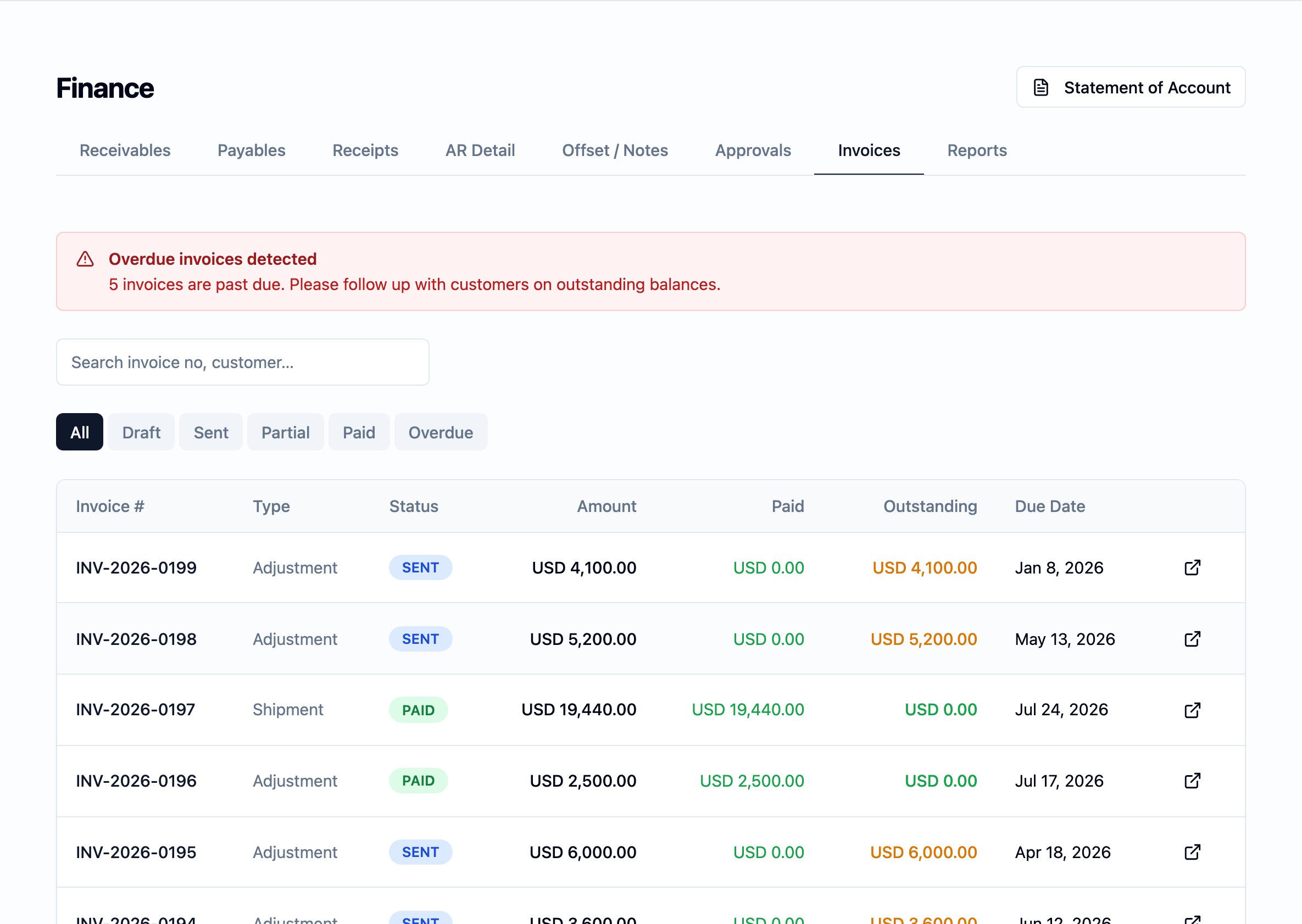
The Finance module's Invoices tab — every customer invoice in the workspace, with type, status, billed amount, paid amount, outstanding balance, and due date on each row.
What it is
An invoice is one document — a single number, a single issue date, a single amount in a single currency — recording one charge against one customer under one order. It is the document the customer receives and reconciles against their own books; it is also the document the workspace’s own finance records read off when they show what is owed. A customer’s outstanding balance on the Receivables board is the running net of the charges raised against them less the receipts and credits applied — the invoice is the document that puts a charge on that running net.Why it exists
Apparel orders are billed in stages: a deposit when the order is confirmed, a balance when the goods ship, and the occasional adjustment when something is owed back either way. Each stage produces a document the customer pays against and the workspace reconciles against. The invoice is that document. An invoice never originates work in the platform — it records the money side of work that already happened on an order or a shipment. The invoice opens a balance the customer owes; a receipt closes it.When it is used
An invoice is created in one of three contexts:- Against an order. When a deposit is due on a confirmed order, or when a balance is owed independently of a shipment — recorded on the order’s Invoices sub-tab. See Orders.
- Against a shipment. When a shipment has been cut, the commercial invoice that bills the customer for the goods on that shipment is raised from the shipment. See Shipments.
- As an adjustment or a sample charge. A standalone charge billed to a customer outside the deposit-and-balance pattern — for a sample run, a rework, or another billable activity.
What appears on the document
Each invoice carries a small set of fields the customer needs to act on it and the workspace needs to reconcile against:Invoice no.— the document’s own number, generated by the workspace in a stable, year-and-month pattern (e.g.INV2506....) so a year’s invoices are easy to read in order. The number is unique across the workspace; once an invoice is issued, the number stays with it for the document’s life.Domestic invoice no.— an external, locally recorded invoice number for tenants that issue government-format invoices alongside the system number. Recorded after the fact rather than generated by the workspace, and unique across the workspace when set. Left blank for invoices that do not need one.Order— the order the invoice was raised against.Customer— the customer the order is for; the same customer the receivables row is opened against.Currency— the document’s own currency. Every figure on the invoice is stated in this currency.Amount— the document’s total in its own currency. Once issued, the amount on the document is fixed — a correction is made by voiding the invoice and reissuing a fresh one (see below).Tax type— the tax classification the invoice was issued under: a taxable domestic invoice (carrying value-added tax), a zero-rated export, or a tax-free invoice. The classification belongs to the invoice; downstream reporting groups invoices by it.Issue date— the date the invoice was issued. Drives the ledger entry’s business date.Due date— the date the customer is contracted to settle the invoice by. Drives the row’s aging on the Receivables board and on the Statement of Account; see Aging buckets.Paid— the amount already received against this invoice in the invoice’s own currency. Updated automatically by each receipt or applied credit; never edited by hand.Notes— free text the workspace records on the invoice for context.
Amount.
How the invoice relates to the ledger entry
The invoice document and the ledger entry are two different records of the same money movement, and the documentation keeps them distinct:- The invoice is the document the customer sees and the workspace files. It carries the number, the dates, the lines, and every field above. It can be voided; it can be reissued; what it cannot be is edited once issued.
- The ledger entry is the charge raised movement that the invoice produces on the receivables side of the finance ledger. It is keyed back to the invoice and carries the amount in both the invoice’s own currency and the workspace’s reporting currency at the rate in effect on the issue date.
Status and transitions
An invoice carries a single status that reflects where it stands against its customer:- Draft. The invoice exists and has posted its charge raised entry to the ledger. The receivables row is open. No receipts have been applied yet.
- Sent. The invoice has been issued to the customer and is awaiting settlement. The receivables row is still open.
- Partially paid. One or more receipts have been applied against the invoice; the outstanding amount on the receivables row is less than the full invoice amount.
- Paid. Receipts and applied credits sum to the full invoice amount. The row leaves the Receivables board; the document stays on file.
- Overdue. The
Due datehas passed and the invoice has not been fully paid. The workspace re-reads this state daily, so an invoice that crosses its due date moves into overdue without a manual step. The overdue figures surface in the per-bucket totals on Receivables and on the Statement of Account. - Cancelled. The invoice has been voided — see below.
Voiding and reissuing an invoice
An invoice issued in error — a wrong amount, a wrong customer classification, a wrong tax type — is never edited. Instead, the workspace voids the original document and reissues a fresh one in its place. Voiding leaves the original on file with a reason and an audit trail; reissuing creates a new document that points back at the one it replaces, so the chain reads in full. This is the document-level mechanic the workspace uses to keep an invoice’s history honest. It works through three steps:- Void the original document. The invoice is marked Voided: the
document keeps its number and its lines, gains a
Voided attimestamp, aVoid reason, and a record of who voided it. Its status moves to Cancelled — the row drops off the Receivables board — and the audit history records a Voided event. - A reversal entry posts to the ledger. When the original invoice’s charge raised entry is reversed, the ledger gains a new entry of the opposite direction, in the same amount, linked back to the entry it cancels. Both entries stay on the ledger; the customer’s balance on Receivables is unchanged from before the invoice was issued. See the finance ledger for the rule that no entry is ever edited.
- Reissue a replacement document. A fresh invoice is created in
Draft, pointing back at the original through a
Reissued fromlink. The replacement carries its own new invoice number and its own issue date; the lines and the amount can be amended to the corrected figures on the way through. The reissued invoice posts its own charge raised entry to the ledger the same way any other new invoice does.
When voiding is allowed
A void is the workspace’s way of saying the document should not have been issued. It is allowed on an invoice that has no receipts applied — thePaid figure must be zero. If a receipt has already been applied,
the receipt must be un-applied first (which writes its own reversing
movement to the ledger) and the invoice can then be voided. The rule
keeps the reversal exact: voiding an invoice that money has already been
received against would leave the receipts hanging.
A voided invoice cannot be voided again. The replacement document can be
voided on the same rules.
”Void” vs “reversal entry” — the boundary
These are two different things and the docs keep them apart:- Void is a document-level action. The user voids the invoice
document. The action is recorded on the document —
Voided at,Void reason, who voided it — and the document’s status moves to Cancelled. Void belongs to the invoice (and to debit and credit notes — see Debit and credit notes), not to the ledger. - A reversal entry is the ledger-level entry that posts when a void commits. It is a new entry on the finance ledger, with the opposite direction of the original, the same amount, and a link back to the entry it cancels. Reversal entries are how the ledger’s no-edit, no-delete rule is honoured every time something is corrected.
Foreign currency
Customer invoices are issued in the invoice’s own currency. The charge raised entry the invoice posts to the ledger carries the amount in that currency and the equivalent in the workspace’s reporting currency at the rate in effect on the issue date. The customer continues to owe whatever the invoice says in its own currency until it is settled in full. When the rate at payment differs from the rate at issue, the difference posts as its own entry on the foreign-exchange side of the finance ledger — never folded back into the invoice or into the customer’s outstanding balance on Receivables.Who can act on invoices
Customer invoices are written and managed by users in the Finance and Finance checker roles, and by the Administrator. The Supervisor sees every figure read-only. Sales and Merchandiser users do not reach the Finance module. See User management for the full role catalogue. Unlike vendor payments and the debit and credit notes, customer invoices do not pass through maker-checker approval before they post to the ledger. A customer invoice posts its charge raised entry the moment the document is created. The void-and-reissue path described above is how an invoice issued in error is corrected.Where it sits in the workflow
- Upstream. An invoice is raised against an order or a shipment; those records carry the customer, the order number, and (for shipment invoices) the goods being billed. See Orders and Shipments.
- Across. The invoice’s charge raised entry surfaces on the
Receivables board, under the
Chargecolumn on the Statement of Account, and on the receivables reporting under the Finance module’s Reports tab. - Downstream. A receipt recorded against the invoice — on the Receipts (收款 / 收款) tab — closes the receivables row when the outstanding amount falls to zero. Where a customer is overpaid or pays in advance, the unapplied amount sits as an advance receipt and is later applied on the Offset / Notes (沖帳 / 冲账) tab.