

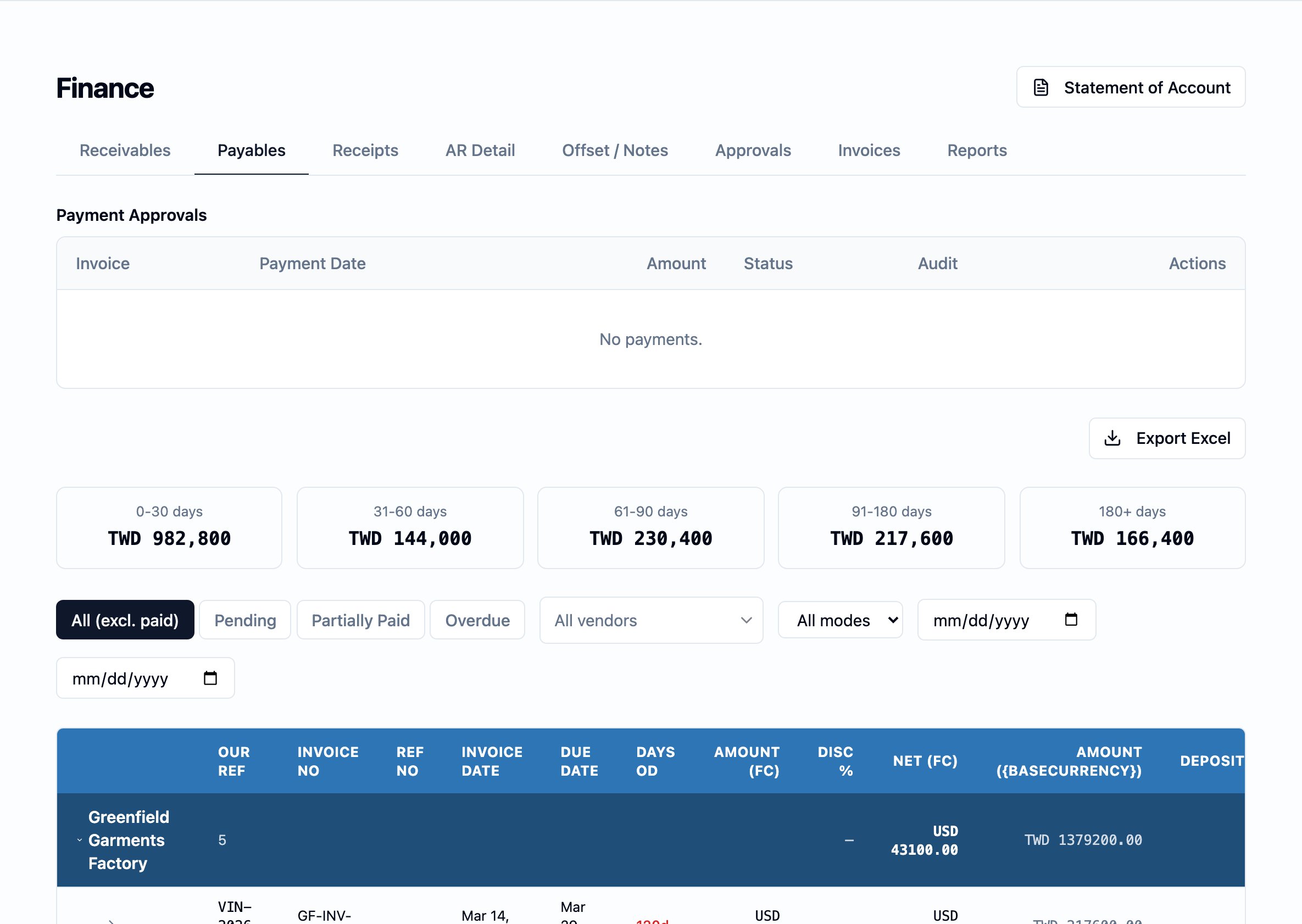
The Payables board — the payment-approvals strip on top, the per-bucket aging summary below it, and the vendor-grouped open-invoice detail rolling up the workspace's outstanding payables.
What this board is
Payables is a working board, not a ledger. Every figure on it is read off the finance ledger and presented for day-to-day payment work: one row per open vendor invoice, the running aging on each row, and the open balance grouped by factory so the team can settle a vendor’s work in one pass. The board lists every vendor invoice that has an outstanding amount — a vendor invoice that has not yet been paid in full, or a credit note that has not yet been applied. Production invoices and non-production invoices (freight, inspection, customs, packaging, testing) sit on the same board. A vendor invoice leaves the board the moment its outstanding amount falls to zero. The invoice itself stays on file under Invoices; the payables view is for open work.Why it exists
A typical apparel order generates vendor charges in two waves — fabric and trim invoices that accrue ahead of production, then freight, inspection, and the long tail of non-production invoices that land after shipment. Some are prepaid, some are settled net, and most cross currencies. Payables is the one place the team can stand to see every open vendor charge, sorted the way they will be worked.What the board shows
The Payables tab opens with three layered views: the Payment Approvals strip at the top, the aging summary cards, and below them the factory-grouped detail.Payment Approvals
Across the top, the Payment Approvals (覆核) strip lists every vendor payment a colleague has submitted and that is awaiting a checker’s review. A vendor payment never reduces a vendor’s balance until a checker approves it — see the approval lifecycle below for what each part of the strip carries.Aging-bucket summary cards
Below the Payment Approvals strip, a row of summary cards groups every open vendor invoice by how long it has been outstanding. The bands are shared with the Receivables board and the canonical definition is on Aging buckets.Factory-grouped detail
Below the cards, the open vendor invoices are grouped by factory — one section per vendor, with the vendor’s open invoices listed beneath. Each row carries the vendor invoice number, the workspace’s own reference, the purchase order it was raised against, the cost type (production, freight, inspection, customs, packaging, testing, and similar), the document’s currency, the document amount, the deposit already applied, the amount already paid, the outstanding amount in both the document’s currency and the workspace’s reporting currency, the due date, and the aging bucket. Each factory section closes with a sub-total for that vendor, so the team can settle one vendor in one pass rather than scrolling.Filtering the board
Above the factory detail, a filter row narrows the board to the open work the team is acting on:- Status. The default view hides paid invoices. The team can switch to Pending, Partially Paid, or Overdue to focus.
- Vendor. Search for a single vendor to see only their open invoices.
- Shipping mode. Narrow to Sea, Air, or Courier — the way the freight invoices the team is settling are routed.
- Date range. Restrict to invoices raised between two dates.
How a vendor balance is opened, reduced, and closed
A row appears on this board the moment a vendor invoice is raised.- A balance is opened by a charge raised. When a vendor invoice (or a debit note from a vendor) is recorded, a charge raised entry is written to the payables side of the finance ledger. The invoice appears on this board the same moment, with the full charged amount as outstanding.
- A balance is reduced by an applied deposit. When a vendor prepayment is allocated against a vendor invoice, the application is written to the ledger and the row’s deposit-applied column rises. The outstanding amount drops by the same.
- A balance is reduced by an approved vendor payment. This is the rule that separates Payables from Receivables: a vendor payment only reduces the vendor’s outstanding balance once a checker has approved it. A payment in draft, or one awaiting approval, is visible on the Payment Approvals strip but does not yet move the figures on this board. The full rule lives on the finance ledger and the approval mechanics on Maker-checker approvals.
- A balance is reduced by a credit note from the vendor. A vendor credit note settles against an open vendor invoice the same way an applied deposit does.
- A balance is closed when the outstanding amount reaches zero. The row leaves the board automatically; the invoice itself stays on file under Invoices.
How vendor payments are approved
The workspace’s maker-checker model applies to every vendor payment: the person who records a payment is the maker, a different person must approve it as the checker, and a payment never posts to the finance ledger until the checker approves. Until then, the payment is visible to the maker and to every eligible checker on the Payment Approvals strip — but the vendor’s outstanding balance, and the row on this board, are unchanged. The full rule, the roles permitted in each part, and the rejection path are on Maker-checker approvals. This board enforces it; the rule is canonical there.How currency is presented
The board never blends one currency into another. Every row carries the document’s own currency; sub-totals across the top, including the per-currency aging sub-totals, are broken out by currency.- The detail table shows the outstanding amount twice — in the document’s own currency, and in the workspace’s reporting currency at the rate that was in effect on the document’s date.
- The per-currency sub-totals above the factory detail list each currency separately. A workspace that pays vendors in TWD, USD, and CNY will see three sub-totals — not a blended figure. The rule is shared with the Receivables board; see Aging buckets.
- Foreign-exchange differences between the rate at which a vendor invoice was booked and the rate at which it was paid are recorded on the foreign-exchange side of the finance ledger, not folded back into the vendor’s outstanding balance.
Who reaches the Payables board
The Payables board is open to the Finance, Finance checker, Administrator, and Supervisor roles, on the same rules as the Receivables board: full read-and-write for finance roles and the administrator; read-only for the supervisor; closed to sales and merchandiser users. See User management.Where it sits in the workflow
- Upstream. Vendor invoices are raised against purchase orders, factory orders, and the non-production work shipped on an order. See Production and Shipments for where vendor work originates.
- Across. Vendor payments are submitted on this board, gate on Maker-checker approvals, and post to the finance ledger only when approved.
- Downstream. The Order Payment Summary card on each order and the workspace’s expense and AP reports under Reports read off the same ledger entries this board surfaces.