> ## Documentation Index
> Fetch the complete documentation index at: https://docs.garmentflow.ai/llms.txt
> Use this file to discover all available pages before exploring further.
# Trim Submissions
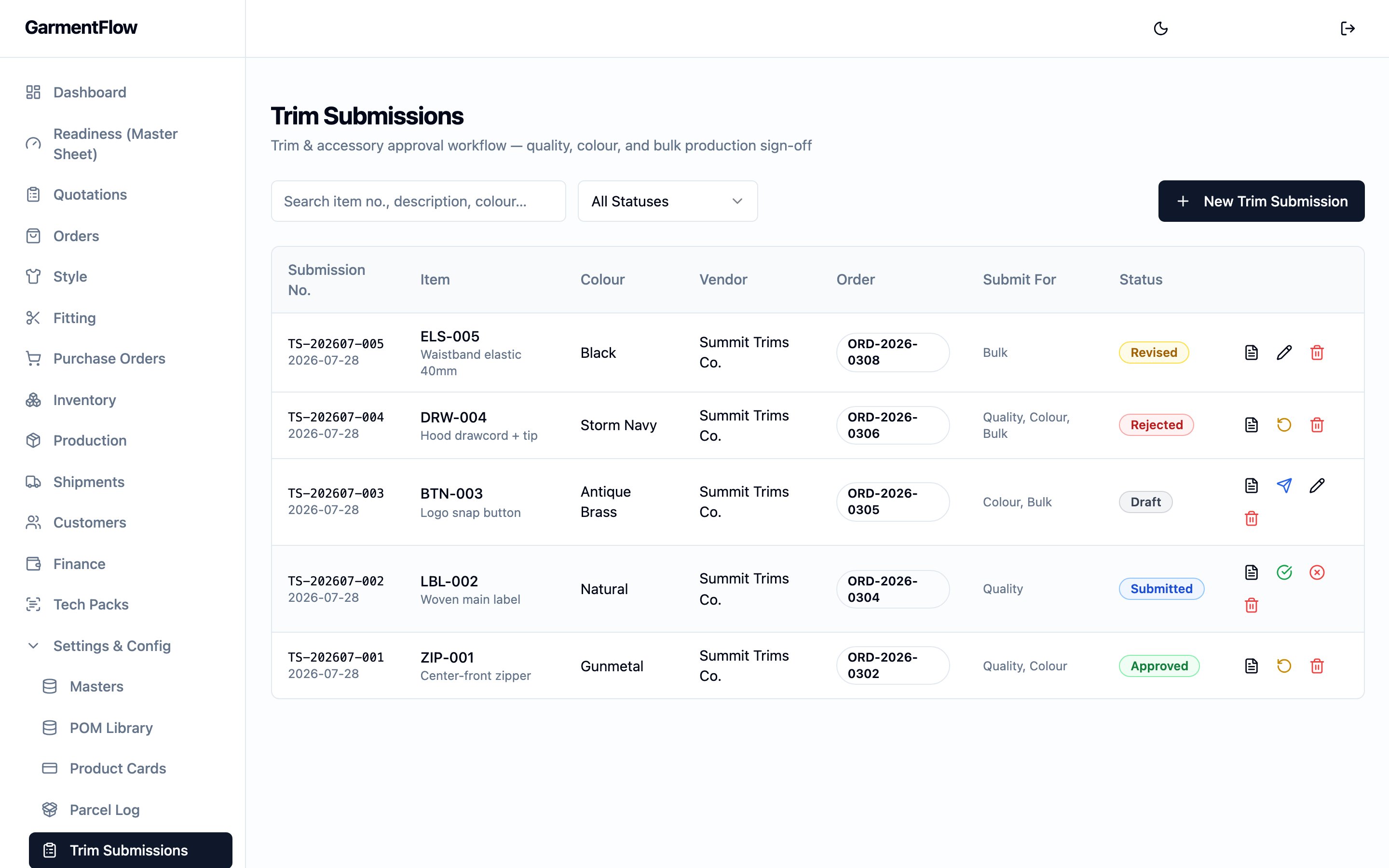
> The paper trail for trim approval — one submission per trim, colour, and approval intent, carrying the vendor it was sent to, the styles it covers, the team's approval-intent ticks, the outcome that came back, the trim photos, and the printable trim card.
A **trim submission** is the workspace's record of a trim sample —
a button, zipper, label, woven loop, or other accessory — being sent out
for sign-off, the approval that came back, and the resulting decision.
One submission carries one trim, one colour, and one intent — the team
ticks which of quality, colour, or bulk the round is for, and the
submission records the recipient's answer.
 ## What it is
A trim submission is the **per-trim audit record** of an approval round.
It identifies the trim and its colour, the
[vendor](/reference/glossary#vendor)
it was sent to, the
[order](/reference/glossary#order)
and
[style](/reference/glossary#style)
the round is for, and — first-class on the record — the related styles
the same approval also covers. As the round progresses, the team
**Sends** the submission, the recipient signs off or rejects it, and the
team marks it **Revised** when a second round is prepared.
The trim card PDF that prints from the submission carries the photos and
the trim's identity, so the printed sample card matches the workspace's
record. The page is reached from the sidebar's **Trim Submissions** entry.
## Why it exists
A bulk trim purchase rarely happens before a sample of the trim has been
sent to the customer (or to the development team) and signed off. The
team needs to know which round each trim is on, whether the round was
approved, why a round was rejected, which photos went with it, and which
styles the approval covers. Tracking that on email leaves no audit
trail and falls apart the moment one button covers a season's worth of
related styles.
The trim submission consolidates the approval round into one record per
trim, colour, and intent. It is **the audit trail** for trim approval —
**not the gate** for the trim purchase. The submission documents what
was sent, what came back, and on which styles the approval applies; the
team raises the
[purchase order](/reference/glossary#po-purchase-order)
for the bulk trim on their own judgement, with the submission on file as
the supporting record.
## When it is used
* **Before a trim is committed to bulk**, to send a sample of the trim
out for quality, colour, or bulk sign-off — singly or in combination.
* **When the recipient answers**, to record the approval or rejection on
the submission, with the rejection reason captured against the round.
* **When a second round is needed**, to mark the submission as revised
and prepare the next iteration on the same record.
* **At any point**, to export the printable trim card PDF — the photos
and identity laid out for the sample swatch that physically travels.
## Dependencies
* A
[vendor](/admin/vendors) — typically the accessory supplier the trim is
going to. Optional on the record but expected in practice.
* An [order](/modules/orders) and one of its
[styles](/modules/styles) the trim is for. Both optional on the record;
setting them puts the submission in the order's and style's context.
* An optional **accessory master** — the canonical
[BOM](/modules/bom) trim record the submission is approving. When set,
the submission reads the trim's identity from the master so the same
trim is referenced everywhere.
A trim submission is **not gated on** any of these — a submission can be
opened standalone (e.g. while a style is still in development). Linking
the order, style, vendor, or accessory master is what wires the audit
trail through to the surrounding records.
## What depends on it
Nothing strictly downstream. The trim PO is not gated on an approved
submission, and no manufacturing-order surface reads the submission. The
submission is the **paper trail**: the workspace's record of which
approval round happened, when, on what trim, with what outcome. Surfaces
that surround it read it, but none gate on it.
* The
[BOM](/modules/bom) trim line's approval history is read here — the
submission is the per-trim record the BOM line points at when the team
wants to see how the trim was signed off.
* The
[vendor](/admin/vendors) detail surfaces a count of submissions sent
to the vendor for context — same record, vendor-scoped.
## Fields
The submission's fields group by identity, the trim itself, linkage and
context, the submission round, the approval intent, the outcome, the
attachments, and free-text notes.
### Identity
* `Submission no.` — the submission's permanent business identifier.
Assigned by the platform when the submission is created and never
changes.
### Trim
* `Item no.` — the trim's item number. Auto-fills from the linked
accessory master if one is picked; editable on the submission.
* `Description` — what the trim is (button, woven label, drawcord, and
so on). Auto-fills from the accessory master where set.
* `Colour` — the trim's colour for this round. Each colour of the same
trim is its own submission.
* `Accessory master` — the optional link back to the canonical
[BOM](/modules/bom) trim record on the workspace's accessory master.
When set, the trim's identity reads from the master.
### Linkage and context
* `Order` — the optional order the submission is for.
* `Style` — the optional style on that order the submission belongs to.
* `Vendor` — the optional vendor the submission was sent to — typically
the
[accessory supplier](/reference/glossary#vendor)
who would be filling the trim purchase. Picked from the
[Vendors](/admin/vendors) directory.
* `Related styles` — a comma-delimited list of other styles the same
approval round also covers. A trim approval is **first-class
multi-style**: one round can carry across a season's worth of related
styles when the same trim runs on each. The list is recorded on the
submission and reads back as the styles the round applies to.
* `Brand` — the customer brand the round is for. Optional, free text.
* `Season` — the selling season. Optional, free text.
### Submission round
* `Date submitted` — the date the round was sent out. Operator-set.
* `Provider` — the supplier's name as it appears on the trim swatch
itself. Captured for the audit trail because the swatch may name a
sub-supplier distinct from the vendor on file.
* `Contact person` — the person at the supplier the team is working with
on the round. Optional.
### Approval intent
Three independent checkboxes — the team ticks any subset to record what
the round is being submitted for.
* `Submit for quality` — the round is asking for sign-off on the trim's
quality.
* `Submit for colour` — the round is asking for sign-off on the colour
match.
* `Submit for bulk` — the round is asking for sign-off on the trim being
used in bulk.
A round can carry one, two, or all three ticks — the three intents are
the things a trim sign-off can cover, and the team picks the subset that
applies.
### Outcome
* `Approved at` — the date the round was approved. Set when the team
records the approval on the submission.
* `Rejected reason` — the reason the round was rejected, free text.
**Required** when the submission is moved to **Rejected**.
### Attachments
* **Photos** — multiple photo attachments per submission, each with a
caption, sortable. The photos travel with the submission on the
printable trim card PDF (see *The trim card PDF* below).
### Notes
* `Remark` — free-text note on the submission as a whole.
## Business rules
1. **One submission per trim, colour, and intent.** A different colour
of the same trim is a separate submission; a separate round on the
same trim and colour for a different intent (e.g. colour-only follow-up
on a previously quality-approved trim) is a separate submission.
2. **A submission is not the gate for the trim PO.** Raising the
[purchase order](/reference/glossary#po-purchase-order)
for bulk trim is not refused by the absence of an approved submission;
the submission is the audit trail, not the gate. The team chooses
whether to wait for sign-off before buying.
3. **A rejection requires a reason.** Moving a submission to **Rejected**
without filling `Rejected reason` is refused — the reason is captured
on the same write so the audit trail names why the round was rejected.
4. **Revising starts a new round on the same record.** Marking a
submission as **Revised** signals the team is preparing a second
iteration on the same submission. The team then resends; the prior
outcome stays on the record's history.
5. **Related styles carry the approval across a batch.** Adding a style
to `Related styles` is the first-class way to say "this same trim
approval also covers that style." The submission documents the
broader coverage; the styles themselves keep their own records of the
trims they run.
6. **Linkage is optional but recommended.** Order, style, vendor, and
accessory-master links are not refused if blank, but a submission
with them filled in reads against the surrounding records (the BOM,
the order, the vendor's history) instead of standing alone.
## Validations
| When | Check | What happens if it fails |
| ------------------------------ | ------------------------------------------------- | ------------------------------------------------------------------------------- |
| Mark a submission **Rejected** | `Rejected reason` is filled in | The transition is rejected with a "reason required" message. |
| Mark a submission **Approved** | The submission is in **Submitted** or **Revised** | The transition is rejected — only a submitted or revised round can be approved. |
| Send a submission | The submission is in **Draft** or **Revised** | The transition is rejected — a draft or revised round is what gets sent. |
## Status and transitions
A trim submission moves through a five-status lifecycle, driven by **action
verbs** on the submission's row actions rather than direct status edits.
The team **Sends** a draft round; the recipient signs off or rejects it;
the team **Marks as Revised** to prepare a second iteration; the revised
round is then sent again.
* **Draft** — the submission is being built. The team is still entering
the trim, the colour, the photos, and the linkage. The round has not
been sent.
* **Submitted** — the round has been sent out. Awaiting a decision from
the recipient.
* **Approved** — the recipient signed off the round. The team has the
audit record they need to proceed with bulk for this trim and colour
on this submission's styles. `Approved at` is set on the transition.
* **Rejected** — the recipient rejected the round. The reason is captured
on `Rejected reason` on the same transition.
* **Revised** — a second iteration is being prepared on the same
submission, after either an approval or a rejection. The revised round
is sent again, returning the submission to **Submitted**.
### Transitions
The actions and the transitions they drive:
* (created) → **Draft**.
* **Draft** → **Submitted**: the team chooses **Send** on the row to
send the round out.
* **Submitted** → **Approved**: the team chooses **Approve** on the row,
recording the approval; `Approved at` is set.
* **Submitted** → **Rejected**: the team chooses **Reject** on the row,
recording the rejection with `Rejected reason`.
* **Approved** → **Revised**: the team chooses **Mark as Revised** to
start a second iteration after a prior approval (e.g. a colour change
on a previously approved trim).
* **Rejected** → **Revised**: the team chooses **Mark as Revised** to
start the rework after a rejection.
* **Revised** → **Submitted**: the team chooses **Send** again to ship
the revised round.
The action verbs the team sees on the row — **Send**, **Approve**,
**Reject**, **Mark as Revised** — drive the lifecycle directly; the
team does not edit the status field by hand.
## Date logic
The submission carries two business-meaningful dates plus the platform's
audit timestamps.
* **`Date submitted`** — the date the round was sent out. Operator-set on
the round, typically the day **Send** is clicked.
* **`Approved at`** — the date the round was approved. Set by the
platform on the **Submitted → Approved** transition. A re-approval on
a re-sent revised round overwrites it; the prior value lives on the
submission's audit trail.
There are no scheduled or computed dates on the submission itself — the
submission's dates record what happened, not when the next milestone is
due.
## The trim card PDF
The submission exports a **trim card PDF** — a printable card carrying
the trim's identity (description, item number, colour) and its photos,
formatted to travel with the physical swatch. The export is generated
from the submission's current fields and photos; re-exporting after an
edit prints the latest content.
The trim card is a **print of the current submission record** — it is
not a converted document or a signed-off artifact. There is no signed
copy upload back, no per-export lock, and the submission's status is
unchanged by the export. The team uses the PDF as the swatch tag and
sends the physical sample to the recipient alongside it.
## Effect of changes
* **Create a submission.** A new submission is opened in **Draft** with
the trim, colour, and linkage fields ready for entry. The team adds
photos, ticks the approval intent, and prepares the round.
* **Click "Send" on a draft (or revised) submission.** The submission
moves to **Submitted** and the team can record the recipient's
decision on it.
* **Click "Approve" on a submitted (or revised-then-submitted)
submission.** The submission moves to **Approved** and `Approved at`
is set. The round is on file as the audit record for this trim and
colour on the submission's styles.
* **Click "Reject" on a submitted submission.** The team fills
`Rejected reason` in the same write and the submission moves to
**Rejected**. The reason stays on the record as the audit of why the
round failed.
* **Click "Mark as Revised" on an approved or rejected submission.** The
submission moves to **Revised**, signalling that a second iteration is
being prepared. The team edits the round (new photos, updated trim
details), then clicks **Send** again to re-submit.
* **Edit the trim, colour, linkage, photos, or related styles.** The
change saves to the submission. Re-export the trim card PDF to print
the updated content.
* **Add or reorder photos.** The new photos and order are saved. The
trim card PDF reads the current photos and order on the next export.
* **Delete a submission.** The submission is removed from the workspace.
Use delete for a submission that was created in error; a submission
that played out and reached a terminal state can be left on file as
the audit trail.
## Best practices
* **Open the submission against the accessory master and the related
styles you mean it to cover.** The accessory-master link is what ties
the submission back to the
[BOM](/modules/bom) trim line; the related-styles list is what makes
one round cover a season's worth of related styles instead of asking
for a fresh round per style.
* **Tick the approval intent before sending.** Recording whether the
round is for quality, colour, or bulk (or any combination) on the
submission is what makes the audit trail readable later; ticking
retrospectively works but leaves the trail thinner.
* **Send through "Send" rather than editing the status by hand.** The
action verbs on the row are the documented path through the lifecycle
and set the dates and validations that go with each transition.
* **Capture the rejection reason in the recipient's own words.** A
precise reason ("colour too warm against the body fabric", "edge
finish unraveled in laundering") makes the next round productive in a
way "rejected" does not.
* **Mark as Revised before resending a second round.** Reusing the same
submission for a revised round keeps the trim, colour, and approval
history on one record; opening a new submission for what is really a
second iteration scatters the audit trail.
* **Re-export the trim card PDF after edits.** The PDF prints from the
current record — an edit doesn't update a previously printed swatch
card.
## Related pages
* [BOM](/modules/bom) — the canonical material record the submission's
accessory-master link reads from.
* [Vendors](/admin/vendors) — the directory of accessory suppliers a
submission is sent to.
* [Samples and fitting](/modules/samples-and-fitting) — the per-style
validation record the trim submission's styles sit alongside.
* [Production](/modules/production) — the trim
[purchase order](/reference/glossary#po-purchase-order) the submission
supports.
* [Orders](/modules/orders) — the order the submission's style belongs
to.
## What it is
A trim submission is the **per-trim audit record** of an approval round.
It identifies the trim and its colour, the
[vendor](/reference/glossary#vendor)
it was sent to, the
[order](/reference/glossary#order)
and
[style](/reference/glossary#style)
the round is for, and — first-class on the record — the related styles
the same approval also covers. As the round progresses, the team
**Sends** the submission, the recipient signs off or rejects it, and the
team marks it **Revised** when a second round is prepared.
The trim card PDF that prints from the submission carries the photos and
the trim's identity, so the printed sample card matches the workspace's
record. The page is reached from the sidebar's **Trim Submissions** entry.
## Why it exists
A bulk trim purchase rarely happens before a sample of the trim has been
sent to the customer (or to the development team) and signed off. The
team needs to know which round each trim is on, whether the round was
approved, why a round was rejected, which photos went with it, and which
styles the approval covers. Tracking that on email leaves no audit
trail and falls apart the moment one button covers a season's worth of
related styles.
The trim submission consolidates the approval round into one record per
trim, colour, and intent. It is **the audit trail** for trim approval —
**not the gate** for the trim purchase. The submission documents what
was sent, what came back, and on which styles the approval applies; the
team raises the
[purchase order](/reference/glossary#po-purchase-order)
for the bulk trim on their own judgement, with the submission on file as
the supporting record.
## When it is used
* **Before a trim is committed to bulk**, to send a sample of the trim
out for quality, colour, or bulk sign-off — singly or in combination.
* **When the recipient answers**, to record the approval or rejection on
the submission, with the rejection reason captured against the round.
* **When a second round is needed**, to mark the submission as revised
and prepare the next iteration on the same record.
* **At any point**, to export the printable trim card PDF — the photos
and identity laid out for the sample swatch that physically travels.
## Dependencies
* A
[vendor](/admin/vendors) — typically the accessory supplier the trim is
going to. Optional on the record but expected in practice.
* An [order](/modules/orders) and one of its
[styles](/modules/styles) the trim is for. Both optional on the record;
setting them puts the submission in the order's and style's context.
* An optional **accessory master** — the canonical
[BOM](/modules/bom) trim record the submission is approving. When set,
the submission reads the trim's identity from the master so the same
trim is referenced everywhere.
A trim submission is **not gated on** any of these — a submission can be
opened standalone (e.g. while a style is still in development). Linking
the order, style, vendor, or accessory master is what wires the audit
trail through to the surrounding records.
## What depends on it
Nothing strictly downstream. The trim PO is not gated on an approved
submission, and no manufacturing-order surface reads the submission. The
submission is the **paper trail**: the workspace's record of which
approval round happened, when, on what trim, with what outcome. Surfaces
that surround it read it, but none gate on it.
* The
[BOM](/modules/bom) trim line's approval history is read here — the
submission is the per-trim record the BOM line points at when the team
wants to see how the trim was signed off.
* The
[vendor](/admin/vendors) detail surfaces a count of submissions sent
to the vendor for context — same record, vendor-scoped.
## Fields
The submission's fields group by identity, the trim itself, linkage and
context, the submission round, the approval intent, the outcome, the
attachments, and free-text notes.
### Identity
* `Submission no.` — the submission's permanent business identifier.
Assigned by the platform when the submission is created and never
changes.
### Trim
* `Item no.` — the trim's item number. Auto-fills from the linked
accessory master if one is picked; editable on the submission.
* `Description` — what the trim is (button, woven label, drawcord, and
so on). Auto-fills from the accessory master where set.
* `Colour` — the trim's colour for this round. Each colour of the same
trim is its own submission.
* `Accessory master` — the optional link back to the canonical
[BOM](/modules/bom) trim record on the workspace's accessory master.
When set, the trim's identity reads from the master.
### Linkage and context
* `Order` — the optional order the submission is for.
* `Style` — the optional style on that order the submission belongs to.
* `Vendor` — the optional vendor the submission was sent to — typically
the
[accessory supplier](/reference/glossary#vendor)
who would be filling the trim purchase. Picked from the
[Vendors](/admin/vendors) directory.
* `Related styles` — a comma-delimited list of other styles the same
approval round also covers. A trim approval is **first-class
multi-style**: one round can carry across a season's worth of related
styles when the same trim runs on each. The list is recorded on the
submission and reads back as the styles the round applies to.
* `Brand` — the customer brand the round is for. Optional, free text.
* `Season` — the selling season. Optional, free text.
### Submission round
* `Date submitted` — the date the round was sent out. Operator-set.
* `Provider` — the supplier's name as it appears on the trim swatch
itself. Captured for the audit trail because the swatch may name a
sub-supplier distinct from the vendor on file.
* `Contact person` — the person at the supplier the team is working with
on the round. Optional.
### Approval intent
Three independent checkboxes — the team ticks any subset to record what
the round is being submitted for.
* `Submit for quality` — the round is asking for sign-off on the trim's
quality.
* `Submit for colour` — the round is asking for sign-off on the colour
match.
* `Submit for bulk` — the round is asking for sign-off on the trim being
used in bulk.
A round can carry one, two, or all three ticks — the three intents are
the things a trim sign-off can cover, and the team picks the subset that
applies.
### Outcome
* `Approved at` — the date the round was approved. Set when the team
records the approval on the submission.
* `Rejected reason` — the reason the round was rejected, free text.
**Required** when the submission is moved to **Rejected**.
### Attachments
* **Photos** — multiple photo attachments per submission, each with a
caption, sortable. The photos travel with the submission on the
printable trim card PDF (see *The trim card PDF* below).
### Notes
* `Remark` — free-text note on the submission as a whole.
## Business rules
1. **One submission per trim, colour, and intent.** A different colour
of the same trim is a separate submission; a separate round on the
same trim and colour for a different intent (e.g. colour-only follow-up
on a previously quality-approved trim) is a separate submission.
2. **A submission is not the gate for the trim PO.** Raising the
[purchase order](/reference/glossary#po-purchase-order)
for bulk trim is not refused by the absence of an approved submission;
the submission is the audit trail, not the gate. The team chooses
whether to wait for sign-off before buying.
3. **A rejection requires a reason.** Moving a submission to **Rejected**
without filling `Rejected reason` is refused — the reason is captured
on the same write so the audit trail names why the round was rejected.
4. **Revising starts a new round on the same record.** Marking a
submission as **Revised** signals the team is preparing a second
iteration on the same submission. The team then resends; the prior
outcome stays on the record's history.
5. **Related styles carry the approval across a batch.** Adding a style
to `Related styles` is the first-class way to say "this same trim
approval also covers that style." The submission documents the
broader coverage; the styles themselves keep their own records of the
trims they run.
6. **Linkage is optional but recommended.** Order, style, vendor, and
accessory-master links are not refused if blank, but a submission
with them filled in reads against the surrounding records (the BOM,
the order, the vendor's history) instead of standing alone.
## Validations
| When | Check | What happens if it fails |
| ------------------------------ | ------------------------------------------------- | ------------------------------------------------------------------------------- |
| Mark a submission **Rejected** | `Rejected reason` is filled in | The transition is rejected with a "reason required" message. |
| Mark a submission **Approved** | The submission is in **Submitted** or **Revised** | The transition is rejected — only a submitted or revised round can be approved. |
| Send a submission | The submission is in **Draft** or **Revised** | The transition is rejected — a draft or revised round is what gets sent. |
## Status and transitions
A trim submission moves through a five-status lifecycle, driven by **action
verbs** on the submission's row actions rather than direct status edits.
The team **Sends** a draft round; the recipient signs off or rejects it;
the team **Marks as Revised** to prepare a second iteration; the revised
round is then sent again.
* **Draft** — the submission is being built. The team is still entering
the trim, the colour, the photos, and the linkage. The round has not
been sent.
* **Submitted** — the round has been sent out. Awaiting a decision from
the recipient.
* **Approved** — the recipient signed off the round. The team has the
audit record they need to proceed with bulk for this trim and colour
on this submission's styles. `Approved at` is set on the transition.
* **Rejected** — the recipient rejected the round. The reason is captured
on `Rejected reason` on the same transition.
* **Revised** — a second iteration is being prepared on the same
submission, after either an approval or a rejection. The revised round
is sent again, returning the submission to **Submitted**.
### Transitions
The actions and the transitions they drive:
* (created) → **Draft**.
* **Draft** → **Submitted**: the team chooses **Send** on the row to
send the round out.
* **Submitted** → **Approved**: the team chooses **Approve** on the row,
recording the approval; `Approved at` is set.
* **Submitted** → **Rejected**: the team chooses **Reject** on the row,
recording the rejection with `Rejected reason`.
* **Approved** → **Revised**: the team chooses **Mark as Revised** to
start a second iteration after a prior approval (e.g. a colour change
on a previously approved trim).
* **Rejected** → **Revised**: the team chooses **Mark as Revised** to
start the rework after a rejection.
* **Revised** → **Submitted**: the team chooses **Send** again to ship
the revised round.
The action verbs the team sees on the row — **Send**, **Approve**,
**Reject**, **Mark as Revised** — drive the lifecycle directly; the
team does not edit the status field by hand.
## Date logic
The submission carries two business-meaningful dates plus the platform's
audit timestamps.
* **`Date submitted`** — the date the round was sent out. Operator-set on
the round, typically the day **Send** is clicked.
* **`Approved at`** — the date the round was approved. Set by the
platform on the **Submitted → Approved** transition. A re-approval on
a re-sent revised round overwrites it; the prior value lives on the
submission's audit trail.
There are no scheduled or computed dates on the submission itself — the
submission's dates record what happened, not when the next milestone is
due.
## The trim card PDF
The submission exports a **trim card PDF** — a printable card carrying
the trim's identity (description, item number, colour) and its photos,
formatted to travel with the physical swatch. The export is generated
from the submission's current fields and photos; re-exporting after an
edit prints the latest content.
The trim card is a **print of the current submission record** — it is
not a converted document or a signed-off artifact. There is no signed
copy upload back, no per-export lock, and the submission's status is
unchanged by the export. The team uses the PDF as the swatch tag and
sends the physical sample to the recipient alongside it.
## Effect of changes
* **Create a submission.** A new submission is opened in **Draft** with
the trim, colour, and linkage fields ready for entry. The team adds
photos, ticks the approval intent, and prepares the round.
* **Click "Send" on a draft (or revised) submission.** The submission
moves to **Submitted** and the team can record the recipient's
decision on it.
* **Click "Approve" on a submitted (or revised-then-submitted)
submission.** The submission moves to **Approved** and `Approved at`
is set. The round is on file as the audit record for this trim and
colour on the submission's styles.
* **Click "Reject" on a submitted submission.** The team fills
`Rejected reason` in the same write and the submission moves to
**Rejected**. The reason stays on the record as the audit of why the
round failed.
* **Click "Mark as Revised" on an approved or rejected submission.** The
submission moves to **Revised**, signalling that a second iteration is
being prepared. The team edits the round (new photos, updated trim
details), then clicks **Send** again to re-submit.
* **Edit the trim, colour, linkage, photos, or related styles.** The
change saves to the submission. Re-export the trim card PDF to print
the updated content.
* **Add or reorder photos.** The new photos and order are saved. The
trim card PDF reads the current photos and order on the next export.
* **Delete a submission.** The submission is removed from the workspace.
Use delete for a submission that was created in error; a submission
that played out and reached a terminal state can be left on file as
the audit trail.
## Best practices
* **Open the submission against the accessory master and the related
styles you mean it to cover.** The accessory-master link is what ties
the submission back to the
[BOM](/modules/bom) trim line; the related-styles list is what makes
one round cover a season's worth of related styles instead of asking
for a fresh round per style.
* **Tick the approval intent before sending.** Recording whether the
round is for quality, colour, or bulk (or any combination) on the
submission is what makes the audit trail readable later; ticking
retrospectively works but leaves the trail thinner.
* **Send through "Send" rather than editing the status by hand.** The
action verbs on the row are the documented path through the lifecycle
and set the dates and validations that go with each transition.
* **Capture the rejection reason in the recipient's own words.** A
precise reason ("colour too warm against the body fabric", "edge
finish unraveled in laundering") makes the next round productive in a
way "rejected" does not.
* **Mark as Revised before resending a second round.** Reusing the same
submission for a revised round keeps the trim, colour, and approval
history on one record; opening a new submission for what is really a
second iteration scatters the audit trail.
* **Re-export the trim card PDF after edits.** The PDF prints from the
current record — an edit doesn't update a previously printed swatch
card.
## Related pages
* [BOM](/modules/bom) — the canonical material record the submission's
accessory-master link reads from.
* [Vendors](/admin/vendors) — the directory of accessory suppliers a
submission is sent to.
* [Samples and fitting](/modules/samples-and-fitting) — the per-style
validation record the trim submission's styles sit alongside.
* [Production](/modules/production) — the trim
[purchase order](/reference/glossary#po-purchase-order) the submission
supports.
* [Orders](/modules/orders) — the order the submission's style belongs
to.