> ## Documentation Index
> Fetch the complete documentation index at: https://docs.garmentflow.ai/llms.txt
> Use this file to discover all available pages before exploring further.
# Receivables
> The Finance board that lists what each customer owes the workspace — one row per open customer document, aged by how long the balance has been outstanding, and broken out by currency so foreign-currency balances are read in their own money.
The **Receivables** board is the Finance module's view of what every customer
owes the workspace. It opens as the first tab in the
[Finance module](/modules/finance) (the **應收 / 应收** tab) and answers a
single question at a glance: *what is owed to us, by whom, in what currency,
and how long has it been outstanding.*
This page describes what the board shows, how a balance is opened and how it
is closed, and the way the board surfaces currency and age so the team can act
on the right rows first.
 ## What this board is
Receivables is a working board, not a ledger. Every figure on it is read off
the [finance ledger](/concepts/finance-ledger) — the canonical record of every
money movement on the workspace — and presented in the shape finance teams
need for day-to-day collection work: one row per open customer document, the
running aging on each row, and the currency-by-currency sub-totals across the
top.
The board lists every customer document that has an outstanding amount: a
customer invoice that has not been fully paid, a debit note that has not been
settled, or a credit note that has not yet been applied. A document leaves
the board the moment its outstanding amount falls to zero — the document
itself stays on file, but the receivables view is for open work.
## Why it exists
In a typical apparel order the customer pays in two parts — a deposit at the
proforma stage and a balance after shipment — and the gap between the two
runs across several months. Across a busy workspace those gaps overlap, sit in
different currencies, and age at different rates. Receivables is the one
place the team can stand to see the full picture: who owes, how much, in
which currency, and how overdue.
## What the board shows
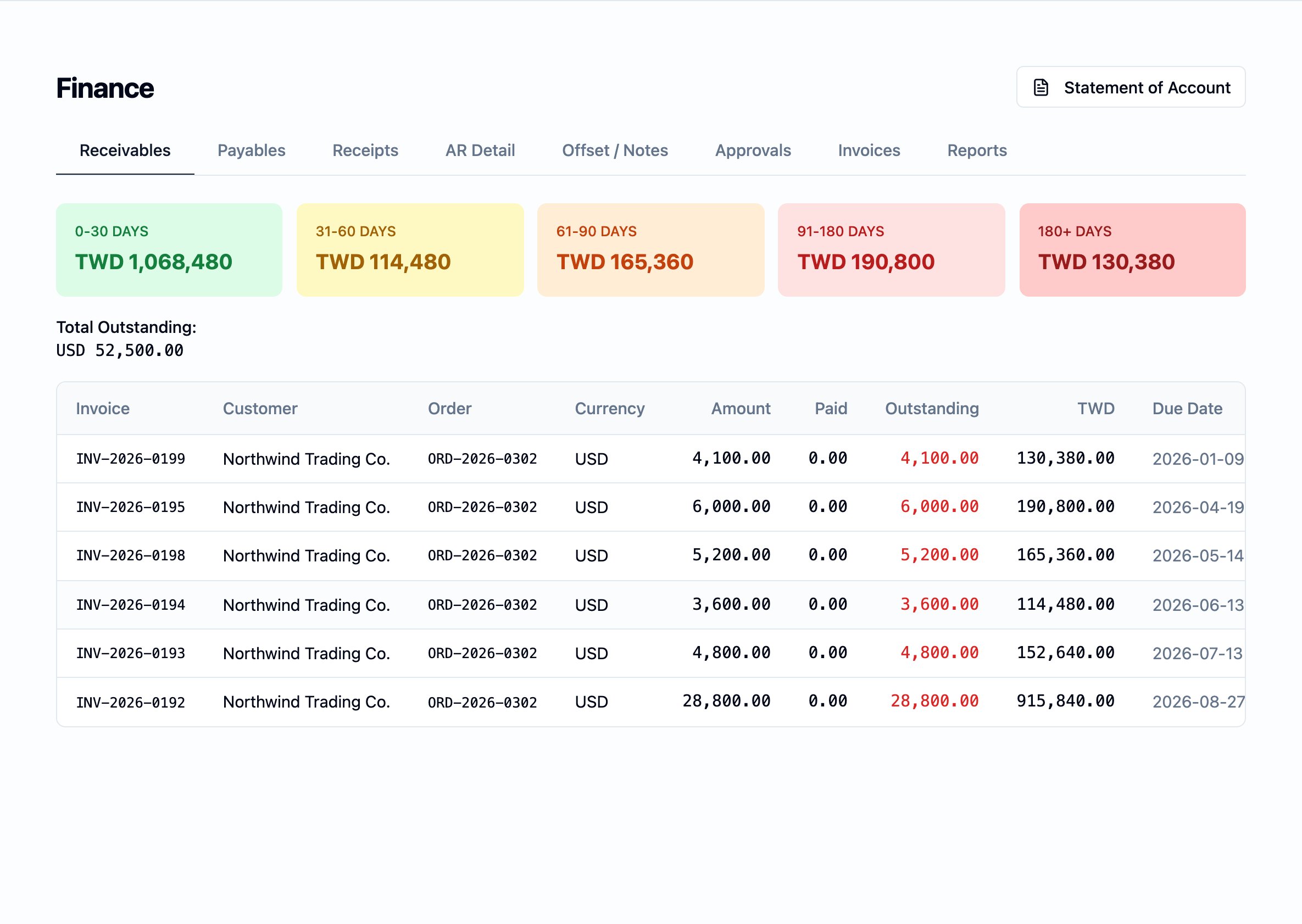
The Receivables tab opens with two layered views: a strip of aging-bucket
summary cards across the top, and a detail table of every open customer
document below.
### The aging-bucket cards
Five summary cards along the top group every open document by how long it has
been outstanding. The bands and the rule that places a row into each are
canonical for the workspace, and shared with the
[Statement of Account](/modules/statement-of-account) and the
[Payables board](/modules/payables). See
[Aging buckets](/reference/aging-buckets) for the full definition.
### The detail table
Below the cards, a single table lists every open customer document. Each row
carries:
* `Invoice` — the document's own number (a customer invoice number, a debit
note number, or a credit note number).
* `Customer` — the customer the document is raised against.
* `Order` — the order the document was raised from.
* `Currency` — the currency the document is denominated in.
* `Amount` — the document's total amount in its own currency.
* `Paid` — what has already been received against this document, in the
document's currency.
* `Outstanding` — what is still owed on the document, in the document's
currency.
* A second outstanding column in the workspace's reporting currency, at the
rate that was in effect when the document was booked — so a row in EUR or
USD can be read alongside the workspace's own money without re-keying.
* `Due Date` — the date the customer is expected to settle the document by.
* `Bucket` — the aging bucket the row currently falls in, computed from the
due date. See [Aging buckets](/reference/aging-buckets).
The detail table is sorted by due date — earliest at the top — so the rows
the team should chase first stand at the head of the board.
## How a balance is opened, reduced, and closed
A row appears on this board the moment a customer document is raised. It
reduces as receipts and credits are applied. It disappears when the
outstanding amount reaches zero.
* **A balance is opened by a *charge raised*.** When a customer invoice or a
debit note is issued, a **charge raised** entry is written to the
receivables side of the [finance ledger](/concepts/finance-ledger). The
document appears on this board the same moment, with the full charged
amount carried in the `Outstanding` column.
* **A balance is reduced by a receipt.** When the team records a customer
receipt against the document — recorded on the **Receipts (收款 / 收款)**
tab — the matching receipt entry is written to the ledger and the row's
`Paid` column rises by the same amount. The `Outstanding` column drops.
* **A balance is also reduced by an applied deposit.** When an unapplied
customer deposit is applied against an invoice — recorded on the
**Offset / Notes (沖帳 / 冲账)** tab — the application is written to the
ledger and the row updates the same way. Deposits and receipts both reduce
the outstanding amount.
* **A balance is reduced by a credit note.** A credit note issued to the
customer settles against an open invoice the same way an applied deposit
does: the credit reduces the invoice's outstanding amount and, once the
invoice is settled in full, the row drops off the board.
* **A balance is closed when the outstanding amount reaches zero.** The row
leaves the board automatically; the document itself remains under
**Invoices** for reference.
Across all of these, the only change the workspace ever makes to the ledger
is to write a new entry — see
[the finance ledger](/concepts/finance-ledger) for how the rule that no entry
is ever edited applies on the receivables side.
## How currency is presented
The board never blends one customer's USD outstanding into another's TWD
outstanding. Every row shows its document in its own currency, and the
sub-totals above the table list each currency separately.
* **The detail table** shows the `Outstanding` column twice — once in the
document's own currency, and once in the workspace's reporting currency at
the rate that was in effect on the document's date. Both views read the
same row; neither one is converted on the fly to reflect today's rate.
* **The `Total Outstanding` line** at the top of the table is broken out by
currency. A workspace that invoices in TWD, USD, and EUR will see three
sub-totals — one per currency — rather than a single blended figure. The
rule is shared with the per-currency aging sub-totals; see
[Aging buckets](/reference/aging-buckets).
* **Foreign-exchange differences** between the rate at which a document was
booked and the rate at which it is paid are recorded on the
foreign-exchange side of the [finance ledger](/concepts/finance-ledger),
not folded back into the customer's outstanding balance. The customer
continues to owe whatever the document says in its own currency.
## Who reaches the Receivables board
The Receivables board is open to the **Finance**, **Finance checker**,
**Administrator**, and **Supervisor** roles. **Sales** and **Merchandiser**
users do not reach the Finance module at all. The **Supervisor** role sees
the board read-only.
See [User management](/admin/user-management#roles) for the full role
catalogue and what each role may do here.
## Where it sits in the workflow
Receivables is downstream of the order surfaces and upstream of the customer
statement.
* **Upstream.** A customer invoice raised from a shipment, a debit note
issued to charge the customer for something owed back, and the proforma
deposit on a confirmed order are all the events that open a balance on this
board. See [Orders](/modules/orders) and [Shipments](/modules/shipments).
* **Across.** Receipts are recorded on the **Receipts (收款)** tab; advance
receipts are applied to invoices on the **Offset / Notes (沖帳)** tab.
Both surfaces write the entries that reduce the rows on this board.
* **Downstream.** The **Statement of Account** the workspace sends a customer
reads the same charges, receipts, and balances this board surfaces, in a
customer-facing format. See
[Statement of Account](/modules/statement-of-account).
## Related pages
* [Finance module](/modules/finance)
* [The finance ledger](/concepts/finance-ledger)
* [Payables](/modules/payables)
* [Statement of Account](/modules/statement-of-account)
* [Aging buckets](/reference/aging-buckets)
* [Orders](/modules/orders)
## What this board is
Receivables is a working board, not a ledger. Every figure on it is read off
the [finance ledger](/concepts/finance-ledger) — the canonical record of every
money movement on the workspace — and presented in the shape finance teams
need for day-to-day collection work: one row per open customer document, the
running aging on each row, and the currency-by-currency sub-totals across the
top.
The board lists every customer document that has an outstanding amount: a
customer invoice that has not been fully paid, a debit note that has not been
settled, or a credit note that has not yet been applied. A document leaves
the board the moment its outstanding amount falls to zero — the document
itself stays on file, but the receivables view is for open work.
## Why it exists
In a typical apparel order the customer pays in two parts — a deposit at the
proforma stage and a balance after shipment — and the gap between the two
runs across several months. Across a busy workspace those gaps overlap, sit in
different currencies, and age at different rates. Receivables is the one
place the team can stand to see the full picture: who owes, how much, in
which currency, and how overdue.
## What the board shows
The Receivables tab opens with two layered views: a strip of aging-bucket
summary cards across the top, and a detail table of every open customer
document below.
### The aging-bucket cards
Five summary cards along the top group every open document by how long it has
been outstanding. The bands and the rule that places a row into each are
canonical for the workspace, and shared with the
[Statement of Account](/modules/statement-of-account) and the
[Payables board](/modules/payables). See
[Aging buckets](/reference/aging-buckets) for the full definition.
### The detail table
Below the cards, a single table lists every open customer document. Each row
carries:
* `Invoice` — the document's own number (a customer invoice number, a debit
note number, or a credit note number).
* `Customer` — the customer the document is raised against.
* `Order` — the order the document was raised from.
* `Currency` — the currency the document is denominated in.
* `Amount` — the document's total amount in its own currency.
* `Paid` — what has already been received against this document, in the
document's currency.
* `Outstanding` — what is still owed on the document, in the document's
currency.
* A second outstanding column in the workspace's reporting currency, at the
rate that was in effect when the document was booked — so a row in EUR or
USD can be read alongside the workspace's own money without re-keying.
* `Due Date` — the date the customer is expected to settle the document by.
* `Bucket` — the aging bucket the row currently falls in, computed from the
due date. See [Aging buckets](/reference/aging-buckets).
The detail table is sorted by due date — earliest at the top — so the rows
the team should chase first stand at the head of the board.
## How a balance is opened, reduced, and closed
A row appears on this board the moment a customer document is raised. It
reduces as receipts and credits are applied. It disappears when the
outstanding amount reaches zero.
* **A balance is opened by a *charge raised*.** When a customer invoice or a
debit note is issued, a **charge raised** entry is written to the
receivables side of the [finance ledger](/concepts/finance-ledger). The
document appears on this board the same moment, with the full charged
amount carried in the `Outstanding` column.
* **A balance is reduced by a receipt.** When the team records a customer
receipt against the document — recorded on the **Receipts (收款 / 收款)**
tab — the matching receipt entry is written to the ledger and the row's
`Paid` column rises by the same amount. The `Outstanding` column drops.
* **A balance is also reduced by an applied deposit.** When an unapplied
customer deposit is applied against an invoice — recorded on the
**Offset / Notes (沖帳 / 冲账)** tab — the application is written to the
ledger and the row updates the same way. Deposits and receipts both reduce
the outstanding amount.
* **A balance is reduced by a credit note.** A credit note issued to the
customer settles against an open invoice the same way an applied deposit
does: the credit reduces the invoice's outstanding amount and, once the
invoice is settled in full, the row drops off the board.
* **A balance is closed when the outstanding amount reaches zero.** The row
leaves the board automatically; the document itself remains under
**Invoices** for reference.
Across all of these, the only change the workspace ever makes to the ledger
is to write a new entry — see
[the finance ledger](/concepts/finance-ledger) for how the rule that no entry
is ever edited applies on the receivables side.
## How currency is presented
The board never blends one customer's USD outstanding into another's TWD
outstanding. Every row shows its document in its own currency, and the
sub-totals above the table list each currency separately.
* **The detail table** shows the `Outstanding` column twice — once in the
document's own currency, and once in the workspace's reporting currency at
the rate that was in effect on the document's date. Both views read the
same row; neither one is converted on the fly to reflect today's rate.
* **The `Total Outstanding` line** at the top of the table is broken out by
currency. A workspace that invoices in TWD, USD, and EUR will see three
sub-totals — one per currency — rather than a single blended figure. The
rule is shared with the per-currency aging sub-totals; see
[Aging buckets](/reference/aging-buckets).
* **Foreign-exchange differences** between the rate at which a document was
booked and the rate at which it is paid are recorded on the
foreign-exchange side of the [finance ledger](/concepts/finance-ledger),
not folded back into the customer's outstanding balance. The customer
continues to owe whatever the document says in its own currency.
## Who reaches the Receivables board
The Receivables board is open to the **Finance**, **Finance checker**,
**Administrator**, and **Supervisor** roles. **Sales** and **Merchandiser**
users do not reach the Finance module at all. The **Supervisor** role sees
the board read-only.
See [User management](/admin/user-management#roles) for the full role
catalogue and what each role may do here.
## Where it sits in the workflow
Receivables is downstream of the order surfaces and upstream of the customer
statement.
* **Upstream.** A customer invoice raised from a shipment, a debit note
issued to charge the customer for something owed back, and the proforma
deposit on a confirmed order are all the events that open a balance on this
board. See [Orders](/modules/orders) and [Shipments](/modules/shipments).
* **Across.** Receipts are recorded on the **Receipts (收款)** tab; advance
receipts are applied to invoices on the **Offset / Notes (沖帳)** tab.
Both surfaces write the entries that reduce the rows on this board.
* **Downstream.** The **Statement of Account** the workspace sends a customer
reads the same charges, receipts, and balances this board surfaces, in a
customer-facing format. See
[Statement of Account](/modules/statement-of-account).
## Related pages
* [Finance module](/modules/finance)
* [The finance ledger](/concepts/finance-ledger)
* [Payables](/modules/payables)
* [Statement of Account](/modules/statement-of-account)
* [Aging buckets](/reference/aging-buckets)
* [Orders](/modules/orders)