> ## Documentation Index
> Fetch the complete documentation index at: https://docs.garmentflow.ai/llms.txt
> Use this file to discover all available pages before exploring further.
# Quotation
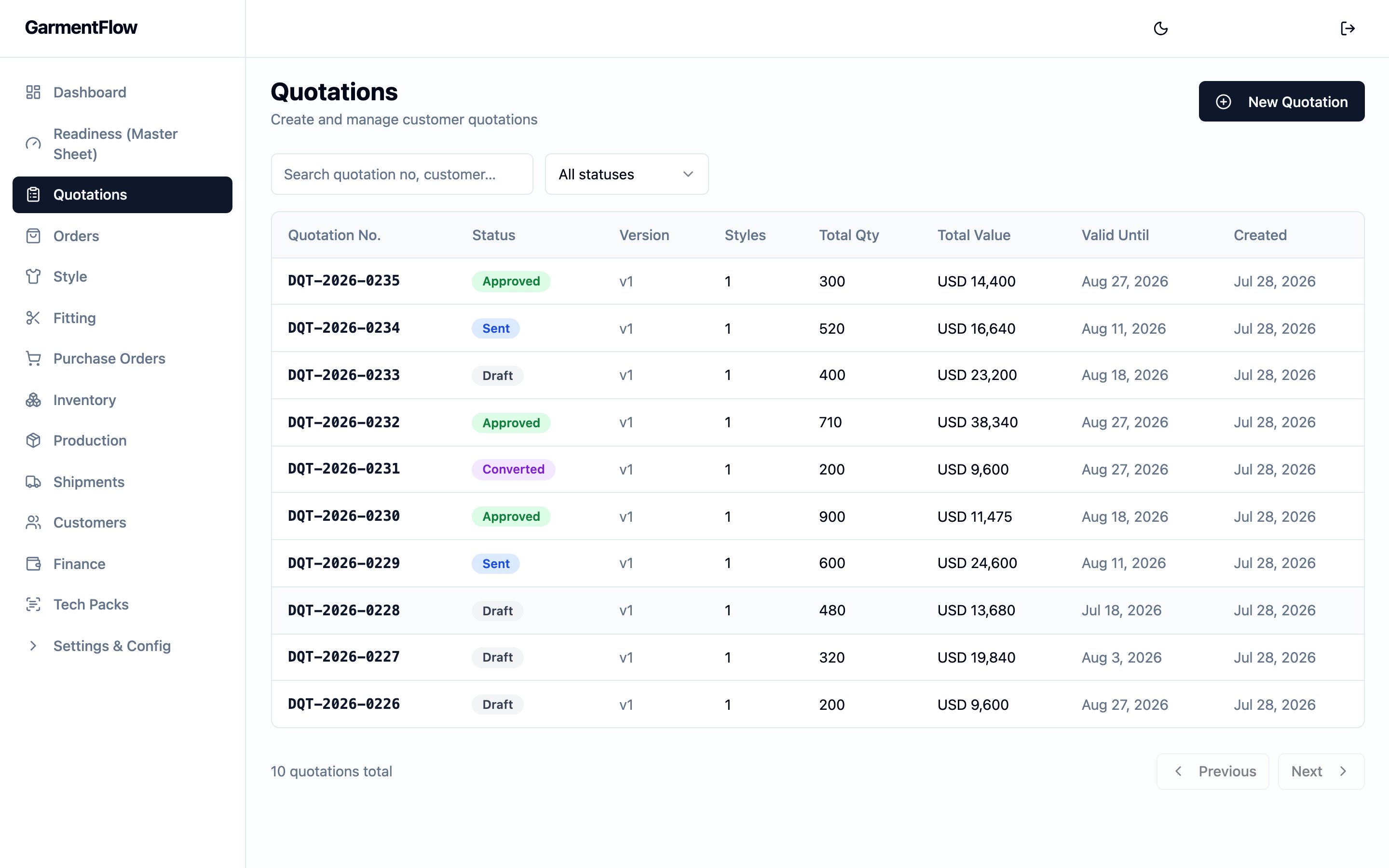
> The customer-facing price offer carrying styles, colorways, sizes, and unit prices in a single currency — the document the customer accepts before any order is opened.
A [quotation](/reference/glossary#quotation)
is the formal price offer you put in front of a customer for one or more
[styles](/reference/glossary#style)
in specified colorways and sizes, valid until a stated date — the document the
customer accepts (or declines) before any
[order](/reference/glossary#order)
is opened.
 ## What it is
A quotation is **per-customer, per-currency, per-version**. One quotation
addresses one customer in one currency, and runs one or more style lines —
each style carries the colorways, sizes, quantities, and unit prices that
together make up the offer.
The quotation is style-centric: each line can carry an explicit link to a
[style](/reference/glossary#style)
master so the offer ties to a real, reusable style record rather than a
free-typed code. The same quotation can run several styles, each with its own
set of colorways and sizes.
A quotation moves through a clear lifecycle — **Draft**, **Sent**,
**Approved** or **Rejected**, and ultimately **Converted** when the offer
becomes an order. When a customer wants changes after a quote has been sent,
the quotation is revised: a new version of the quote is opened, the prior
version is marked **Superseded**, and the chain stays in the history.
## Why it exists
A quote is the moment the deal stops being a conversation and starts being a
proposal: prices, quantities, colorways, and validity all written down in one
place the customer can sign back. The quotation gives sales a single
document — branded as your own — to send the customer, and gives operations
a clean hand-off into the order once the offer is accepted: every style line,
every colorway, every size, every price carries forward without retyping.
Versioning lets the offer evolve through negotiation while every earlier
version stays intact. A revised quote is a new version on the same chain, so
the history of what was proposed at each round is preserved — and the order
that eventually opens is unambiguously the one approved against the
specific version that was accepted.
## When it is used
* **During sales**, to put a priced offer in front of a customer before any
order is opened.
* **On negotiation**, to revise the offer — open a new version, edit, and
send again.
* **At acceptance**, as the hand-off into the
[order](/modules/orders) the customer has now committed to, and (where
your administrator has enabled it) to generate a
[proforma invoice](/reference/glossary#pi-proforma-invoice)
(PI) for the customer to arrange payment.
* **After the customer signs back the PI**, to attach the signed copy to the
quotation so the commercial trail stays on one record.
The quotation lives in the **Quotations** module. To work an end-to-end
quote, see [Create a quotation](/modules/create-a-quotation).
## Dependencies
* A **customer record**, picked on the quotation header. Your administrator
manages the customer master.
* At least one **style to quote**. A line can either link to an existing
style master or carry a free-typed style number — linking is preferred so
the offer ties to a real style record. See
[Styles](/modules/styles).
* A **cost sheet** on each style you intend to quote from, to set the unit
prices the quotation carries. The cost sheet is the costing tool; the
quotation is the offer. See [Cost Sheet](/modules/cost-sheet).
* **Quotation write permission**, for the user creating, editing, sending,
approving, rejecting, revising, or converting a quotation. Reads are open
to any authenticated user in your tenant.
## What depends on it
* The
[order](/reference/glossary#order)
that opens when the quotation is converted — the new order keeps a link
back to the source quotation and inherits its customer, currency, styles,
colorways, sizes, and prices. See
[Orders](/modules/orders).
* The
[proforma invoice](/reference/glossary#pi-proforma-invoice)
generated from an approved quotation — the PI carries the line items,
prices, customer, and terms forward. See
[the documents and conversion chain](/concepts/documents-and-conversion-chain).
* The **signed-back PI** that the customer returns — uploaded against the
quotation, so the original offer, the PI generated from it, and the
signed-back copy all live on the same record.
* The audit trail that production and finance read back through — every
shipment traces back through its order, the PI, and the quotation it came
from. See
[the documents and conversion chain](/concepts/documents-and-conversion-chain).
* The post-convert money story — once an approved quotation converts to an
order, the deposit and billing path runs in the
[Finance module](/modules/finance), and the customer-facing settlement
picture rolls up onto the
[Statement of Account](/modules/statement-of-account). The customer
invoices the order eventually carries are a separate commercial artifact
from the quotation's PI — see [Invoices](/modules/invoices) for that
document.
## Fields
Group the quotation's fields by purpose. The header carries the identity,
the customer, the commercial framing, and notes; each style line carries a
quoted style; each size cell carries one colorway × size price.
### Header — identity
* `Quotation no.` — the quotation's permanent business identifier.
Generated by the platform when the quotation is created; unique within
your tenant. The format is a tenant-configurable prefix, the year, and a
serial that resets each year (your administrator sets the prefix).
* `Version` — the version number on this quotation's revision chain. The
first quotation starts at version 1; each **Revise** opens a new version
on the same chain, incremented by one. The chain is linked by a
parent-version reference, not by reusing the same quotation number.
* `Prepared by` — the user who created the quotation. Set by the platform
at create time; carried forward as the assigned sales user on the order
when the quotation converts.
### Header — customer and commercial framing
* `Customer` — who you are quoting. Picked from the customer master.
Required.
* `Currency` — the currency the prices are quoted in. One quotation is one
currency; an offer in a different currency is a separate quotation. The
picker offers the currencies your tenant uses (USD, EUR, JPY, TWD, CNY,
GBP). Required.
* `Validity date` — the date the offer expires. After this date the prices
are no longer guaranteed. Optional.
* `Season` — the selling season the offer is for, picked from the per-tenant
season list your administrator configures. Tenants typically configure the
list to combine year and season on a single label (e.g. `2026 S/S`,
`26 FW`) so the offer carries the year on the document alongside the
season. Optional.
* `Origin` — the country or region of origin (產地) the offer is for. Picked
from the per-tenant origin list your administrator configures. Optional.
* `Terms` — the payment and commercial terms text that prints on the
quotation. Picked from the per-tenant payment-condition list your
administrator configures; the chosen entry's label is stored on the
quotation. Optional.
* `Notes` — internal-facing free text that prints as the "Remark" on the
quotation document. Optional.
### Header — AI cover note
* `AI cover note` — an optional cover note drafted with AI assistance,
saved on the quotation for use on the cover page of the quotation
document.
### Header — audit
* `Created`, `Last updated` — set by the platform. Shown on the quotation
for reference; the `Created` date is what the quotation document prints
as its issue date.
### Style line — identity and link
Each style line is one style block on the quotation, carrying the priced
colorways and sizes for that style.
* `Style master No.` — the optional link to a
[style](/reference/glossary#style)
master. Picked from the style-master picker. Linking ties the line to a
real style record (and surfaces the master's identifier on the quotation
document); when left blank, the line is a free-typed one. Optional but
recommended.
* `Style No.` — the customer-facing style number on the quote. **Required**,
up to 100 characters. Independent of the master's number, so a quote may
carry a customer-specific style code even when linked to a master.
* `Style Name` — the style's name on the quote. **Required**, up to 255
characters.
* `Fabric No.` — the fabric reference for the style on the quote. Optional,
up to 300 characters.
* `Sample Size` — the sample size the offer references. Optional, up to 50
characters.
* `MOQ` — the minimum order quantity the offer is conditional on for this
style line. Non-negative integer; optional, blank when the line carries
no MOQ. Carried on the quotation line for the rendered document and is
not propagated to the order on convert.
* `No. of Colorways` — the count of distinct colorways entered on this
style line. Derived from the colorway names actually entered in the size
rows, so it cannot drift from the data; not edited directly.
### Style line — legacy descriptive fields
These fields were on earlier versions of the quotation form and are no
longer offered as inputs on a new quote. The platform still carries them
on style lines that already had them — on a revised quotation, and on the
order line a converted quotation opens — so the descriptive detail you
once recorded is not lost.
* `Gender` — the gender the style is for. Carried forward when present;
not entered on new quotations.
* `Finish` — a free-text finish note on the style. Carried forward when
present; not entered on new quotations.
### Size cell — colorway × size
Each size cell on a style line is one colorway × one size, with its
quantity and unit price.
* `Colorway` — the colorway name as written on the quote. **Required**, up
to 100 characters. Free-text on the quotation — picking the colorway
off a style master's palette is an order-level concern.
* `Color code` — an optional colorway code, typically a hex value (e.g.
`#000000`). Up to 50 characters.
* `Size` — the size label for this row (e.g. `S`, `M`, `38`). **Required**,
up to 50 characters.
* `Qty` — the quantity quoted for this colorway × size. Integer, **zero or
more**.
* `Unit price` — the per-piece price quoted for this colorway × size, in
the quotation's `Currency`. **Zero or more**. The quotation's pricing is
per-size — a single colorway can carry different prices across sizes,
and the totals respect them.
### Attachments — signed-back PI
The customer's signed-back
[proforma invoice](/reference/glossary#pi-proforma-invoice)
attaches to the quotation, not to the order or the PI. Each attachment
carries:
* `Filename`, `File type`, `Size` — file metadata. Only **PDF** and **JPG**
uploads are accepted.
* `Uploaded by`, `Uploaded at` — who attached the file, and when.
## Business rules
1. **One quotation is per-customer and per-currency.** The customer and the
currency are picked on the header and stay set across the quotation's
lifecycle. An offer in a different currency, or to a different customer,
is a separate quotation.
2. **Edits are restricted to Draft.** Header changes, line add/edit/delete,
colorway and size edits, and price edits all require the quotation to be
in **Draft**. A request to write to a quotation in any other status is
refused with a "draft only" message.
3. **Send locks the quotation from further edits.** Once you send a
quotation, it leaves **Draft** for **Sent** and the platform stops
accepting edits to the header, the styles, or the sizes. The way to
change a sent quote is to **revise** it — see business rule 6.
4. **The customer's response decides the next state.** From **Sent**, the
quotation moves to **Approved** when the customer accepts, or to
**Rejected** when the customer declines. Both are set by the team on
the quotation, not derived from another action.
5. **Only an Approved quotation may be converted to an order.** Convert is
refused on any other status, with a message identifying the current
status. A quotation that has already been converted cannot be converted
again.
6. **Revise opens a new version on the chain and supersedes the prior.**
Revising a **Sent**, **Approved**, or **Rejected** quotation opens a
new **Draft** quotation linked back to the prior one, increments the
version number, deep-copies every style line and size with its
`Colorway`, `Color code`, `Size`, `Qty`, and `Unit price`, and copies
the header (customer, currency, validity, season, origin, terms,
notes). The new quotation receives its own fresh `Quotation no.`; the
prior quotation is marked **Superseded** in the same step. The
`AI cover note` is not copied — draft it fresh on the new version when
it is needed.
7. **The quotation list hides superseded versions by default.** A
superseded quotation stays on the record and remains accessible by
direct link or by including superseded rows in the list, so the
negotiation history is preserved.
8. **Generating a PI does not change the quotation's status.** When your
administrator has enabled quotation-to-PI on your tenant and the
quotation is **Approved**, "Generate PI" opens a new
[proforma invoice](/reference/glossary#pi-proforma-invoice)
pre-filled from the quotation. The quotation stays **Approved** so it
can still be converted to an order.
9. **The signed-back PI attaches to the quotation.** The customer's
signed copy of the PI is uploaded against the quotation record itself,
not against the order or the PI document.
10. **A quotation document renders on demand.** The quotation exports as a
PDF carrying your tenant's branding (logo, colors, and seller block);
nothing is stored to a file store on render, so each download reflects
the live quotation.
11. **Write actions on the quotation are restricted.** Users with
quotation write permission create, edit, send, approve, reject,
revise, and convert quotations, and upload the signed-back PI. Reads
are open to any authenticated user in your tenant.
## Validations
| When | Check | What happens if it fails |
| ------------------------- | ------------------------------------------------------------------------------------------------------------------ | ------------------------------------------------------------------------------------------------------------- |
| Create or edit the header | `Currency` is set to one of the configured currencies | The save is rejected. |
| Edit the header | Quotation is in **Draft** | The save is rejected as "only Draft quotations can be edited". |
| Add or edit a style line | `Style No.` is set (≤100) and `Style Name` is set (≤255); `Fabric No.` ≤300; `Sample Size` ≤50; `MOQ` ≥ 0 when set | The save is rejected on whichever field exceeds the limit. |
| Add or edit a style line | Parent quotation is in **Draft** | The save is rejected as "only Draft quotations can be edited". |
| Add or edit a size cell | `Colorway` is set (≤100), `Size` is set (≤50), `Color code` ≤50, `Qty` ≥ 0, `Unit price` ≥ 0 | The save is rejected on whichever field exceeds the limit. |
| Add or edit a size cell | Parent quotation is in **Draft** | The save is rejected as "only Draft quotations can be edited". |
| Send | Quotation is in **Draft** | Send is rejected with the current status. |
| Approve | Quotation is in **Sent** | Approve is rejected with the current status. |
| Reject | Quotation is in **Sent** | Reject is rejected with the current status. |
| Revise | Quotation is in **Sent**, **Approved**, or **Rejected** | Revise is rejected with the current status. |
| Convert to order | Quotation is in **Approved** | Convert is rejected with the current status; a quotation already converted is refused as "already converted". |
| Generate PI | Quotation is in **Approved**, and `quotation-to-PI` is enabled for your tenant | Generation is refused (either with the current status, or as not enabled for the tenant). |
| Upload signed-back PI | File is a **PDF** or **JPG** | The upload is refused. |
There is **no** save-time validation that an **Approved** or **Sent**
quotation has at least one style line, or that every style line has at
least one size row. The form requires a style line to start with; the
team is the gate that decides the offer is ready to send.
## Date logic
The quotation has one business-meaningful date:
* **`Validity date`** — the date the offer expires. Set by the user on the
header; optional. Not propagated to the order on convert (the order
carries its own `Order date` and `Ship date`).
The platform records two audit timestamps:
* **`Created`** — when the quotation was opened. Shown on the quotation
document as its issue date.
* **`Last updated`** — when the quotation was last written to.
There is no `Sent at`, `Approved at`, `Rejected at`, or `Converted at` date
on the quotation header — the visible signals for each transition are the
**status** itself and the `Last updated` timestamp on the row.
Multi-currency handling: the quotation carries the `Currency` only; no
exchange rate is recorded on the quotation. Currency conversion is an
order-time concern — the exchange rate is captured on the
[order](/modules/orders) when the quotation converts.
## Status and transitions
A quotation moves through a six-state lifecycle. **Draft** is the only
editable state; every other state is locked from edit and changes only via
explicit actions on the quotation.
* **Draft** — the quotation is open for edit. Header changes, line
add/edit/delete, colorway and size edits all work. A new quotation starts
here.
* **Sent** — the quotation has been issued to the customer. Edits are
refused; the way to change it is to **revise**.
* **Approved** — the customer has accepted the offer. Edits are refused;
the quotation can now be **converted to an order**, can **generate a
PI** (when your administrator has enabled that), or can be **revised** if
the offer needs to change.
* **Rejected** — the customer has declined the offer. Edits are refused;
the quotation can still be **revised** to open a new version with
adjusted terms.
* **Superseded** — the quotation has been replaced by a revised version on
the chain. Edits are refused; the row stays in history, accessible by
direct link, hidden from the default quotation list.
* **Converted** — the quotation has been converted to an order. Edits are
refused; the converted order is the live record of the deal from this
point on.
Transitions:
* (created) → **Draft**: a new quotation starts here, fully editable.
* **Draft** → **Sent**: the user sends the quotation.
* **Sent** → **Approved**: the customer accepts.
* **Sent** → **Rejected**: the customer declines.
* **Sent** | **Approved** | **Rejected** → **Superseded** (on this
quotation) AND a new **Draft** quotation appears on the chain:
**revise** opens a fresh version, deep-copying the header and every line
and size; the prior quotation is marked **Superseded** in the same step.
* **Approved** → **Converted**: the user converts the quotation to an
order. A new order opens carrying the quotation's customer, currency,
styles, colorways, sizes, and prices, with a link back to the source
quotation. See [Effect of changes](#effect-of-changes).
What each state unlocks or locks:
* **Draft** — full edit access (header, style lines, sizes). Send is
enabled.
* **Sent** — edits refused. Approve, Reject, and Revise are enabled.
Download of the quotation document is enabled.
* **Approved** — edits refused. Convert to order is enabled. Generate PI
is enabled when your administrator has switched it on for your tenant.
Revise is enabled. Signed-back PI upload is enabled. Download of the
quotation document is enabled.
* **Rejected** — edits refused. Revise is enabled. Download of the
quotation document is enabled.
* **Superseded** — edits refused. The row is read-only; the live work is
on the latest version of the chain.
* **Converted** — edits refused. The order created from this quotation
is the live record; the converted quotation stays as the source-of-offer
reference.
## Calculations
The quotation's math is computed at view time from the size cells. No
total is stored on the header.
Per size cell:
* **Line total** = `Qty × Unit price`. Empty when either input is unset.
Per style line:
* **Style total** = sum of every size cell's `Line total` on that style.
Per quotation:
* **Grand total** = sum of every size cell's `Line total` across every
style line. Shown on the quotation document.
The grand total is expressed in the quotation's `Currency`. No discounts,
adjustments, or per-quotation deductions apply — the figure on the
document is the exact sum of every quoted `Qty × Unit price`.
## Effect of changes
* **Edit the header or a style line on a Draft quotation.** The change is
saved and the next view recomputes the affected totals.
* **Edit a size cell on a Draft quotation.** The line total and the grand
total recompute on the next read.
* **Send.** The quotation leaves **Draft** for **Sent**; every edit path
is refused from this point. The customer can now respond.
* **Approve.** The quotation moves from **Sent** to **Approved**.
**Convert to order** is enabled. **Generate PI** is enabled when your
administrator has switched it on for your tenant. **Revise** stays
enabled. The signed-back PI upload is enabled.
* **Reject.** The quotation moves from **Sent** to **Rejected**. The way
to revive the offer is to **revise** — open a new version with adjusted
terms.
* **Revise.** The current quotation is marked **Superseded**, and a new
**Draft** quotation opens on the same chain with the next version
number. The new quotation deep-copies every style line and size from
the prior version, and copies the header (customer, currency,
validity, season, origin, terms, notes). The new quotation receives
its own fresh `Quotation no.`; the chain link to the prior row is
preserved. The `AI cover note` is not copied — draft it fresh when it
is needed.
* **Convert to order.** The quotation moves from **Approved** to
**Converted**. A new
[order](/reference/glossary#order)
opens carrying the customer, the currency, every style line (with the
link to its style master where the quote was linked), every colorway,
every size, and every unit price from the quotation. The new order
keeps a link back to the source quotation. The order's own fields — its
number, status and phase, ship date, trade term, destination, and
deposit terms — are governed by the [order](/modules/orders), not by
the quotation.
* **Generate PI.** When your administrator has enabled it and the
quotation is **Approved**, generating a PI opens a new
[proforma invoice](/reference/glossary#pi-proforma-invoice)
pre-filled from the quotation — line items, customer, currency, and
terms carry forward. The quotation's status does not change; you can
still convert it to an order. The PI is the document the customer signs
back for payment arrangement.
* **Upload the signed-back PI.** A PDF or JPG of the customer's
signed-back proforma invoice attaches to the quotation. The quotation's
status does not change.
* **Download the quotation document.** The quotation renders as a
one-page document showing the customer's bill-to block, your tenant's
seller block, the quotation header (`Quotation no.`, date, currency,
season, origin, validity, terms, notes), and a per-style block listing
each colorway with its sizes, quantities, unit prices, and totals, plus
the grand total in the quotation's currency. Downloading does not change
the quotation. The render is on-demand, so each download reflects the
current state of the quotation.
## Best practices
* **Quote with the cost sheet open.** The cost sheet is where factory
cost, customer price, and margin are worked out per style; the
quotation is the offer. Set the unit prices on the quote from the
cost sheet's customer-side numbers so the offer stays grounded in
real margin. See [Cost Sheet](/modules/cost-sheet) and
[Build the cost sheet](/modules/build-the-cost-sheet).
* **Link each style line to its style master.** Linking via `Style master No.`
ties the line to a real style record, so the offer (and the order it
converts into) stays connected to the style's BOM, cost-sheet history,
and downstream production artifacts. Free-typed lines work, but the
linkage is what makes the rest of the chain easy to follow.
* **Set the `Validity date` deliberately.** A clear expiry tells the
customer when the offer holds and reminds your sales team when to
refresh it.
* **Revise — do not try to edit a sent quote.** The platform refuses the
edit, and the prior version is the record of what was actually offered
at each round.
* **Send only when the offer is complete.** The platform does not block a
send for missing prices or empty styles; the merchandiser is the gate.
Walk the styles, colorways, sizes, and prices before pressing send.
* **Upload the signed-back PI promptly.** Attaching the signed copy to
the quotation keeps the original offer, the PI generated from it, and
the customer's signed acceptance on one record — easy to find, easy to
audit.
## Related pages
* [Create a quotation](/modules/create-a-quotation)
* [Orders](/modules/orders)
* [Cost Sheet](/modules/cost-sheet)
* [Styles](/modules/styles)
* [Documents and the conversion chain](/concepts/documents-and-conversion-chain)
* [Finance](/modules/finance)
* [Statement of Account](/modules/statement-of-account)
## What it is
A quotation is **per-customer, per-currency, per-version**. One quotation
addresses one customer in one currency, and runs one or more style lines —
each style carries the colorways, sizes, quantities, and unit prices that
together make up the offer.
The quotation is style-centric: each line can carry an explicit link to a
[style](/reference/glossary#style)
master so the offer ties to a real, reusable style record rather than a
free-typed code. The same quotation can run several styles, each with its own
set of colorways and sizes.
A quotation moves through a clear lifecycle — **Draft**, **Sent**,
**Approved** or **Rejected**, and ultimately **Converted** when the offer
becomes an order. When a customer wants changes after a quote has been sent,
the quotation is revised: a new version of the quote is opened, the prior
version is marked **Superseded**, and the chain stays in the history.
## Why it exists
A quote is the moment the deal stops being a conversation and starts being a
proposal: prices, quantities, colorways, and validity all written down in one
place the customer can sign back. The quotation gives sales a single
document — branded as your own — to send the customer, and gives operations
a clean hand-off into the order once the offer is accepted: every style line,
every colorway, every size, every price carries forward without retyping.
Versioning lets the offer evolve through negotiation while every earlier
version stays intact. A revised quote is a new version on the same chain, so
the history of what was proposed at each round is preserved — and the order
that eventually opens is unambiguously the one approved against the
specific version that was accepted.
## When it is used
* **During sales**, to put a priced offer in front of a customer before any
order is opened.
* **On negotiation**, to revise the offer — open a new version, edit, and
send again.
* **At acceptance**, as the hand-off into the
[order](/modules/orders) the customer has now committed to, and (where
your administrator has enabled it) to generate a
[proforma invoice](/reference/glossary#pi-proforma-invoice)
(PI) for the customer to arrange payment.
* **After the customer signs back the PI**, to attach the signed copy to the
quotation so the commercial trail stays on one record.
The quotation lives in the **Quotations** module. To work an end-to-end
quote, see [Create a quotation](/modules/create-a-quotation).
## Dependencies
* A **customer record**, picked on the quotation header. Your administrator
manages the customer master.
* At least one **style to quote**. A line can either link to an existing
style master or carry a free-typed style number — linking is preferred so
the offer ties to a real style record. See
[Styles](/modules/styles).
* A **cost sheet** on each style you intend to quote from, to set the unit
prices the quotation carries. The cost sheet is the costing tool; the
quotation is the offer. See [Cost Sheet](/modules/cost-sheet).
* **Quotation write permission**, for the user creating, editing, sending,
approving, rejecting, revising, or converting a quotation. Reads are open
to any authenticated user in your tenant.
## What depends on it
* The
[order](/reference/glossary#order)
that opens when the quotation is converted — the new order keeps a link
back to the source quotation and inherits its customer, currency, styles,
colorways, sizes, and prices. See
[Orders](/modules/orders).
* The
[proforma invoice](/reference/glossary#pi-proforma-invoice)
generated from an approved quotation — the PI carries the line items,
prices, customer, and terms forward. See
[the documents and conversion chain](/concepts/documents-and-conversion-chain).
* The **signed-back PI** that the customer returns — uploaded against the
quotation, so the original offer, the PI generated from it, and the
signed-back copy all live on the same record.
* The audit trail that production and finance read back through — every
shipment traces back through its order, the PI, and the quotation it came
from. See
[the documents and conversion chain](/concepts/documents-and-conversion-chain).
* The post-convert money story — once an approved quotation converts to an
order, the deposit and billing path runs in the
[Finance module](/modules/finance), and the customer-facing settlement
picture rolls up onto the
[Statement of Account](/modules/statement-of-account). The customer
invoices the order eventually carries are a separate commercial artifact
from the quotation's PI — see [Invoices](/modules/invoices) for that
document.
## Fields
Group the quotation's fields by purpose. The header carries the identity,
the customer, the commercial framing, and notes; each style line carries a
quoted style; each size cell carries one colorway × size price.
### Header — identity
* `Quotation no.` — the quotation's permanent business identifier.
Generated by the platform when the quotation is created; unique within
your tenant. The format is a tenant-configurable prefix, the year, and a
serial that resets each year (your administrator sets the prefix).
* `Version` — the version number on this quotation's revision chain. The
first quotation starts at version 1; each **Revise** opens a new version
on the same chain, incremented by one. The chain is linked by a
parent-version reference, not by reusing the same quotation number.
* `Prepared by` — the user who created the quotation. Set by the platform
at create time; carried forward as the assigned sales user on the order
when the quotation converts.
### Header — customer and commercial framing
* `Customer` — who you are quoting. Picked from the customer master.
Required.
* `Currency` — the currency the prices are quoted in. One quotation is one
currency; an offer in a different currency is a separate quotation. The
picker offers the currencies your tenant uses (USD, EUR, JPY, TWD, CNY,
GBP). Required.
* `Validity date` — the date the offer expires. After this date the prices
are no longer guaranteed. Optional.
* `Season` — the selling season the offer is for, picked from the per-tenant
season list your administrator configures. Tenants typically configure the
list to combine year and season on a single label (e.g. `2026 S/S`,
`26 FW`) so the offer carries the year on the document alongside the
season. Optional.
* `Origin` — the country or region of origin (產地) the offer is for. Picked
from the per-tenant origin list your administrator configures. Optional.
* `Terms` — the payment and commercial terms text that prints on the
quotation. Picked from the per-tenant payment-condition list your
administrator configures; the chosen entry's label is stored on the
quotation. Optional.
* `Notes` — internal-facing free text that prints as the "Remark" on the
quotation document. Optional.
### Header — AI cover note
* `AI cover note` — an optional cover note drafted with AI assistance,
saved on the quotation for use on the cover page of the quotation
document.
### Header — audit
* `Created`, `Last updated` — set by the platform. Shown on the quotation
for reference; the `Created` date is what the quotation document prints
as its issue date.
### Style line — identity and link
Each style line is one style block on the quotation, carrying the priced
colorways and sizes for that style.
* `Style master No.` — the optional link to a
[style](/reference/glossary#style)
master. Picked from the style-master picker. Linking ties the line to a
real style record (and surfaces the master's identifier on the quotation
document); when left blank, the line is a free-typed one. Optional but
recommended.
* `Style No.` — the customer-facing style number on the quote. **Required**,
up to 100 characters. Independent of the master's number, so a quote may
carry a customer-specific style code even when linked to a master.
* `Style Name` — the style's name on the quote. **Required**, up to 255
characters.
* `Fabric No.` — the fabric reference for the style on the quote. Optional,
up to 300 characters.
* `Sample Size` — the sample size the offer references. Optional, up to 50
characters.
* `MOQ` — the minimum order quantity the offer is conditional on for this
style line. Non-negative integer; optional, blank when the line carries
no MOQ. Carried on the quotation line for the rendered document and is
not propagated to the order on convert.
* `No. of Colorways` — the count of distinct colorways entered on this
style line. Derived from the colorway names actually entered in the size
rows, so it cannot drift from the data; not edited directly.
### Style line — legacy descriptive fields
These fields were on earlier versions of the quotation form and are no
longer offered as inputs on a new quote. The platform still carries them
on style lines that already had them — on a revised quotation, and on the
order line a converted quotation opens — so the descriptive detail you
once recorded is not lost.
* `Gender` — the gender the style is for. Carried forward when present;
not entered on new quotations.
* `Finish` — a free-text finish note on the style. Carried forward when
present; not entered on new quotations.
### Size cell — colorway × size
Each size cell on a style line is one colorway × one size, with its
quantity and unit price.
* `Colorway` — the colorway name as written on the quote. **Required**, up
to 100 characters. Free-text on the quotation — picking the colorway
off a style master's palette is an order-level concern.
* `Color code` — an optional colorway code, typically a hex value (e.g.
`#000000`). Up to 50 characters.
* `Size` — the size label for this row (e.g. `S`, `M`, `38`). **Required**,
up to 50 characters.
* `Qty` — the quantity quoted for this colorway × size. Integer, **zero or
more**.
* `Unit price` — the per-piece price quoted for this colorway × size, in
the quotation's `Currency`. **Zero or more**. The quotation's pricing is
per-size — a single colorway can carry different prices across sizes,
and the totals respect them.
### Attachments — signed-back PI
The customer's signed-back
[proforma invoice](/reference/glossary#pi-proforma-invoice)
attaches to the quotation, not to the order or the PI. Each attachment
carries:
* `Filename`, `File type`, `Size` — file metadata. Only **PDF** and **JPG**
uploads are accepted.
* `Uploaded by`, `Uploaded at` — who attached the file, and when.
## Business rules
1. **One quotation is per-customer and per-currency.** The customer and the
currency are picked on the header and stay set across the quotation's
lifecycle. An offer in a different currency, or to a different customer,
is a separate quotation.
2. **Edits are restricted to Draft.** Header changes, line add/edit/delete,
colorway and size edits, and price edits all require the quotation to be
in **Draft**. A request to write to a quotation in any other status is
refused with a "draft only" message.
3. **Send locks the quotation from further edits.** Once you send a
quotation, it leaves **Draft** for **Sent** and the platform stops
accepting edits to the header, the styles, or the sizes. The way to
change a sent quote is to **revise** it — see business rule 6.
4. **The customer's response decides the next state.** From **Sent**, the
quotation moves to **Approved** when the customer accepts, or to
**Rejected** when the customer declines. Both are set by the team on
the quotation, not derived from another action.
5. **Only an Approved quotation may be converted to an order.** Convert is
refused on any other status, with a message identifying the current
status. A quotation that has already been converted cannot be converted
again.
6. **Revise opens a new version on the chain and supersedes the prior.**
Revising a **Sent**, **Approved**, or **Rejected** quotation opens a
new **Draft** quotation linked back to the prior one, increments the
version number, deep-copies every style line and size with its
`Colorway`, `Color code`, `Size`, `Qty`, and `Unit price`, and copies
the header (customer, currency, validity, season, origin, terms,
notes). The new quotation receives its own fresh `Quotation no.`; the
prior quotation is marked **Superseded** in the same step. The
`AI cover note` is not copied — draft it fresh on the new version when
it is needed.
7. **The quotation list hides superseded versions by default.** A
superseded quotation stays on the record and remains accessible by
direct link or by including superseded rows in the list, so the
negotiation history is preserved.
8. **Generating a PI does not change the quotation's status.** When your
administrator has enabled quotation-to-PI on your tenant and the
quotation is **Approved**, "Generate PI" opens a new
[proforma invoice](/reference/glossary#pi-proforma-invoice)
pre-filled from the quotation. The quotation stays **Approved** so it
can still be converted to an order.
9. **The signed-back PI attaches to the quotation.** The customer's
signed copy of the PI is uploaded against the quotation record itself,
not against the order or the PI document.
10. **A quotation document renders on demand.** The quotation exports as a
PDF carrying your tenant's branding (logo, colors, and seller block);
nothing is stored to a file store on render, so each download reflects
the live quotation.
11. **Write actions on the quotation are restricted.** Users with
quotation write permission create, edit, send, approve, reject,
revise, and convert quotations, and upload the signed-back PI. Reads
are open to any authenticated user in your tenant.
## Validations
| When | Check | What happens if it fails |
| ------------------------- | ------------------------------------------------------------------------------------------------------------------ | ------------------------------------------------------------------------------------------------------------- |
| Create or edit the header | `Currency` is set to one of the configured currencies | The save is rejected. |
| Edit the header | Quotation is in **Draft** | The save is rejected as "only Draft quotations can be edited". |
| Add or edit a style line | `Style No.` is set (≤100) and `Style Name` is set (≤255); `Fabric No.` ≤300; `Sample Size` ≤50; `MOQ` ≥ 0 when set | The save is rejected on whichever field exceeds the limit. |
| Add or edit a style line | Parent quotation is in **Draft** | The save is rejected as "only Draft quotations can be edited". |
| Add or edit a size cell | `Colorway` is set (≤100), `Size` is set (≤50), `Color code` ≤50, `Qty` ≥ 0, `Unit price` ≥ 0 | The save is rejected on whichever field exceeds the limit. |
| Add or edit a size cell | Parent quotation is in **Draft** | The save is rejected as "only Draft quotations can be edited". |
| Send | Quotation is in **Draft** | Send is rejected with the current status. |
| Approve | Quotation is in **Sent** | Approve is rejected with the current status. |
| Reject | Quotation is in **Sent** | Reject is rejected with the current status. |
| Revise | Quotation is in **Sent**, **Approved**, or **Rejected** | Revise is rejected with the current status. |
| Convert to order | Quotation is in **Approved** | Convert is rejected with the current status; a quotation already converted is refused as "already converted". |
| Generate PI | Quotation is in **Approved**, and `quotation-to-PI` is enabled for your tenant | Generation is refused (either with the current status, or as not enabled for the tenant). |
| Upload signed-back PI | File is a **PDF** or **JPG** | The upload is refused. |
There is **no** save-time validation that an **Approved** or **Sent**
quotation has at least one style line, or that every style line has at
least one size row. The form requires a style line to start with; the
team is the gate that decides the offer is ready to send.
## Date logic
The quotation has one business-meaningful date:
* **`Validity date`** — the date the offer expires. Set by the user on the
header; optional. Not propagated to the order on convert (the order
carries its own `Order date` and `Ship date`).
The platform records two audit timestamps:
* **`Created`** — when the quotation was opened. Shown on the quotation
document as its issue date.
* **`Last updated`** — when the quotation was last written to.
There is no `Sent at`, `Approved at`, `Rejected at`, or `Converted at` date
on the quotation header — the visible signals for each transition are the
**status** itself and the `Last updated` timestamp on the row.
Multi-currency handling: the quotation carries the `Currency` only; no
exchange rate is recorded on the quotation. Currency conversion is an
order-time concern — the exchange rate is captured on the
[order](/modules/orders) when the quotation converts.
## Status and transitions
A quotation moves through a six-state lifecycle. **Draft** is the only
editable state; every other state is locked from edit and changes only via
explicit actions on the quotation.
* **Draft** — the quotation is open for edit. Header changes, line
add/edit/delete, colorway and size edits all work. A new quotation starts
here.
* **Sent** — the quotation has been issued to the customer. Edits are
refused; the way to change it is to **revise**.
* **Approved** — the customer has accepted the offer. Edits are refused;
the quotation can now be **converted to an order**, can **generate a
PI** (when your administrator has enabled that), or can be **revised** if
the offer needs to change.
* **Rejected** — the customer has declined the offer. Edits are refused;
the quotation can still be **revised** to open a new version with
adjusted terms.
* **Superseded** — the quotation has been replaced by a revised version on
the chain. Edits are refused; the row stays in history, accessible by
direct link, hidden from the default quotation list.
* **Converted** — the quotation has been converted to an order. Edits are
refused; the converted order is the live record of the deal from this
point on.
Transitions:
* (created) → **Draft**: a new quotation starts here, fully editable.
* **Draft** → **Sent**: the user sends the quotation.
* **Sent** → **Approved**: the customer accepts.
* **Sent** → **Rejected**: the customer declines.
* **Sent** | **Approved** | **Rejected** → **Superseded** (on this
quotation) AND a new **Draft** quotation appears on the chain:
**revise** opens a fresh version, deep-copying the header and every line
and size; the prior quotation is marked **Superseded** in the same step.
* **Approved** → **Converted**: the user converts the quotation to an
order. A new order opens carrying the quotation's customer, currency,
styles, colorways, sizes, and prices, with a link back to the source
quotation. See [Effect of changes](#effect-of-changes).
What each state unlocks or locks:
* **Draft** — full edit access (header, style lines, sizes). Send is
enabled.
* **Sent** — edits refused. Approve, Reject, and Revise are enabled.
Download of the quotation document is enabled.
* **Approved** — edits refused. Convert to order is enabled. Generate PI
is enabled when your administrator has switched it on for your tenant.
Revise is enabled. Signed-back PI upload is enabled. Download of the
quotation document is enabled.
* **Rejected** — edits refused. Revise is enabled. Download of the
quotation document is enabled.
* **Superseded** — edits refused. The row is read-only; the live work is
on the latest version of the chain.
* **Converted** — edits refused. The order created from this quotation
is the live record; the converted quotation stays as the source-of-offer
reference.
## Calculations
The quotation's math is computed at view time from the size cells. No
total is stored on the header.
Per size cell:
* **Line total** = `Qty × Unit price`. Empty when either input is unset.
Per style line:
* **Style total** = sum of every size cell's `Line total` on that style.
Per quotation:
* **Grand total** = sum of every size cell's `Line total` across every
style line. Shown on the quotation document.
The grand total is expressed in the quotation's `Currency`. No discounts,
adjustments, or per-quotation deductions apply — the figure on the
document is the exact sum of every quoted `Qty × Unit price`.
## Effect of changes
* **Edit the header or a style line on a Draft quotation.** The change is
saved and the next view recomputes the affected totals.
* **Edit a size cell on a Draft quotation.** The line total and the grand
total recompute on the next read.
* **Send.** The quotation leaves **Draft** for **Sent**; every edit path
is refused from this point. The customer can now respond.
* **Approve.** The quotation moves from **Sent** to **Approved**.
**Convert to order** is enabled. **Generate PI** is enabled when your
administrator has switched it on for your tenant. **Revise** stays
enabled. The signed-back PI upload is enabled.
* **Reject.** The quotation moves from **Sent** to **Rejected**. The way
to revive the offer is to **revise** — open a new version with adjusted
terms.
* **Revise.** The current quotation is marked **Superseded**, and a new
**Draft** quotation opens on the same chain with the next version
number. The new quotation deep-copies every style line and size from
the prior version, and copies the header (customer, currency,
validity, season, origin, terms, notes). The new quotation receives
its own fresh `Quotation no.`; the chain link to the prior row is
preserved. The `AI cover note` is not copied — draft it fresh when it
is needed.
* **Convert to order.** The quotation moves from **Approved** to
**Converted**. A new
[order](/reference/glossary#order)
opens carrying the customer, the currency, every style line (with the
link to its style master where the quote was linked), every colorway,
every size, and every unit price from the quotation. The new order
keeps a link back to the source quotation. The order's own fields — its
number, status and phase, ship date, trade term, destination, and
deposit terms — are governed by the [order](/modules/orders), not by
the quotation.
* **Generate PI.** When your administrator has enabled it and the
quotation is **Approved**, generating a PI opens a new
[proforma invoice](/reference/glossary#pi-proforma-invoice)
pre-filled from the quotation — line items, customer, currency, and
terms carry forward. The quotation's status does not change; you can
still convert it to an order. The PI is the document the customer signs
back for payment arrangement.
* **Upload the signed-back PI.** A PDF or JPG of the customer's
signed-back proforma invoice attaches to the quotation. The quotation's
status does not change.
* **Download the quotation document.** The quotation renders as a
one-page document showing the customer's bill-to block, your tenant's
seller block, the quotation header (`Quotation no.`, date, currency,
season, origin, validity, terms, notes), and a per-style block listing
each colorway with its sizes, quantities, unit prices, and totals, plus
the grand total in the quotation's currency. Downloading does not change
the quotation. The render is on-demand, so each download reflects the
current state of the quotation.
## Best practices
* **Quote with the cost sheet open.** The cost sheet is where factory
cost, customer price, and margin are worked out per style; the
quotation is the offer. Set the unit prices on the quote from the
cost sheet's customer-side numbers so the offer stays grounded in
real margin. See [Cost Sheet](/modules/cost-sheet) and
[Build the cost sheet](/modules/build-the-cost-sheet).
* **Link each style line to its style master.** Linking via `Style master No.`
ties the line to a real style record, so the offer (and the order it
converts into) stays connected to the style's BOM, cost-sheet history,
and downstream production artifacts. Free-typed lines work, but the
linkage is what makes the rest of the chain easy to follow.
* **Set the `Validity date` deliberately.** A clear expiry tells the
customer when the offer holds and reminds your sales team when to
refresh it.
* **Revise — do not try to edit a sent quote.** The platform refuses the
edit, and the prior version is the record of what was actually offered
at each round.
* **Send only when the offer is complete.** The platform does not block a
send for missing prices or empty styles; the merchandiser is the gate.
Walk the styles, colorways, sizes, and prices before pressing send.
* **Upload the signed-back PI promptly.** Attaching the signed copy to
the quotation keeps the original offer, the PI generated from it, and
the customer's signed acceptance on one record — easy to find, easy to
audit.
## Related pages
* [Create a quotation](/modules/create-a-quotation)
* [Orders](/modules/orders)
* [Cost Sheet](/modules/cost-sheet)
* [Styles](/modules/styles)
* [Documents and the conversion chain](/concepts/documents-and-conversion-chain)
* [Finance](/modules/finance)
* [Statement of Account](/modules/statement-of-account)