> ## Documentation Index
> Fetch the complete documentation index at: https://docs.garmentflow.ai/llms.txt
> Use this file to discover all available pages before exploring further.
# Production
> Run subcontracting, purchasing, inventory, and quality claims from one hub — anchored on the factory order that commercialises a customer order's bulk run.
The **Production** hub runs the operational side of an OEM business: the
outsourcing contract you raise with a factory, the
[purchase orders](/reference/glossary#po-purchase-order)
you raise with suppliers, the
[inventory](/reference/glossary#inventory)
ledger that records what was received and issued, and the quality claims your
team files when a delivery is wrong. The
[factory order](/reference/glossary#factory-order)
(**委外單**) is the anchor — every other surface in the hub reads from or
feeds into it.
## Three records, three jobs
Three records carry the word "production" in their name or in conversation,
and the page reads them differently. Keep the distinction.
* **Factory order (委外單)** — the **outsourcing contract** you raise with a
garment factory. One factory order can span several customer
[orders](/reference/glossary#order)
and several
[styles](/reference/glossary#style),
each style carrying its own per-piece factory price. This is the defining
object of the Production hub, and the rest of this page develops it.
* **Production order** — the **per-order operational tracker** that lives on
the order detail. One production order per customer order, with its own
cutting, sewing, QC, and ready milestones. Distinct from the factory order
— the factory order is the contract; the production order is the order
team's own status record. The deep behaviour lives on the
[Order module guide](/modules/orders).
* **[Manufacturing order](/reference/glossary#mo-manufacturing-order)
(MO, 製造單)** — the **per-style production-spec workbook** the factory
works to. The MO is a multi-tab factory Excel — order quantities,
the approved
[BOM](/reference/glossary#bom-bill-of-materials)'s
per-colorway color matrix, the finalised grading grid, the per-stage
sample measurement comparison, and the customer's brand-tab library
attachments (packing, production notes, sample review, style detail)
— rendered from one of the workspace's
[PMS templates](/admin/pms-templates), picked on the Style MO create
wizard. The MO is owned by the [style](/modules/styles), not by the
Production hub — see
[Build a manufacturing order (MO)](/modules/build-an-mo) for the
workflow and [style vs. order vs. MO](/concepts/style-vs-order-vs-mo)
for the model.
And one more distinction worth pinning down before reading on.
* A **factory order (委外單)** goes to a **garment factory** for cut-make-trim
work on finished garments — one
[vendor](/reference/glossary#vendor)
type out of the three you keep in your [Vendors](/admin/vendors) directory.
* A **purchase order (採購單)** goes to a **material supplier** — the fabric
mill or accessory supplier vendor types — for fabric or trim. Both carry a
number and an
[accounts-payable](/reference/glossary#ap-accounts-payable)
obligation, but they are different contracts to different parties for
different things.
## The hub and the order detail
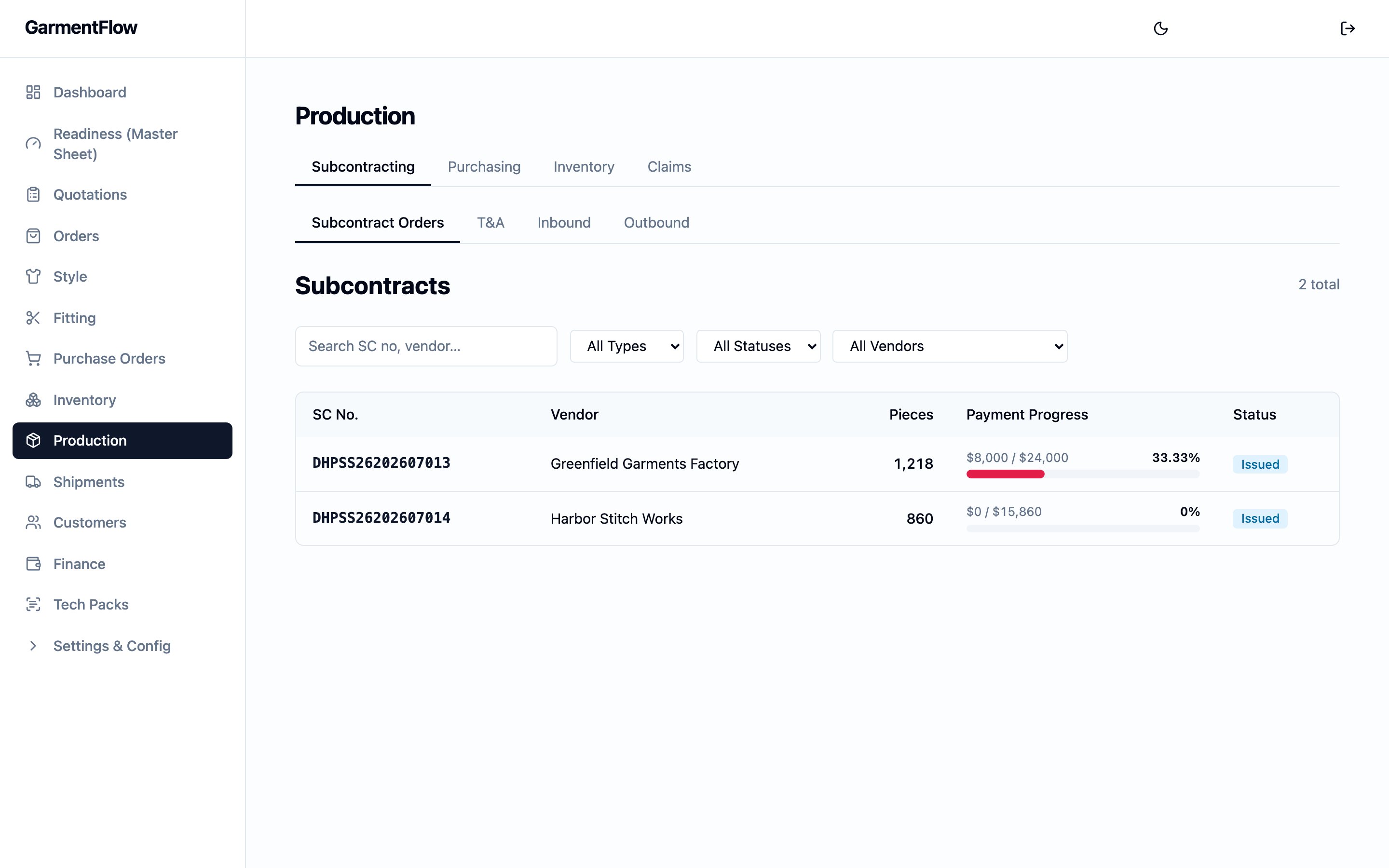
The Production hub is the **cross-order workspace** — open it from the main
navigation to see every factory order, every purchase order, every inventory
movement, and every claim across the tenant. Inside the hub, four tabs split
the work:
* **Subcontracting** — factory orders, the per-factory-order T\&A schedule,
the recorded receipt of finished goods from the factory, and the
customer-facing **commercial shipment** list (the same list the
[Shipments](/modules/shipments) module shows). The sidebar's
**Subcontracts** entry opens the same cross-order factory-order list —
same records, same filters — under the platform's secondary name for the
factory order (the 外包 / 委外 record); the canonical coverage is the
*Factory order (委外單)* section below.
* **Purchasing** — material purchase orders, receipts of materials, and
issuances to the factory.
* **Inventory** — read-only balance views for fabric, trim, and finished
goods. *Your administrator may enable these views.*
* **Claims** — material claims and garment claims. *Your administrator may
enable claims.*
The same records also surface on every customer order's detail page,
filtered to that one order. The order detail's **Production**, **Purchase
Orders**, **Subcontracts**, and **Outbound** sub-tabs each show the slice of
the hub that belongs to that order — open the hub when you need to work
across several orders, and the order detail when you need to focus on one.
The Production hub does not duplicate the order's data; it is the same
records, read across orders.
## Factory order (委外單)
The **factory order** is the contract you raise with a garment factory for
cut-make-trim work on one or more customer orders. It is the central record
of the Production hub — the page the
[style vs. order vs. MO](/concepts/style-vs-order-vs-mo) concept callout
points to for the 委外單, and the surface every downstream production
behaviour in the platform hangs off.
### What it is
A factory order records who is making, what, at what factory price, for
which destinations, on what schedule, and against which payment terms. One
factory order can cover **many customer orders and many styles at once** —
consolidating everything going to one factory into a single contract is
the point of the document. The factory order lives in the **Subcontracting**
tab of the Production hub; the order detail's **Subcontracts** sub-tab is
the per-order slice of the same list.
### Why it exists
An OEM factory rarely runs a single customer order in isolation. The same
factory takes work from several orders in a season; one customer order
often runs several styles, each cut at a different per-piece price; and the
goods coming back from the factory often go to several destinations. The
factory order pulls that variety into a single contract so the team sends
one document to the factory, tracks one schedule, reads one payment-progress
bar, and works from one auto-seeded outbound-shipment skeleton.
### When it is used
* **When work is being placed with a factory**, raised from the
**Subcontracting** tab against the factory, the orders it covers, the
styles on those orders, and the per-style factory prices.
* **Once issued**, as the contract the factory signs, the schedule the team
works to, and the payment-progress bar finance reads.
* **As the run lands**, as the record the team books the finished-goods
receipt against — and from which the per-leg outbound shipments are
seeded.
### How a factory order is built
A factory order is detailed down to **one row per (order × style ×
destination)**, so quantities stay correct even when the document spans
many orders shipping to several places.
* **Orders.** Every customer order the factory order covers is linked on
the header. Each link snapshots the customer's own work-order number for
the order, so the factory sees the customer's reference alongside yours.
* **Styles.** Every order's styles that this factory order is making sit
under the orders, each carrying its own **factory FOB** — the per-piece
factory price for that style. One factory order can mix styles at
different per-piece prices because the FOB is per-style, not
per-factory-order.
* **Destinations.** Under each (order × style), one row per destination
carries the quantity going to that destination, plus a flag for whether
the row is **retention** (held back from the contract value until a
separate release). The destination text is entered on the line — it is
the destination as agreed with the factory, not auto-pulled from the
customer order.
Every style on the factory order must belong to one of the linked customer
orders. The platform refuses a factory-order line whose style is not on a
linked order.
### Identity
* `Factory-order no.` — the factory order's permanent business identifier.
Assigned by the platform when the factory order is created and never
changes. The format is a tenant-configurable scheme your administrator
sets up; the platform assigns a sequential number against that scheme.
* `Factory` — the garment factory the work is going to. **Required.**
Picked from your [Vendors](/admin/vendors) directory.
* `Season` — the selling season the work belongs to. Used on the contract
document and in the numbering scheme.
* `Currency` — the contract currency. The per-style FOB and the
payment-progress bar are read in this currency.
### Status
A factory order moves through five statuses, set by the team as the work
progresses.
* **Draft** — the factory order is being built. The orders, styles,
destinations, and quantities are still editable.
* **Issued** — the factory order has been sent to the factory. The first
time you issue a factory order, the platform also seeds the **outbound
shipment skeleton** (see *Issuing seeds the outbound skeleton* below).
* **Confirmed** — the factory has confirmed the work.
* **Delivered** — the goods have come back from the factory.
* **Cancelled** — the factory order has been cancelled. The record stays
on file as the audit trail.
A factory order can be deleted only while it is in **Draft**. After it has
been issued, cancel it instead.
### The contract
Once the factory order is **issued**, you can **convert it into a contract
document** — a generated PDF showing the per-line amounts and the subtotal
— and upload the factory's signed copy back against the same record. The
contract carries a separate status alongside the factory order's own:
* **None** — no contract document has been generated.
* **Converted** — the contract PDF has been generated and is available on
the factory order.
* **Signed** — the factory's signed-back copy has been uploaded against
the factory order.
Generating the contract is a one-shot action — a second conversion is
refused with the original on file. The signed-back upload is a file
attachment on the same factory order; once uploaded, the contract status
moves to **Signed** and the file is downloadable from the record. For the
broader pattern that quotation, proforma invoice, commercial invoice, and
packing list move through, see
[documents and the conversion chain](/concepts/documents-and-conversion-chain).
The factory-order contract conversion is its own thing — it is between
you and the factory, not between you and the customer.
### Production T\&A
Each factory order carries a **production T\&A schedule** covering the span
from the signing of the contract through to the finished-goods receipt.
The schedule is **per factory order** — not per customer order, not per
production order — because the schedule moves with the work to the
factory, and the factory order is the contract that work is placed under.
The milestones on the schedule come from your tenant's configured T\&A
list. A typical configuration covers the signing of the contract, the
arrival of fabric, the arrival of trim, cutting, sewing, finishing, final
QC, and the receipt of finished goods back from the factory. Your
administrator sets the milestone list and the at-risk window.
Each milestone carries a **planned date** and an **actual date**. The
planned dates are anchored on the backward schedule from the order's ship
date (see
[Order — backward scheduling](/modules/orders#backward-scheduling-from-the-ship-date)).
The actual dates are recorded by the team as the work happens. The page
flags each milestone as **on time**, **at risk**, or **late** by reading
the planned date, the actual date, and today against the at-risk window,
so the schedule is an early-warning view of whether the run will land on
time.
### The material-arrival gate
*Your administrator may enable a material-arrival check on the start of
production.* When the check is on and a factory order's materials have
not all been received against its purchase orders, **recording the cutting
milestone's actual date is held** and the shortfall is shown — which BOM
line is short, how much was required, how much was received, and the
coverage percentage. This is the platform's way of stopping the factory
from cutting before fabric is in.
The gate is a guard with an escape valve. When you need to start anyway
— a receipt not yet keyed, a small shortfall the team accepts — you can
**override the hold by recording a reason**. The override and the reason
are kept on the factory order for accountability; once the override is
in place, the cutting milestone's actual date saves.
The check reads the same material receipts that feed the inventory
balances, so it reflects what has actually arrived. It fires only when
there is demand to check against — a current BOM on the styles and at
least one purchase order tied to those BOM lines. With no demand, the
gate does not fire.
### Issuing seeds the outbound skeleton
The first time a factory order moves from **Draft** to **Issued**, the
platform also creates the **outbound shipment skeleton** — one draft
outbound shipment per distinct (customer order × destination) on the
factory order. The outbound shipments are the **per-leg outbound records
on the order**: the records the team works as the run is shipped out, and
the records whose shipped status draws the finished-goods record down.
The outbound shipments are seeded as drafts and the team fills in the
actuals as the legs are worked. The order detail's **Outbound** sub-tab
is the per-order view of the same shipments. The customer-facing
commercial shipment that carries the carrier, the bill of lading, and the
commercial invoice is a different record — see
[Shipments](/modules/shipments).
### Payment progress
Each factory order shows a **payment-progress bar** for what has been
paid against the contract. The bar reads from the Finance side:
* The **contract value** is the sum of `Qty × Factory FOB` across every
non-retention destination row on the factory order. Retention rows are
excluded so the bar can reach 100%.
* The **paid value** is the sum of any deposits booked against the
factory order plus any vendor payments recorded against the factory
order's vendor invoices.
The Production hub shows the bar; the deposits, vendor invoices, and
payments themselves are managed in [Finance](/modules/finance). The bar
is a quick-glance view, not the place to record a payment — recording
happens on the Finance side.
### Where a factory order sits
A factory order is the **commercial layer** of one or more customer
orders' bulk runs. It cross-references the order (via the linked-orders
header), the order's styles (via the linked styles, each carrying its
own factory FOB), and — through the order's style line — the MO that
owns the production spec the factory works to. The factory order is not
the spec; the [MO (製造單)](/concepts/style-vs-order-vs-mo) is. The
factory order is the contract that commercialises the work to make to
that spec.
The same factory order can carry many styles, each pointing at its own
per-order MO via the style line. The binder is the order's style line,
not a direct link between the factory order and the MO.
## Purchase order (採購單)
A **purchase order** goes to a **material supplier** for fabric or trim.
Purchase orders are split into two lists in the **Purchasing** tab of the
hub — **fabric** purchase orders and **trim** purchase orders — each
numbered automatically in its own sequence.
### Raising a purchase order
A purchase order is raised against a supplier with the materials needed,
the quantities, the unit prices, the payment terms, and any notes. A
purchase order **may** be linked to a customer order and one of its
styles, so the buying is traceable back to the demand it serves.
A purchase order can also carry a **read-only reference to a factory
order**, which surfaces the factory order's aggregated material need on
the purchase-order form — you see how much fabric or trim is needed
across every (style × destination) on the factory order, so you can buy
against real demand. The reference is one-way: the purchase order reads
the factory order's need, but never writes back to it.
Payment terms and the in-form notice list are picked from per-tenant
lookups your administrator maintains, so the values stay consistent
across purchase orders.
### Linking to the BOM
Each purchase-order line carries an **optional link back to a
[BOM](/modules/bom) line** on the order's style, picked through a
BOM-line picker on the line. The link is what lets the receipts against
the purchase-order line accumulate as **coverage** on the BOM line, which
the material-arrival gate (above) and the readiness view both read off.
The pricing side of the line reads against the style's
[cost sheet](/modules/cost-sheet) for margin analysis on the order.
### Status
A purchase order moves through **Draft**, **Issued**, **Partially
received**, **Received**, and **Cancelled**.
* **Draft** — being built.
* **Issued** — sent to the supplier.
* **Partially received** — some material has been received against the
purchase order; receipts accumulate as deliveries arrive.
* **Received** — all material has been received.
* **Cancelled** — the purchase order has been cancelled.
### Purchase order → proforma invoice
*Your administrator may enable* converting a purchase order into a
[proforma invoice](/reference/glossary#pi-proforma-invoice)
with editable quantities — useful when the supplier invoices a different
quantity than you ordered. The conversion produces a PDF and never
mutates the original purchase order; the most recent proforma invoice is
shown on the purchase order. For the broader mental model of how
converting one document into another works, see
[documents and the conversion chain](/concepts/documents-and-conversion-chain).
## The inventory ledger
Every material or finished-good event in the hub — a receipt, an
issuance, a return, an adjustment — posts a row to one running ledger.
The balance views read this ledger; the platform never stores a separate
balance figure to keep in sync.
The mental model lives on
[purchasing, receipts, and inventory](/concepts/purchase-receipts-inventory).
The four day-to-day surfaces in the Production hub are:
* **Receiving materials** (收料) — recording a
[receipt](/reference/glossary#receipt)
against a purchase-order line. A purchase order can carry several
receipts — each one accumulates against the line, so the full quantity
doesn't need to be recorded in a single entry.
* **Issuing materials** (出料) — recording an issuance against fabric or
trim balances for the factory's run.
* **Receiving finished goods** — recording a finished-goods receipt
against a factory order. This surface lives on the **Subcontracting**
tab rather than on **Purchasing**, because the receipt is against a
factory order, not a material supplier. Finished-goods receipts carry
the per-size breakdown, so the balance is readable down to each size.
* **Outbound shipments from the factory order** — the per-destination
outbound shipments the factory order's first issuance seeded; the team
records actuals against each as the run is shipped out. The
customer-facing commercial shipment is a separate record — see
[Shipments](/modules/shipments).
### Balance views
*Your administrator may enable the balance views.* When they are enabled,
the hub's **Inventory** tab shows three read-only views:
* **Fabric stock** — on-hand fabric, one balance per item.
* **Trim stock** — on-hand trim, one balance per item.
* **Finished-goods stock** — on-hand garments, with a **per-size
breakdown** so the balance is readable for a style down to each size.
Each balance is the sum of receipts and returns minus issuances, read
off the same ledger.
## Claims (客訴)
*Your administrator may enable* the claims module. When enabled, the
hub's **Claims** tab tracks quality issues in two kinds:
* **Material claims** — a problem with fabric or trim. Linked to the
source purchase order, the supplier, and the material in question.
* **Garment claims** — a problem with finished goods. Linked to the
factory order, the order style, and the shipment.
A claim is opened when an issue is found, moves through **resolved** to
**closed**, and carries **defect photos** as evidence — attach images as
the investigation runs.
A claim is a **tracking record**. It documents the issue and the
resolution; it does not itself move money or stock. The financial
follow-up of a claim — a credit note, a hold on a payment, a replacement
shipment — is recorded on the relevant Finance or Shipments record, not
on the claim.
The platform refuses a claim that mixes source references across the two
categories: a **material claim** can only link to material references
(purchase order, supplier, fabric or trim master); a **garment claim**
can only link to garment references (factory order, order style,
shipment).
## Production order — the order's operational tracker
On the order detail, a **production order** is the per-order operational
tracker that the order team works as the floor work progresses. Opening
it on an order automatically **flips that order's commercial status to
production** (the only place the platform writes the commercial status
itself; see [order lifecycle](/concepts/order-lifecycle)).
A production order is distinct from the factory order. The production
order is one record per customer order, the order team's own status
record, with its own cutting, sewing, QC, and ready dates and a status
that moves from **planned** through **cutting**, **sewing**, and **QC**
to **ready**. The factory order is the contract with the factory; the
production order is the order team's view of where the work is up to on
that one order.
A production order also carries a **non-blocking warning** at create
when no approved
[pre-production sample](/reference/glossary#sample)
exists for the order — see
[samples and fitting](/modules/samples-and-fitting) for the per-style
fitting record. The team can acknowledge the warning and proceed; the
acknowledgement records that the team knowingly started without an
approved PP sample. The create is not refused either way.
The deep behaviour of the production order — its fields, its lifecycle
transitions, and its place in the order's two-dimensional lifecycle —
lives on the [Order module guide](/modules/orders) and on the
[order lifecycle](/concepts/order-lifecycle) concept page. The Production
hub does not restate it.
## Business rules
1. **One factory order can span several customer orders and several
styles.** The header carries multiple orders; each order's styles
that the factory order is making sit under it, each with its own
per-piece factory FOB.
2. **Every style on a factory order must belong to one of the linked
orders.** A style cannot be added that isn't on a linked customer
order; the platform refuses the line.
3. **The factory-order quantity grain is (order × style × destination).**
One row per destination per style on the factory order — that is the
grain the quantities live at and the grain the outbound-shipment
skeleton is seeded against.
4. **A factory order can be deleted only while it is in Draft.** After
it has been issued, cancel it instead.
5. **Issuing seeds the outbound shipment skeleton.** Moving a factory
order from **Draft** to **Issued** for the first time creates one
draft outbound shipment per distinct (customer order × destination)
on the factory order.
6. **The contract is a one-shot conversion.** Once the factory order
has been converted into a contract document, a second conversion is
refused with the original on file.
7. **Retention rows are excluded from the contract value.** The
payment-progress bar reads the contract value across non-retention
destination rows only, so retention does not block the bar from
reaching 100%.
8. **One production order per customer order.** A second production
order on the same customer order is refused.
9. **Opening the production order flips the order's commercial status
to production.** The platform writes the commercial status itself in
the same write that creates the production order.
10. **Material claims and garment claims do not cross categories.** A
claim's source references are validated against its category; the
platform refuses a mixed claim.
11. **Claims are a tracking record.** Resolving or closing a claim
does not itself create a finance or inventory event.
12. **Inventory balances are read off the ledger, not entered.** A
balance is the running sum of receipts, returns, issuances, and
adjustments for the item; the ledger is the source of truth.
13. **A purchase order's factory-order reference is read-only.** The
purchase order reads the factory order's aggregated material need
but never writes back to it.
14. **Factory orders and material purchase orders go to different
parties.** Factory orders go to a garment factory for cut-make-trim
work; purchase orders go to a material supplier for fabric or
trim. Both are AP-bearing but they are different contracts.
## Related pages
* [Style vs. order vs. MO](/concepts/style-vs-order-vs-mo) — the
distinction the factory order extends with a contract layer.
* [Order](/modules/orders) — the customer commitment whose Production,
Purchase Orders, Subcontracts, and Outbound sub-tabs are the
per-order slices of the hub.
* [Order lifecycle](/concepts/order-lifecycle) — the order's two parallel
lifecycle dimensions, and the production-flip rule.
* [Vendors](/admin/vendors) — the directory of garment factories, fabric
mills, and accessory suppliers every factory order, purchase order, and
subcontract is raised against.
* [Shipments](/modules/shipments) — the customer-facing leg of the
shipment journey.
* [Finance](/modules/finance) — the AP side the payment-progress bar
reads.
* [PMS Templates](/admin/pms-templates) — the workspace's library of
factory Excel templates the MO create wizard picks from to generate
the PMS document.
* [Grading](/modules/grading) — the per-order-style grading table
whose finalised version renders on the MO workbook's Grading tab.
* [Build a manufacturing order (MO)](/modules/build-an-mo) — the
eight-tab workbook, the seven upstream inputs it reads from, and
the create-and-issue flow.
* [Generate the factory work order](/modules/generate-the-factory-work-order) —
the second form of the MO document, the A4 PDF that composes the OEM's
cover with the source tech pack's own pages for the factory to work
from.
* [From tech pack to work order](/concepts/from-tech-pack-to-work-order) —
how the receiving side of a brand's tech pack becomes the working style
the factory order commercialises.
* [Purchasing, receipts, and inventory](/concepts/purchase-receipts-inventory) —
the mental model behind the ledger.
* [Documents and the conversion chain](/concepts/documents-and-conversion-chain) —
the broader pattern for converting one document into the next.
 ## Three records, three jobs
Three records carry the word "production" in their name or in conversation,
and the page reads them differently. Keep the distinction.
* **Factory order (委外單)** — the **outsourcing contract** you raise with a
garment factory. One factory order can span several customer
## Three records, three jobs
Three records carry the word "production" in their name or in conversation,
and the page reads them differently. Keep the distinction.
* **Factory order (委外單)** — the **outsourcing contract** you raise with a
garment factory. One factory order can span several customer