> ## Documentation Index
> Fetch the complete documentation index at: https://docs.garmentflow.ai/llms.txt
> Use this file to discover all available pages before exploring further.
# Cost Sheet
> The per-style, per-version, per-audience price build-up — how a style is costed for the factory side and quoted to the customer side, with margin in between.
A [cost sheet](/reference/glossary#cost-sheet)
captures, line by line and side by side, what one piece of a
[style](/reference/glossary#style)
costs to make and what it is quoted at — your factory cost on one side, the
customer-quoted price on the other, the margin in between.
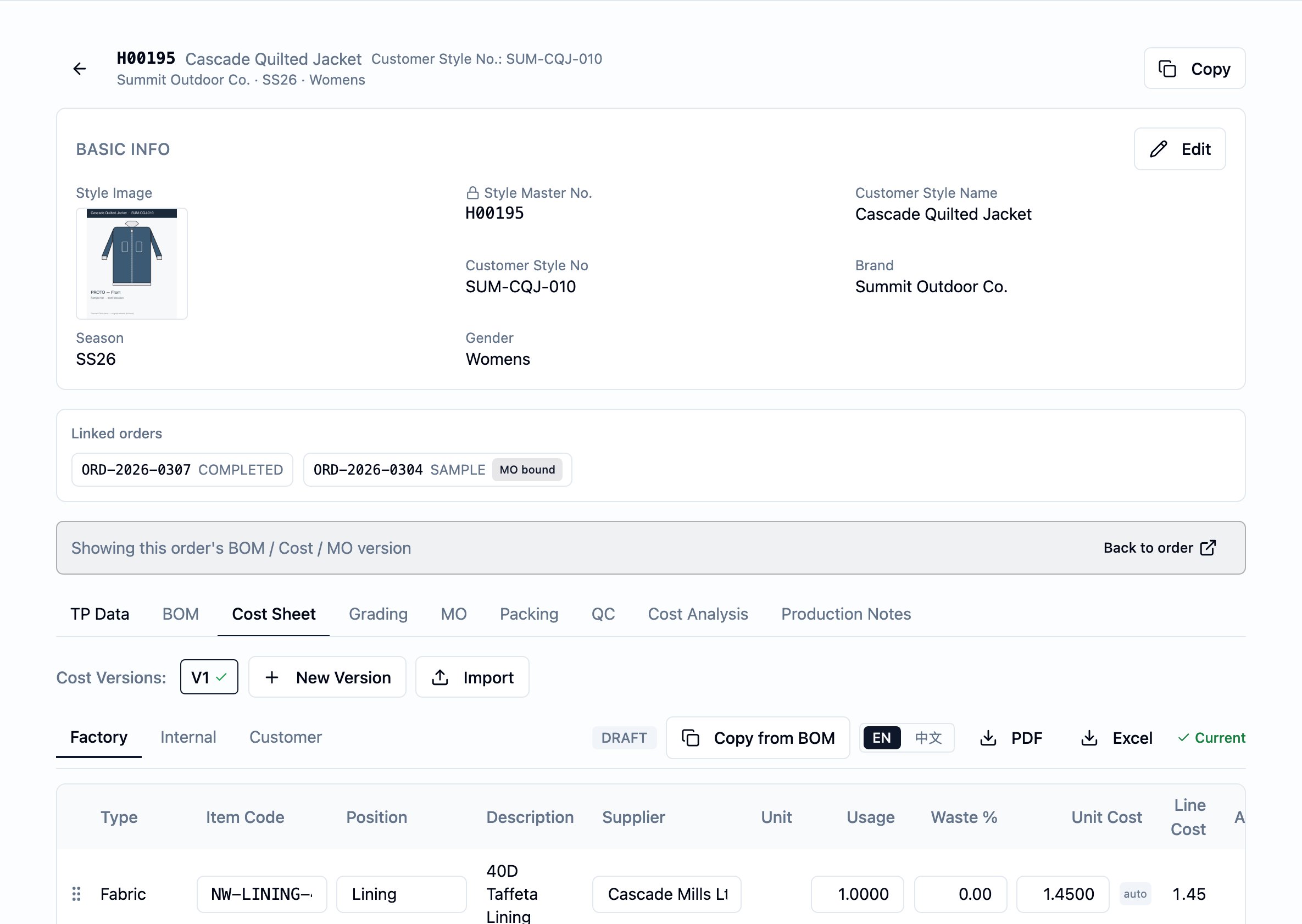 ## What it is
A cost sheet is **per-style, per-version, per-audience** — a factory-vs.-customer
per-piece build-up. One sheet says, for a single style at a single version,
what each material costs the factory and what the customer is being charged
for it.
The cost sheet has two parallel cost columns:
* **Factory side** — what it costs you to make or buy that piece (your input
to margin and to negotiations with suppliers).
* **Customer side** — what you are quoting the customer for that piece (the
price they will see in a quotation or proforma).
The difference between the two, summed across the sheet and the per-sheet
add-ons, is the per-piece **margin**.
Each cost sheet is also approved **per audience** — factory, customer, and
internal. The same sheet can be signed off for one audience while still
pending for another, and each audience's export of the sheet shows a
different cut of the data (see "Status and transitions" and "Effect of
changes").
## Why it exists
Apparel costing has to do two jobs at once. You need a clean, defensible
build-up of what a piece costs you — fabric usage, trims, cut-and-make,
miscellaneous — to negotiate with factories and to know your floor. And you
need a separate view of what you are quoting the customer, which is rarely
the factory number plus a flat margin. The two columns let the same sheet
support both jobs without a second document drifting out of step.
Versioning lets the build-up evolve — costs get renegotiated, a material
gets swapped, a quote needs a different multiplier — while every earlier
version stays intact for the order or quotation it was used on. Per-audience
approval lets sales sign off the customer view while the factory side is
still being negotiated, and vice versa.
## When it is used
* **During development**, to build up the factory cost as the
[BOM](/reference/glossary#bom-bill-of-materials)
takes shape.
* **At quoting**, to set the customer-side price the
[quotation](/modules/quotations) and PI will carry.
* **On a reorder or renegotiation**, when the price basis changes — mint a
new version, rebuild, approve.
* **Before handing off to commercial**, to capture sign-off from the
factory, customer, and internal audiences that approve cost sheets in
your tenant.
The cost sheet lives on the style — open the style, go to the **Cost** tab.
## Dependencies
* A **style** — every cost sheet belongs to one. See the
[Styles module guide](/modules/styles).
* A **BOM**, if you intend to use **Copy from BOM** to seed the cost-sheet
lines from the style's material list. The BOM does **not** have to be
approved for the copy to run. See the [BOM page](/modules/bom).
* At least one **approval audience** enabled for your tenant — your
administrator configures which of factory, customer, and internal are in
use. A new cost-sheet version cannot be created if none are enabled.
## What depends on it
* The style's **Margin analysis** view — the per-line factory / customer /
margin table and (when an order is selected) order-projected totals,
computed from the current cost-sheet version. Internal audience only.
* **Audience-tailored exports** — the PDF/Excel export of the cost sheet
for the factory, customer, or internal audience.
* The pricing decisions captured downstream on **quotations**, **proforma
invoices**, and **orders** — these read the current cost-sheet version's
customer-side numbers as their price basis.
* The [artifact-version](/reference/glossary#artifact-version)
pin each order keeps onto the style — when an order's cost-sheet version
is created, marked current, or switched, the order's pin advances in
lockstep. See [BOM, cost sheet, and artifact versions](/concepts/bom-cost-sheet-artifact-versions).
## Fields
Group the cost sheet's fields by purpose. The header carries
identification, per-sheet add-ons, notes, and audit. Each line carries one
material's build-up. Each approval row carries one audience's sign-off
state.
### Header — identity
* `Version` — the cost sheet's version number for the style. Assigned by
the platform when the version is created; starts at 1 on the first
version and increases by one each time a new version is minted on the
same style — and on the same order, when the version is tied to one.
* `Style` — the parent style. Set when the version is created and not
edited afterwards.
* `Order` — the order the version is tied to, when the cost sheet was
created in an order context. When set, marking this version current
advances that order's pin. Optional; a style-level cost sheet has none.
### Header — per-sheet add-ons
These are per-piece amounts that apply to the whole sheet, not to any one
line. They roll into the grand totals.
* `CM (factory)` — the factory cut-and-make charge per piece, on the
factory side. Optional.
* `CM (customer)` — the cut-and-make amount per piece on the
customer-quoted side. Optional.
* `Misc (factory)` — any other per-piece factory-side amount that is not a
material line. Optional.
* `Misc (customer)` — the customer-side equivalent. Optional.
### Header — notes and audit
* `Notes` — free text. Optional.
* `Created`, `Last updated` — set by the system. Shown on the sheet for
reference.
### Lines — identity and display
Each line documents one material's per-piece cost.
* `Description` — what the line is. **Required**, up to 500 characters.
* `Type` — the line's grouping: **fabric** or **accessory**. Lines are
displayed in fixed group order (fabrics first, then accessories). The
per-sheet `CM` and `Misc` add-ons sit at the header, not in the line
list.
* `Sort order` — the line's position within its group. Drag-and-drop
reorder writes this; it stays within a single group.
### Lines — sourcing
These identify the material and where it comes from. The customer **view**
shows `Item code` and `Position` alongside the factory and internal views;
only `Supplier` stays factory- and internal-only. The customer **export**
omits the sourcing columns entirely (see "Effect of changes").
* `Item code` — the material's code. Frozen on a Copy-from-BOM line; the
source BOM line's item number is captured here and is not re-read from
the master afterwards.
* `Position` — where the material sits on the garment (e.g. body,
collar).
* `Supplier` — the
[vendor](/reference/glossary#vendor)
name. Frozen on copy, same as `Item code` — see [Vendors](/admin/vendors)
for the directory the BOM picks this from.
* `Unit` — the **report/quote** unit of measure for `Usage` (e.g. yd,
pc) — the unit you quote and report in.
* `Purchase unit` — the procurement unit, when it differs from `Unit` —
the unit you actually buy in. Optional and editable on the factory
and internal audiences only. **Not** seeded by Copy from BOM; fill it
after Copy when it applies.
### Lines — per-piece quantities and prices
These are the math inputs. They are the same on every audience's view; the
customer-audience export simply hides the factory-side columns.
* `Usage` — the factory-side per-piece quantity of the material.
* `Usage (customer)` — the customer-side per-piece quantity. Defaults to
the same value as `Usage` when the line is created by Copy-from-BOM.
* `Waste %` — the factory waste percentage applied to `Usage` to produce
the adjusted usage used in the factory cost (see "Calculations").
Optional.
* `Unit cost (factory)` — the per-unit price on the factory side.
Optional.
* `Customer unit cost` — the per-unit price on the customer side. In
manual mode you enter it directly; it defaults to the factory unit
cost on Copy. In multiplier mode the cell shows the factory unit cost
times the `Customer multiplier` — the post-multiplier value the Cost
tab displays and the customer export quotes.
* `Customer multiplier` — the per-line OEM markup. When set, the
customer-side line cost is computed as the factory-side line cost
multiplied by this value, and `Customer unit cost` shows the
post-multiplier value. When left blank, the line uses manual mode.
* `Line notes` — free text. Optional.
### Approval rows
The cost sheet carries one approval row per enabled audience. Each row
records:
* `Audience` — **Factory**, **Customer**, or **Internal**.
* `Status` — **Pending**, **Approved**, or **Rejected**. Defaults to
Pending when the cost-sheet version is created.
* `Approved by`, `Approved at` — set when the audience approves; cleared
when the audience later rejects.
* `Rejected by`, `Rejected at`, `Rejection note` — set when the audience
rejects; cleared when the audience is subsequently re-approved.
## Business rules
1. **One cost sheet per artifact version.** A version of a style's cost
sheet *is* one cost sheet — they are the same object. To change a
value once a sheet is approved, mint a new version; you cannot rewrite
the old one.
2. **A cost-sheet version may be tied to an order or kept at style
level.** When the version is created in an
[order](/reference/glossary#order)
context, the version is tied to that order, and the order's pin onto
the cost sheet advances when the version is created, marked current,
or switched. Without that context, the version is style-level. The
two coexist on the same style.
3. **Edits are restricted to Draft.** Header edits (CM, Misc, notes),
line add/edit/delete, line reorder, and Copy-from-BOM all require the
sheet to be in **Draft** status. A request to write to a sheet that is
Partially approved or Approved is refused with a "draft only" message.
4. **The header status is derived from per-audience approvals.** You do
not set the cost sheet's status directly. The system recomputes it on
every approve or reject:
* any audience **Rejected** → the sheet is **Draft**;
* all enabled audiences **Approved** → the sheet is **Approved**;
* at least one **Approved** and the others not Rejected → the sheet is
**Partially approved**;
* otherwise (all **Pending**) → the sheet is **Draft**.
5. **Approval is per audience, not a single document approval.** The
customer audience can be approved while the factory audience is still
pending — the sheet then shows **Partially approved**. Approving an
audience that is already Approved is refused; the row has to be
rejected first.
6. **Anyone with cost-sheet approval permission may approve any
audience.** The platform does not restrict the customer audience to
sales users, or the internal audience to finance users — approval is
gated by capability, not by which audience is being approved.
7. **Re-approval clears the rejection.** Approving an audience whose row
is currently **Rejected** succeeds, clears the rejection's `Rejected
by`, `Rejected at`, and `Rejection note`, and replaces them with the
new `Approved by` and `Approved at`. The user clearing the rejection
does not have to be the user who recorded it.
8. **At least one approval audience must be enabled in your tenant.**
Creating a new cost-sheet version is refused when no audience is
enabled.
9. **Copy from BOM seeds only fabric and accessory lines.** CM and
miscellaneous amounts live on the header as per-sheet add-ons, not as
copied lines. Copy from BOM does not touch them.
10. **Re-running Copy from BOM refreshes the cost lines without
creating duplicates.** A cost line already linked to a BOM line is
skipped on a re-run, and a BOM line added since the previous run is
seeded into a new cost line.
11. **Copy from BOM does not require an approved BOM.** The cost sheet
copies from the style's current BOM regardless of its status. The
copy is refused only when the style has no current BOM.
12. **Customer markup mode is per line.** A line uses **multiplier mode**
when a `Customer multiplier` is set and **manual mode** when it is
blank. In multiplier mode the customer-side line cost derives from
the factory-side line cost, and the `Customer unit cost` shown on
screen and on the customer export is the factory unit cost times the
multiplier. In manual mode you set `Customer unit cost` directly.
The two modes cannot be active on the same line at once.
13. **Margin analysis is internal-only and read-only.** The style's
Margin analysis view, which shows the per-line factory / customer /
margin table and the order projection, is computed at view time from
the current cost-sheet version and is not stored. It is not part of
any customer-facing document.
14. **Approval is not gated by content.** The platform does not refuse
approval of a sheet that has no lines, missing prices, or zero
totals. Approve when the build-up is ready; the math handles missing
pieces by leaving the affected totals empty.
15. **Write actions on the cost sheet are restricted.** Users with
cost-sheet write permission create versions, edit, run Copy from
BOM, and approve or reject audiences. Reads and exports are open to
authenticated users in your tenant.
### Price-lock framing
The cost sheet's "lock" works in three plain layers:
1. **Values freeze on the cost line at Copy from BOM.** When you run
Copy, each eligible BOM line becomes a cost line, and the cost line
takes its own copies of the item code, position, supplier, unit,
usage, factory unit cost, and customer unit cost. From that moment
on, changing the source BOM line — or the underlying
[fabric master](/reference/glossary#fabric-master)
or
[accessory master](/reference/glossary#accessory-master)
— does **not** alter the cost line. The cost sheet is the source of truth
for that line going forward.
2. **Approved freezes the document from further edits.** Once every
enabled audience has approved, the header status derives to
**Approved**, and every edit path is refused with a "draft only"
message. To change a value after that, mint a new version.
3. **The version locks to an order via the per-order pin.** A style is
reused across orders; when a cost-sheet version is tied to an order,
the order's pin advances in lockstep when the version is created,
marked current, or switched. That pin is what makes a specific
version "this order's costing."
## Validations
| When | Check | What happens if it fails |
| ----------------------------- | ------------------------------------------------------------------ | ------------------------------------------------------------------------------- |
| Create a cost-sheet version | At least one approval audience is enabled in your tenant | The save is rejected as "no approval audiences enabled for this tenant". |
| Any header or line write | The sheet is in **Draft** | The save is rejected as "cost sheet may only be edited while draft". |
| Add or edit a line | `Description` is filled in | The save is rejected. |
| Reorder lines | The set of line IDs matches the group exactly, with no unknown IDs | The reorder is rejected. |
| Reorder lines | All IDs in the set share one line type | The reorder is rejected as "reorder must stay within a single line-type group". |
| Approve an audience | The audience row is not already **Approved** | Approval is rejected as "audience '…' has already approved". |
| Approve or reject an audience | The audience row exists on the sheet | The action is rejected as "approval row for audience '…' not found". |
| Export the cost sheet | The chosen audience is **factory**, **customer**, or **internal** | The export is rejected. |
| Copy from BOM | The style has a current BOM version | The copy is rejected as "no BOM found for this style". |
There are **no** save-time validations that the sheet has at least one
line before approval, that every line has both a factory and a customer
price, or that the grand totals are non-zero. The platform trusts you to
approve when the build-up is ready (see business rule 14).
## Date logic
The cost sheet has **no business dates of its own** — no quote date, no
effective-from, no expiry. The dates a quotation or proforma sets live on
those documents, not on the cost sheet.
The system records two kinds of timestamps:
* **`Approved at`, `Rejected at`** on each audience row — set when that
audience approves or rejects, cleared when the row swaps state. The
effect on what the sheet can do comes from the **header status**
recomputation, not from the timestamp itself.
* **`Created`, `Last updated`** on the header — set on create and on
every write.
There are no computed dates and no date-chain propagation from the cost
sheet outward. Dates that bound a quote in business terms belong on the
upstream
[quotation](/reference/glossary#quotation)
or
[proforma invoice](/reference/glossary#pi-proforma-invoice).
## Status and transitions
A cost sheet's status is **derived** from its per-audience approval rows
(business rule 4). The visible states are:
* **Draft** — the sheet is open for edit. Header changes, line edits,
reorder, and Copy from BOM all work. New cost-sheet versions start
here.
* **Partially approved** — at least one audience has approved and none
has rejected; the others are still pending. The sheet is **locked from
edit** (further edits require a new version).
* **Approved** — every enabled audience has approved. The sheet is
locked from edit.
Transitions all run through the per-audience approve and reject actions;
you never set the header status directly.
* (created) → **Draft**: a new cost-sheet version starts with one
**Pending** row per enabled audience.
* **Draft** → **Partially approved**: one audience approves while at
least one other remains pending.
* **Draft** → **Approved**: every enabled audience approves (or, when
only one audience is enabled, that audience approves).
* **Partially approved** → **Approved**: the last pending audience
approves.
* **Partially approved** or **Approved** → **Draft**: any audience
rejects. The rejection resets the header to **Draft** regardless of
how many other approvals stand.
* **Draft** → **Draft** (no-op): all audiences are pending.
What each state unlocks or locks:
* **Draft** — full edit access (header add-ons, line add/edit/delete,
reorder, Copy from BOM). Export works on Draft, and the export's
header shows the **Draft** status so the recipient sees the sheet is
not final.
* **Partially approved**, **Approved** — every edit path is refused. New
work goes into a new version.
What is recorded on a transition:
* On approve: `Approved by` and `Approved at` are set on the audience
row; any previous `Rejected by`, `Rejected at`, and `Rejection note`
on that row are cleared.
* On reject: `Rejected by`, `Rejected at`, and `Rejection note` are set
on the audience row; any previous `Approved by` and `Approved at` on
that row are cleared.
There is **no separate header-level approver record** — the sign-off
trail lives entirely on the audience rows.
## Calculations
All cost-sheet math is computed at view time from the lines and the
header add-ons. **Nothing is stored** — there is no saved "grand total"
on the sheet. Change an input, save, and the next view recomputes.
Per line, factory side:
* **Adjusted usage** = `Usage × (1 + Waste % / 100)`. When either
`Usage` or `Waste %` is unset, the adjusted usage is empty.
* **Factory line cost** = `Adjusted usage × Unit cost (factory)`. Empty
when either input is unset.
Per line, customer side — two modes:
* **Multiplier mode** (when `Customer multiplier` is set):
**Customer line cost** = `Factory line cost × Customer multiplier`.
Empty when the factory line cost is empty.
* **Manual mode** (when `Customer multiplier` is blank):
**Customer line cost** = `Usage (customer) × Customer unit cost`.
Empty when either side is unset.
Per line, margin:
* **Line margin** = `Customer line cost − Factory line cost`. Empty when
either side is empty.
Header grand totals:
* **Factory grand total** = sum of factory line costs across all lines,
plus `CM (factory)` and `Misc (factory)`. Empty contributions count as
zero when something else contributes; the grand total is empty only
when nothing contributes.
* **Customer grand total** = sum of customer line costs, plus
`CM (customer)` and `Misc (customer)`. Same empty-value rule as the
factory side.
* **Grand margin** = `Customer grand total − Factory grand total`. Empty
when either grand total is empty.
Rounding is **presentation-only**, and it differs between screen and
export:
* **On the Cost tab**, values display to **2 decimal places**, half-up
rounded.
* **In the PDF and Excel exports**, values print to **up to 4 decimal
places**, with trailing zeros stripped — `12.5000` shows as `12.5`,
`12.3456` shows as `12.3456`.
The math always reads the **current** cost-sheet version. The
calculation does not lock to a particular version — marking a different
version current changes the totals shown on the style's Margin analysis,
and the order's pin moves in step with it.
### Margin analysis
The style's **Margin analysis** tab is a read-only, internal-audience
view computed from the current cost-sheet version. It is reached on the
style detail; when you open it from an order context, the same tab also
shows the projection for that order's quantity (see below). The view
does not appear on any customer-facing document.
The body of the tab is a single per-line table — one row per cost-sheet
line in the cost sheet's own order (fabric lines first, then accessory
lines) — with these columns:
* `Type`, `Description`, `Item Code`, `Unit` — identifying the line.
`Description` and the line's other identity values read off the
current cost-sheet version.
* `Total Usage (F)` — the factory-side per-piece usage after waste,
same as `Adjusted usage` on the cost sheet.
* `Unit Price (F)`, `Amount (F)` — the factory unit price and line
cost, both from the cost-sheet version.
* `Unit Price (C)`, `Amount (C)` — the customer unit price and line
cost from the cost-sheet version.
* `Margin` — the per-line margin, `Amount (C) − Amount (F)`.
Two **addend rows** sit below the line list, one each for the cost
sheet's per-sheet `CM (工繳)` and `Misc (雜項)` header amounts (see
Fields → Header — per-sheet add-ons above). Each addend row shows the
factory side, the customer side, and the margin between them, so the
contribution of cut-and-make and the miscellaneous catch-all reads on
the same line as the materials.
A **Total per piece — Factory / Customer / Margin** row in the footer
sums the line costs and the two addends into the per-piece grand totals
— the same `Factory grand total`, `Customer grand total`, and `Grand
margin` defined under [Calculations](#calculations).
When you open the tab in an **order context** — the style page reached
from an order's Styles & SKUs line carries the order through to this
tab — a second footer row, **Order total (×N pcs)**, projects the
per-piece factory total, customer total, and margin out to that order's
ordered quantity for the style (the sum of `Qty` across that order's
colorways and sizes on the style). The projection is the per-piece
totals multiplied by the order's quantity for the style — nothing more
elaborate; it lets the team read what the order is worth and what the
margin is at the order's own size. Without an order context, the order-
total row does not render.
A summary strip under the table repeats the per-piece **Revenue**
(`Customer grand total`), **Cost** (`Factory grand total`), **Margin**
(`Grand margin`), and **Margin %** (`Margin / Revenue × 100`, empty
when revenue is empty or zero) for an at-a-glance read. The tab carries
an explicit internal-only banner — the view is never put on a customer
document.
Margin analysis is computed at view time and is not stored. The order
total feeds straight off the order's saved ordered quantity for the
style; it does not roll into the order's [non-production cost
allocation](/concepts/cost-allocation), which works downstream from
this projection.
The cost-sheet figures themselves are sized in the cost sheet's own
currency. When an order's margin analysis or reporting rollup converts
them into the workspace's
[base currency](/admin/workspace-settings#company-info),
the conversion uses the order's saved
[FX rate](/admin/fx-rates)
snapshot, not whatever rate is current on the FX Rates page today. See
[Order: FX rate field](/modules/orders#header-commercial-framing).
## Effect of changes
* **Edit a header add-on (CM, Misc) or `Notes` on a Draft sheet.** The
grand totals recompute on the next read. A write attempted outside
Draft is refused.
* **Add, edit, delete, or reorder a line on a Draft sheet.** The
affected line costs and the grand totals recompute on the next read.
* **Run Copy from BOM on a Draft sheet.** New fabric and accessory lines
are appended for each eligible BOM line that does not already have a
cost-line counterpart. Existing cost lines linked to a BOM line are
left as they are. CM and Misc header add-ons are not touched.
* **Mark a different cost-sheet version current.** The style's Margin
analysis switches to the new current version's totals, the per-order
pin (where the version carries one) advances with it, and the
audience-tailored exports start serving the new current version. No
stored values change — versions stay independent.
* **Approve or reject one audience.** The header status recomputes
immediately (see "Status and transitions"). A single rejection on an
otherwise approved sheet sends it back to **Draft**.
* **Edit a source BOM line, a fabric master, or an accessory master
after a Copy.** Does **not** change this cost sheet. Copy froze
`Item code`, `Position`, `Supplier`, `Unit`, `Usage`, `Unit cost
(factory)`, and `Customer unit cost` on the cost line; the cost
sheet is the source of truth from that point. To pull updated source
values, run Copy again on a Draft sheet — new lines are added for any
newly added BOM lines; existing linked lines are left alone.
* **Mint a new cost-sheet version.** A new **Draft** version is opened
and becomes current; the previously current version is no longer the
current one but stays readable. Old approvals stay on the prior
version.
* **Export the cost sheet (PDF or Excel).** The export produces an
audience-tailored cut of the sheet — the factory and internal exports
include the sourcing columns; the **customer export** omits them,
even though `Item code` and `Position` appear on the customer view in
the Cost tab itself (only `Supplier` is hidden from the customer
view). The customer export is **always in English**, so the same
file can go to any customer regardless of who generated it; the
**factory and internal exports** can be downloaded with English or
Chinese column labels — the labels switch, and each line's
description follows the same language by reading the linked fabric
or accessory master's `Name (English)` or `Name (Chinese)` (the
customer export reads `Name (English)`), with the stored line text
used as a fallback when that side of the bilingual pair is blank;
every other value stays as entered. See [bilingual masters and
Translate](/admin/master-catalogs#bilingual-names-and-translation).
The customer export's footer also carries the customer's
own style number from the style record, so the recipient sees the
code they use for the style on their side. Export works on any
status, including **Draft**, and the export's header carries the
live status so a Draft export is visibly labeled as such. Exporting
does not change the sheet.
## Best practices
* **Start from the BOM.** Build the BOM first, then press **Copy from
BOM** on a fresh cost-sheet version. You skip the retyping, the line
identity stays consistent, and the cost sheet inherits the right
sourcing data on day one.
* **Set `Waste %` on every fabric line that needs it.** Copy from BOM
leaves `Waste %` blank; the factory line cost is empty until you fill
it (or until you accept zero waste deliberately).
* **Prefer the customer multiplier over typing customer unit costs.**
Multiplier mode keeps the customer side in step with the factory side
automatically — a factory cost renegotiation flows straight through.
Reach for manual mode only when the customer price is genuinely
independent.
* **Use the header CM and Misc add-ons rather than ad-hoc lines.** They
are the per-sheet, per-piece amounts the math expects, and they keep
the line list focused on materials.
* **Mint a new version for a renegotiation; do not try to edit an
approved sheet.** The platform refuses the edit, and the prior version
is the audit trail for what an earlier order or quotation was built
on.
* **Approve per audience as each side is ready.** Sales can approve the
customer view while the factory side is still being negotiated; the
sheet shows **Partially approved** until the last audience signs off.
## Related pages
* [Styles module guide](/modules/styles)
* [BOM](/modules/bom)
* [BOM, cost sheet, and artifact versions](/concepts/bom-cost-sheet-artifact-versions)
* [The style-centric model](/concepts/style-centric-model)
* [Vendors](/admin/vendors)
* [Quotations](/modules/quotations)
## What it is
A cost sheet is **per-style, per-version, per-audience** — a factory-vs.-customer
per-piece build-up. One sheet says, for a single style at a single version,
what each material costs the factory and what the customer is being charged
for it.
The cost sheet has two parallel cost columns:
* **Factory side** — what it costs you to make or buy that piece (your input
to margin and to negotiations with suppliers).
* **Customer side** — what you are quoting the customer for that piece (the
price they will see in a quotation or proforma).
The difference between the two, summed across the sheet and the per-sheet
add-ons, is the per-piece **margin**.
Each cost sheet is also approved **per audience** — factory, customer, and
internal. The same sheet can be signed off for one audience while still
pending for another, and each audience's export of the sheet shows a
different cut of the data (see "Status and transitions" and "Effect of
changes").
## Why it exists
Apparel costing has to do two jobs at once. You need a clean, defensible
build-up of what a piece costs you — fabric usage, trims, cut-and-make,
miscellaneous — to negotiate with factories and to know your floor. And you
need a separate view of what you are quoting the customer, which is rarely
the factory number plus a flat margin. The two columns let the same sheet
support both jobs without a second document drifting out of step.
Versioning lets the build-up evolve — costs get renegotiated, a material
gets swapped, a quote needs a different multiplier — while every earlier
version stays intact for the order or quotation it was used on. Per-audience
approval lets sales sign off the customer view while the factory side is
still being negotiated, and vice versa.
## When it is used
* **During development**, to build up the factory cost as the
[BOM](/reference/glossary#bom-bill-of-materials)
takes shape.
* **At quoting**, to set the customer-side price the
[quotation](/modules/quotations) and PI will carry.
* **On a reorder or renegotiation**, when the price basis changes — mint a
new version, rebuild, approve.
* **Before handing off to commercial**, to capture sign-off from the
factory, customer, and internal audiences that approve cost sheets in
your tenant.
The cost sheet lives on the style — open the style, go to the **Cost** tab.
## Dependencies
* A **style** — every cost sheet belongs to one. See the
[Styles module guide](/modules/styles).
* A **BOM**, if you intend to use **Copy from BOM** to seed the cost-sheet
lines from the style's material list. The BOM does **not** have to be
approved for the copy to run. See the [BOM page](/modules/bom).
* At least one **approval audience** enabled for your tenant — your
administrator configures which of factory, customer, and internal are in
use. A new cost-sheet version cannot be created if none are enabled.
## What depends on it
* The style's **Margin analysis** view — the per-line factory / customer /
margin table and (when an order is selected) order-projected totals,
computed from the current cost-sheet version. Internal audience only.
* **Audience-tailored exports** — the PDF/Excel export of the cost sheet
for the factory, customer, or internal audience.
* The pricing decisions captured downstream on **quotations**, **proforma
invoices**, and **orders** — these read the current cost-sheet version's
customer-side numbers as their price basis.
* The [artifact-version](/reference/glossary#artifact-version)
pin each order keeps onto the style — when an order's cost-sheet version
is created, marked current, or switched, the order's pin advances in
lockstep. See [BOM, cost sheet, and artifact versions](/concepts/bom-cost-sheet-artifact-versions).
## Fields
Group the cost sheet's fields by purpose. The header carries
identification, per-sheet add-ons, notes, and audit. Each line carries one
material's build-up. Each approval row carries one audience's sign-off
state.
### Header — identity
* `Version` — the cost sheet's version number for the style. Assigned by
the platform when the version is created; starts at 1 on the first
version and increases by one each time a new version is minted on the
same style — and on the same order, when the version is tied to one.
* `Style` — the parent style. Set when the version is created and not
edited afterwards.
* `Order` — the order the version is tied to, when the cost sheet was
created in an order context. When set, marking this version current
advances that order's pin. Optional; a style-level cost sheet has none.
### Header — per-sheet add-ons
These are per-piece amounts that apply to the whole sheet, not to any one
line. They roll into the grand totals.
* `CM (factory)` — the factory cut-and-make charge per piece, on the
factory side. Optional.
* `CM (customer)` — the cut-and-make amount per piece on the
customer-quoted side. Optional.
* `Misc (factory)` — any other per-piece factory-side amount that is not a
material line. Optional.
* `Misc (customer)` — the customer-side equivalent. Optional.
### Header — notes and audit
* `Notes` — free text. Optional.
* `Created`, `Last updated` — set by the system. Shown on the sheet for
reference.
### Lines — identity and display
Each line documents one material's per-piece cost.
* `Description` — what the line is. **Required**, up to 500 characters.
* `Type` — the line's grouping: **fabric** or **accessory**. Lines are
displayed in fixed group order (fabrics first, then accessories). The
per-sheet `CM` and `Misc` add-ons sit at the header, not in the line
list.
* `Sort order` — the line's position within its group. Drag-and-drop
reorder writes this; it stays within a single group.
### Lines — sourcing
These identify the material and where it comes from. The customer **view**
shows `Item code` and `Position` alongside the factory and internal views;
only `Supplier` stays factory- and internal-only. The customer **export**
omits the sourcing columns entirely (see "Effect of changes").
* `Item code` — the material's code. Frozen on a Copy-from-BOM line; the
source BOM line's item number is captured here and is not re-read from
the master afterwards.
* `Position` — where the material sits on the garment (e.g. body,
collar).
* `Supplier` — the
[vendor](/reference/glossary#vendor)
name. Frozen on copy, same as `Item code` — see [Vendors](/admin/vendors)
for the directory the BOM picks this from.
* `Unit` — the **report/quote** unit of measure for `Usage` (e.g. yd,
pc) — the unit you quote and report in.
* `Purchase unit` — the procurement unit, when it differs from `Unit` —
the unit you actually buy in. Optional and editable on the factory
and internal audiences only. **Not** seeded by Copy from BOM; fill it
after Copy when it applies.
### Lines — per-piece quantities and prices
These are the math inputs. They are the same on every audience's view; the
customer-audience export simply hides the factory-side columns.
* `Usage` — the factory-side per-piece quantity of the material.
* `Usage (customer)` — the customer-side per-piece quantity. Defaults to
the same value as `Usage` when the line is created by Copy-from-BOM.
* `Waste %` — the factory waste percentage applied to `Usage` to produce
the adjusted usage used in the factory cost (see "Calculations").
Optional.
* `Unit cost (factory)` — the per-unit price on the factory side.
Optional.
* `Customer unit cost` — the per-unit price on the customer side. In
manual mode you enter it directly; it defaults to the factory unit
cost on Copy. In multiplier mode the cell shows the factory unit cost
times the `Customer multiplier` — the post-multiplier value the Cost
tab displays and the customer export quotes.
* `Customer multiplier` — the per-line OEM markup. When set, the
customer-side line cost is computed as the factory-side line cost
multiplied by this value, and `Customer unit cost` shows the
post-multiplier value. When left blank, the line uses manual mode.
* `Line notes` — free text. Optional.
### Approval rows
The cost sheet carries one approval row per enabled audience. Each row
records:
* `Audience` — **Factory**, **Customer**, or **Internal**.
* `Status` — **Pending**, **Approved**, or **Rejected**. Defaults to
Pending when the cost-sheet version is created.
* `Approved by`, `Approved at` — set when the audience approves; cleared
when the audience later rejects.
* `Rejected by`, `Rejected at`, `Rejection note` — set when the audience
rejects; cleared when the audience is subsequently re-approved.
## Business rules
1. **One cost sheet per artifact version.** A version of a style's cost
sheet *is* one cost sheet — they are the same object. To change a
value once a sheet is approved, mint a new version; you cannot rewrite
the old one.
2. **A cost-sheet version may be tied to an order or kept at style
level.** When the version is created in an
[order](/reference/glossary#order)
context, the version is tied to that order, and the order's pin onto
the cost sheet advances when the version is created, marked current,
or switched. Without that context, the version is style-level. The
two coexist on the same style.
3. **Edits are restricted to Draft.** Header edits (CM, Misc, notes),
line add/edit/delete, line reorder, and Copy-from-BOM all require the
sheet to be in **Draft** status. A request to write to a sheet that is
Partially approved or Approved is refused with a "draft only" message.
4. **The header status is derived from per-audience approvals.** You do
not set the cost sheet's status directly. The system recomputes it on
every approve or reject:
* any audience **Rejected** → the sheet is **Draft**;
* all enabled audiences **Approved** → the sheet is **Approved**;
* at least one **Approved** and the others not Rejected → the sheet is
**Partially approved**;
* otherwise (all **Pending**) → the sheet is **Draft**.
5. **Approval is per audience, not a single document approval.** The
customer audience can be approved while the factory audience is still
pending — the sheet then shows **Partially approved**. Approving an
audience that is already Approved is refused; the row has to be
rejected first.
6. **Anyone with cost-sheet approval permission may approve any
audience.** The platform does not restrict the customer audience to
sales users, or the internal audience to finance users — approval is
gated by capability, not by which audience is being approved.
7. **Re-approval clears the rejection.** Approving an audience whose row
is currently **Rejected** succeeds, clears the rejection's `Rejected
by`, `Rejected at`, and `Rejection note`, and replaces them with the
new `Approved by` and `Approved at`. The user clearing the rejection
does not have to be the user who recorded it.
8. **At least one approval audience must be enabled in your tenant.**
Creating a new cost-sheet version is refused when no audience is
enabled.
9. **Copy from BOM seeds only fabric and accessory lines.** CM and
miscellaneous amounts live on the header as per-sheet add-ons, not as
copied lines. Copy from BOM does not touch them.
10. **Re-running Copy from BOM refreshes the cost lines without
creating duplicates.** A cost line already linked to a BOM line is
skipped on a re-run, and a BOM line added since the previous run is
seeded into a new cost line.
11. **Copy from BOM does not require an approved BOM.** The cost sheet
copies from the style's current BOM regardless of its status. The
copy is refused only when the style has no current BOM.
12. **Customer markup mode is per line.** A line uses **multiplier mode**
when a `Customer multiplier` is set and **manual mode** when it is
blank. In multiplier mode the customer-side line cost derives from
the factory-side line cost, and the `Customer unit cost` shown on
screen and on the customer export is the factory unit cost times the
multiplier. In manual mode you set `Customer unit cost` directly.
The two modes cannot be active on the same line at once.
13. **Margin analysis is internal-only and read-only.** The style's
Margin analysis view, which shows the per-line factory / customer /
margin table and the order projection, is computed at view time from
the current cost-sheet version and is not stored. It is not part of
any customer-facing document.
14. **Approval is not gated by content.** The platform does not refuse
approval of a sheet that has no lines, missing prices, or zero
totals. Approve when the build-up is ready; the math handles missing
pieces by leaving the affected totals empty.
15. **Write actions on the cost sheet are restricted.** Users with
cost-sheet write permission create versions, edit, run Copy from
BOM, and approve or reject audiences. Reads and exports are open to
authenticated users in your tenant.
### Price-lock framing
The cost sheet's "lock" works in three plain layers:
1. **Values freeze on the cost line at Copy from BOM.** When you run
Copy, each eligible BOM line becomes a cost line, and the cost line
takes its own copies of the item code, position, supplier, unit,
usage, factory unit cost, and customer unit cost. From that moment
on, changing the source BOM line — or the underlying
[fabric master](/reference/glossary#fabric-master)
or
[accessory master](/reference/glossary#accessory-master)
— does **not** alter the cost line. The cost sheet is the source of truth
for that line going forward.
2. **Approved freezes the document from further edits.** Once every
enabled audience has approved, the header status derives to
**Approved**, and every edit path is refused with a "draft only"
message. To change a value after that, mint a new version.
3. **The version locks to an order via the per-order pin.** A style is
reused across orders; when a cost-sheet version is tied to an order,
the order's pin advances in lockstep when the version is created,
marked current, or switched. That pin is what makes a specific
version "this order's costing."
## Validations
| When | Check | What happens if it fails |
| ----------------------------- | ------------------------------------------------------------------ | ------------------------------------------------------------------------------- |
| Create a cost-sheet version | At least one approval audience is enabled in your tenant | The save is rejected as "no approval audiences enabled for this tenant". |
| Any header or line write | The sheet is in **Draft** | The save is rejected as "cost sheet may only be edited while draft". |
| Add or edit a line | `Description` is filled in | The save is rejected. |
| Reorder lines | The set of line IDs matches the group exactly, with no unknown IDs | The reorder is rejected. |
| Reorder lines | All IDs in the set share one line type | The reorder is rejected as "reorder must stay within a single line-type group". |
| Approve an audience | The audience row is not already **Approved** | Approval is rejected as "audience '…' has already approved". |
| Approve or reject an audience | The audience row exists on the sheet | The action is rejected as "approval row for audience '…' not found". |
| Export the cost sheet | The chosen audience is **factory**, **customer**, or **internal** | The export is rejected. |
| Copy from BOM | The style has a current BOM version | The copy is rejected as "no BOM found for this style". |
There are **no** save-time validations that the sheet has at least one
line before approval, that every line has both a factory and a customer
price, or that the grand totals are non-zero. The platform trusts you to
approve when the build-up is ready (see business rule 14).
## Date logic
The cost sheet has **no business dates of its own** — no quote date, no
effective-from, no expiry. The dates a quotation or proforma sets live on
those documents, not on the cost sheet.
The system records two kinds of timestamps:
* **`Approved at`, `Rejected at`** on each audience row — set when that
audience approves or rejects, cleared when the row swaps state. The
effect on what the sheet can do comes from the **header status**
recomputation, not from the timestamp itself.
* **`Created`, `Last updated`** on the header — set on create and on
every write.
There are no computed dates and no date-chain propagation from the cost
sheet outward. Dates that bound a quote in business terms belong on the
upstream
[quotation](/reference/glossary#quotation)
or
[proforma invoice](/reference/glossary#pi-proforma-invoice).
## Status and transitions
A cost sheet's status is **derived** from its per-audience approval rows
(business rule 4). The visible states are:
* **Draft** — the sheet is open for edit. Header changes, line edits,
reorder, and Copy from BOM all work. New cost-sheet versions start
here.
* **Partially approved** — at least one audience has approved and none
has rejected; the others are still pending. The sheet is **locked from
edit** (further edits require a new version).
* **Approved** — every enabled audience has approved. The sheet is
locked from edit.
Transitions all run through the per-audience approve and reject actions;
you never set the header status directly.
* (created) → **Draft**: a new cost-sheet version starts with one
**Pending** row per enabled audience.
* **Draft** → **Partially approved**: one audience approves while at
least one other remains pending.
* **Draft** → **Approved**: every enabled audience approves (or, when
only one audience is enabled, that audience approves).
* **Partially approved** → **Approved**: the last pending audience
approves.
* **Partially approved** or **Approved** → **Draft**: any audience
rejects. The rejection resets the header to **Draft** regardless of
how many other approvals stand.
* **Draft** → **Draft** (no-op): all audiences are pending.
What each state unlocks or locks:
* **Draft** — full edit access (header add-ons, line add/edit/delete,
reorder, Copy from BOM). Export works on Draft, and the export's
header shows the **Draft** status so the recipient sees the sheet is
not final.
* **Partially approved**, **Approved** — every edit path is refused. New
work goes into a new version.
What is recorded on a transition:
* On approve: `Approved by` and `Approved at` are set on the audience
row; any previous `Rejected by`, `Rejected at`, and `Rejection note`
on that row are cleared.
* On reject: `Rejected by`, `Rejected at`, and `Rejection note` are set
on the audience row; any previous `Approved by` and `Approved at` on
that row are cleared.
There is **no separate header-level approver record** — the sign-off
trail lives entirely on the audience rows.
## Calculations
All cost-sheet math is computed at view time from the lines and the
header add-ons. **Nothing is stored** — there is no saved "grand total"
on the sheet. Change an input, save, and the next view recomputes.
Per line, factory side:
* **Adjusted usage** = `Usage × (1 + Waste % / 100)`. When either
`Usage` or `Waste %` is unset, the adjusted usage is empty.
* **Factory line cost** = `Adjusted usage × Unit cost (factory)`. Empty
when either input is unset.
Per line, customer side — two modes:
* **Multiplier mode** (when `Customer multiplier` is set):
**Customer line cost** = `Factory line cost × Customer multiplier`.
Empty when the factory line cost is empty.
* **Manual mode** (when `Customer multiplier` is blank):
**Customer line cost** = `Usage (customer) × Customer unit cost`.
Empty when either side is unset.
Per line, margin:
* **Line margin** = `Customer line cost − Factory line cost`. Empty when
either side is empty.
Header grand totals:
* **Factory grand total** = sum of factory line costs across all lines,
plus `CM (factory)` and `Misc (factory)`. Empty contributions count as
zero when something else contributes; the grand total is empty only
when nothing contributes.
* **Customer grand total** = sum of customer line costs, plus
`CM (customer)` and `Misc (customer)`. Same empty-value rule as the
factory side.
* **Grand margin** = `Customer grand total − Factory grand total`. Empty
when either grand total is empty.
Rounding is **presentation-only**, and it differs between screen and
export:
* **On the Cost tab**, values display to **2 decimal places**, half-up
rounded.
* **In the PDF and Excel exports**, values print to **up to 4 decimal
places**, with trailing zeros stripped — `12.5000` shows as `12.5`,
`12.3456` shows as `12.3456`.
The math always reads the **current** cost-sheet version. The
calculation does not lock to a particular version — marking a different
version current changes the totals shown on the style's Margin analysis,
and the order's pin moves in step with it.
### Margin analysis
The style's **Margin analysis** tab is a read-only, internal-audience
view computed from the current cost-sheet version. It is reached on the
style detail; when you open it from an order context, the same tab also
shows the projection for that order's quantity (see below). The view
does not appear on any customer-facing document.
The body of the tab is a single per-line table — one row per cost-sheet
line in the cost sheet's own order (fabric lines first, then accessory
lines) — with these columns:
* `Type`, `Description`, `Item Code`, `Unit` — identifying the line.
`Description` and the line's other identity values read off the
current cost-sheet version.
* `Total Usage (F)` — the factory-side per-piece usage after waste,
same as `Adjusted usage` on the cost sheet.
* `Unit Price (F)`, `Amount (F)` — the factory unit price and line
cost, both from the cost-sheet version.
* `Unit Price (C)`, `Amount (C)` — the customer unit price and line
cost from the cost-sheet version.
* `Margin` — the per-line margin, `Amount (C) − Amount (F)`.
Two **addend rows** sit below the line list, one each for the cost
sheet's per-sheet `CM (工繳)` and `Misc (雜項)` header amounts (see
Fields → Header — per-sheet add-ons above). Each addend row shows the
factory side, the customer side, and the margin between them, so the
contribution of cut-and-make and the miscellaneous catch-all reads on
the same line as the materials.
A **Total per piece — Factory / Customer / Margin** row in the footer
sums the line costs and the two addends into the per-piece grand totals
— the same `Factory grand total`, `Customer grand total`, and `Grand
margin` defined under [Calculations](#calculations).
When you open the tab in an **order context** — the style page reached
from an order's Styles & SKUs line carries the order through to this
tab — a second footer row, **Order total (×N pcs)**, projects the
per-piece factory total, customer total, and margin out to that order's
ordered quantity for the style (the sum of `Qty` across that order's
colorways and sizes on the style). The projection is the per-piece
totals multiplied by the order's quantity for the style — nothing more
elaborate; it lets the team read what the order is worth and what the
margin is at the order's own size. Without an order context, the order-
total row does not render.
A summary strip under the table repeats the per-piece **Revenue**
(`Customer grand total`), **Cost** (`Factory grand total`), **Margin**
(`Grand margin`), and **Margin %** (`Margin / Revenue × 100`, empty
when revenue is empty or zero) for an at-a-glance read. The tab carries
an explicit internal-only banner — the view is never put on a customer
document.
Margin analysis is computed at view time and is not stored. The order
total feeds straight off the order's saved ordered quantity for the
style; it does not roll into the order's [non-production cost
allocation](/concepts/cost-allocation), which works downstream from
this projection.
The cost-sheet figures themselves are sized in the cost sheet's own
currency. When an order's margin analysis or reporting rollup converts
them into the workspace's
[base currency](/admin/workspace-settings#company-info),
the conversion uses the order's saved
[FX rate](/admin/fx-rates)
snapshot, not whatever rate is current on the FX Rates page today. See
[Order: FX rate field](/modules/orders#header-commercial-framing).
## Effect of changes
* **Edit a header add-on (CM, Misc) or `Notes` on a Draft sheet.** The
grand totals recompute on the next read. A write attempted outside
Draft is refused.
* **Add, edit, delete, or reorder a line on a Draft sheet.** The
affected line costs and the grand totals recompute on the next read.
* **Run Copy from BOM on a Draft sheet.** New fabric and accessory lines
are appended for each eligible BOM line that does not already have a
cost-line counterpart. Existing cost lines linked to a BOM line are
left as they are. CM and Misc header add-ons are not touched.
* **Mark a different cost-sheet version current.** The style's Margin
analysis switches to the new current version's totals, the per-order
pin (where the version carries one) advances with it, and the
audience-tailored exports start serving the new current version. No
stored values change — versions stay independent.
* **Approve or reject one audience.** The header status recomputes
immediately (see "Status and transitions"). A single rejection on an
otherwise approved sheet sends it back to **Draft**.
* **Edit a source BOM line, a fabric master, or an accessory master
after a Copy.** Does **not** change this cost sheet. Copy froze
`Item code`, `Position`, `Supplier`, `Unit`, `Usage`, `Unit cost
(factory)`, and `Customer unit cost` on the cost line; the cost
sheet is the source of truth from that point. To pull updated source
values, run Copy again on a Draft sheet — new lines are added for any
newly added BOM lines; existing linked lines are left alone.
* **Mint a new cost-sheet version.** A new **Draft** version is opened
and becomes current; the previously current version is no longer the
current one but stays readable. Old approvals stay on the prior
version.
* **Export the cost sheet (PDF or Excel).** The export produces an
audience-tailored cut of the sheet — the factory and internal exports
include the sourcing columns; the **customer export** omits them,
even though `Item code` and `Position` appear on the customer view in
the Cost tab itself (only `Supplier` is hidden from the customer
view). The customer export is **always in English**, so the same
file can go to any customer regardless of who generated it; the
**factory and internal exports** can be downloaded with English or
Chinese column labels — the labels switch, and each line's
description follows the same language by reading the linked fabric
or accessory master's `Name (English)` or `Name (Chinese)` (the
customer export reads `Name (English)`), with the stored line text
used as a fallback when that side of the bilingual pair is blank;
every other value stays as entered. See [bilingual masters and
Translate](/admin/master-catalogs#bilingual-names-and-translation).
The customer export's footer also carries the customer's
own style number from the style record, so the recipient sees the
code they use for the style on their side. Export works on any
status, including **Draft**, and the export's header carries the
live status so a Draft export is visibly labeled as such. Exporting
does not change the sheet.
## Best practices
* **Start from the BOM.** Build the BOM first, then press **Copy from
BOM** on a fresh cost-sheet version. You skip the retyping, the line
identity stays consistent, and the cost sheet inherits the right
sourcing data on day one.
* **Set `Waste %` on every fabric line that needs it.** Copy from BOM
leaves `Waste %` blank; the factory line cost is empty until you fill
it (or until you accept zero waste deliberately).
* **Prefer the customer multiplier over typing customer unit costs.**
Multiplier mode keeps the customer side in step with the factory side
automatically — a factory cost renegotiation flows straight through.
Reach for manual mode only when the customer price is genuinely
independent.
* **Use the header CM and Misc add-ons rather than ad-hoc lines.** They
are the per-sheet, per-piece amounts the math expects, and they keep
the line list focused on materials.
* **Mint a new version for a renegotiation; do not try to edit an
approved sheet.** The platform refuses the edit, and the prior version
is the audit trail for what an earlier order or quotation was built
on.
* **Approve per audience as each side is ready.** Sales can approve the
customer view while the factory side is still being negotiated; the
sheet shows **Partially approved** until the last audience signs off.
## Related pages
* [Styles module guide](/modules/styles)
* [BOM](/modules/bom)
* [BOM, cost sheet, and artifact versions](/concepts/bom-cost-sheet-artifact-versions)
* [The style-centric model](/concepts/style-centric-model)
* [Vendors](/admin/vendors)
* [Quotations](/modules/quotations)