> ## Documentation Index
> Fetch the complete documentation index at: https://docs.garmentflow.ai/llms.txt
> Use this file to discover all available pages before exploring further.
# Navigating the system
> The map of GarmentFlow — the six sections of the documentation and the four areas of the product, and how to find your way between them.
GarmentFlow documentation has six sections, and the product has four main areas
you'll work in. This page is the map.
 ## The shape of the documentation
The sidebar on the left is the spine of the docs. It has six sections, in this order:
* **Getting started** — what you're reading now: this orientation page, a summary of
[what changed in v5](/getting-started/what-changed-in-v5), and an end-to-end
[walkthrough of a first order](/getting-started/your-first-order).
* **Concepts** — the mental models the rest of the docs assume:
[the style-centric model](/concepts/style-centric-model),
[style vs. order vs. MO](/concepts/style-vs-order-vs-mo),
[the order lifecycle](/concepts/order-lifecycle),
[purchasing, receipts, and inventory](/concepts/purchase-receipts-inventory),
[BOM, cost sheet, and artifact versions](/concepts/bom-cost-sheet-artifact-versions),
[the readiness engine and AI](/concepts/readiness-engine-and-ai), and
[documents and the conversion chain](/concepts/documents-and-conversion-chain).
* **Modules** — the day-to-day reference for each business area:
[Style](/modules/styles), [Tech Packs](/modules/tech-packs),
[BOM](/modules/bom), [Cost sheet](/modules/cost-sheet),
[Samples and fitting](/modules/samples-and-fitting),
[Grading](/modules/grading), [Product cards](/modules/product-cards),
[Trim submissions](/modules/trim-submissions),
[Quotation](/modules/quotations), [Order](/modules/orders),
[Production](/modules/production), [Shipments](/modules/shipments), and
[Finance](/modules/finance) — one collapsible group that gathers the Finance
module's tabs ([Receivables](/modules/receivables), [Payables](/modules/payables),
[Invoices](/modules/invoices),
[Debit and credit notes](/modules/debit-credit-notes),
[Statement of account](/modules/statement-of-account),
[Foreign exchange](/modules/foreign-exchange), and
[Finance reports](/modules/finance-reports)) the way the product does.
* **Workflows** — the how-to pages that run from start to outcome:
[Import a tech pack](/modules/import-a-tech-pack),
[Develop a style](/modules/develop-a-style),
[Build the BOM](/modules/build-the-bom),
[Build the cost sheet](/modules/build-the-cost-sheet),
[Create a quotation](/modules/create-a-quotation),
[Create an order](/modules/create-an-order),
[Build a manufacturing order](/modules/build-an-mo), and
[Generate the factory work order](/modules/generate-the-factory-work-order).
* **Admin & configuration** — workspace setup, master-data import,
[user management](/admin/user-management), the
[Feature settings](/admin/feature-settings) panel,
[Workspace settings](/admin/workspace-settings) (your company profile, bank accounts,
branding, and AI defaults), the [Audit log](/admin/audit-log), and
[Your account](/admin/your-account) for your own profile, password, and sessions.
* **Reference** — the [glossary](/reference/glossary) and the
[release notes](/reference/release-notes).
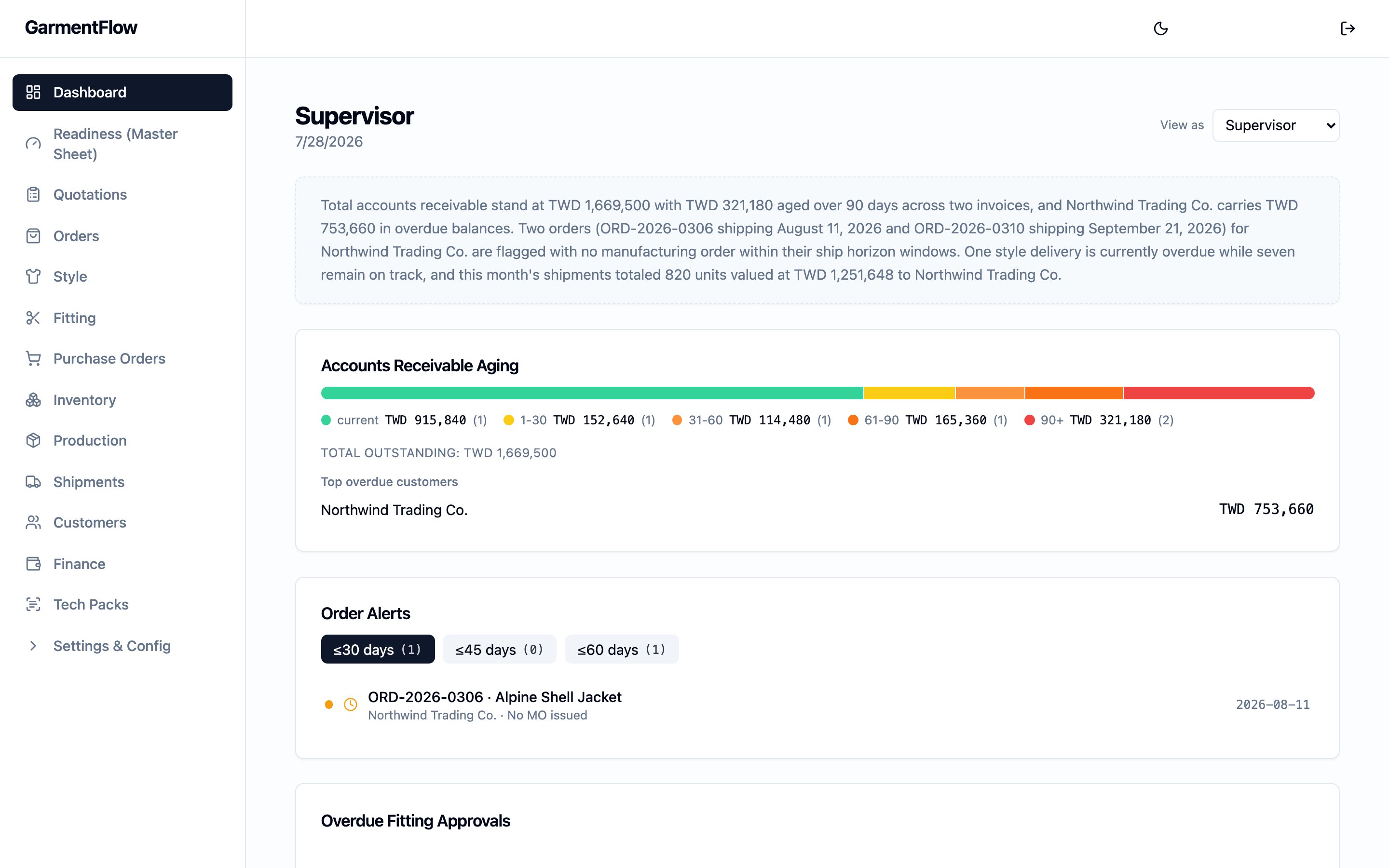
## The shape of the product
The product itself has four areas the team works in. **Styles** sit at the center —
the reusable product records every order draws from, with the BOM, cost sheet,
samples, fittings, grading, product cards, and trim submissions all hanging off the
style. **Quotations**, **Orders**, and **Finance** are the commercial leg: a
quotation becomes a proforma invoice becomes an order, the order carries the
customer commitment, and Finance is one hub with the tabs the team works in —
**Receivables**, **Payables**, **Receipts**, **Offset / notes**, **Invoices**, and
**Reports** — backed by the same finance ledger every screen reads from.
**Production** is one hub with four tabs — **Subcontracting**, **Purchasing**,
**Inventory**, and **Claims** — anchored on the factory order that commercialises
an order's bulk run. **Shipments** carries the outbound side, in two records that
work together: the per-leg outbound record on the order, and the customer-facing
commercial shipment for the batch.
The four areas connect: orders consume styles, production runs against orders,
shipments are cut against orders, and the finished-goods record draws down when the
outbound leg is marked shipped. The
[order lifecycle](/concepts/order-lifecycle) covers how the pieces interlock end to end.
## The style-centric model in one paragraph
Every later page assumes one idea: the **style** is the center, not the order. A style
owns its BOM, its cost sheet, its sample history, and its manufacturing-ready artifacts;
orders consume styles; manufacturing orders produce styles; and a style's documents are
versioned so the same style can sell to many customers across many seasons without
losing its identity. Read [the style-centric model](/concepts/style-centric-model) once,
and the rest of the docs will read more clearly.
## Finding things in the docs
The sidebar is the spine; the search box at the top of every page finds any term in any
section; **Related pages** at the foot of every page suggests two to five next steps the
reader is likely to want; and the first time a term appears on a page, hovering it shows
a one-line definition and links to the glossary.
## Switching language
GarmentFlow documentation ships in three languages: English (canonical),
**繁體中文** (Taiwan), and **简体中文** (Mainland). Use the language selector at the top
right of any page to switch. The three trees mirror each other file-for-file, with
locally-correct terminology rather than literal calques — so a `zh-Hant` reader sees the
Taiwan industry term, a `zh-Hans` reader the Mainland term.
## Where to go next
The end-to-end walkthrough — one jacket order, from product record to paid shipment.
The platform-shift summary — what v5 changed and what it means for how you work.
The one idea that explains everything else.
## Related pages
* [Your first order](/getting-started/your-first-order)
* [What changed in v5](/getting-started/what-changed-in-v5)
* [The style-centric model](/concepts/style-centric-model)
* [Glossary](/reference/glossary)
## The shape of the documentation
The sidebar on the left is the spine of the docs. It has six sections, in this order:
* **Getting started** — what you're reading now: this orientation page, a summary of
[what changed in v5](/getting-started/what-changed-in-v5), and an end-to-end
[walkthrough of a first order](/getting-started/your-first-order).
* **Concepts** — the mental models the rest of the docs assume:
[the style-centric model](/concepts/style-centric-model),
[style vs. order vs. MO](/concepts/style-vs-order-vs-mo),
[the order lifecycle](/concepts/order-lifecycle),
[purchasing, receipts, and inventory](/concepts/purchase-receipts-inventory),
[BOM, cost sheet, and artifact versions](/concepts/bom-cost-sheet-artifact-versions),
[the readiness engine and AI](/concepts/readiness-engine-and-ai), and
[documents and the conversion chain](/concepts/documents-and-conversion-chain).
* **Modules** — the day-to-day reference for each business area:
[Style](/modules/styles), [Tech Packs](/modules/tech-packs),
[BOM](/modules/bom), [Cost sheet](/modules/cost-sheet),
[Samples and fitting](/modules/samples-and-fitting),
[Grading](/modules/grading), [Product cards](/modules/product-cards),
[Trim submissions](/modules/trim-submissions),
[Quotation](/modules/quotations), [Order](/modules/orders),
[Production](/modules/production), [Shipments](/modules/shipments), and
[Finance](/modules/finance) — one collapsible group that gathers the Finance
module's tabs ([Receivables](/modules/receivables), [Payables](/modules/payables),
[Invoices](/modules/invoices),
[Debit and credit notes](/modules/debit-credit-notes),
[Statement of account](/modules/statement-of-account),
[Foreign exchange](/modules/foreign-exchange), and
[Finance reports](/modules/finance-reports)) the way the product does.
* **Workflows** — the how-to pages that run from start to outcome:
[Import a tech pack](/modules/import-a-tech-pack),
[Develop a style](/modules/develop-a-style),
[Build the BOM](/modules/build-the-bom),
[Build the cost sheet](/modules/build-the-cost-sheet),
[Create a quotation](/modules/create-a-quotation),
[Create an order](/modules/create-an-order),
[Build a manufacturing order](/modules/build-an-mo), and
[Generate the factory work order](/modules/generate-the-factory-work-order).
* **Admin & configuration** — workspace setup, master-data import,
[user management](/admin/user-management), the
[Feature settings](/admin/feature-settings) panel,
[Workspace settings](/admin/workspace-settings) (your company profile, bank accounts,
branding, and AI defaults), the [Audit log](/admin/audit-log), and
[Your account](/admin/your-account) for your own profile, password, and sessions.
* **Reference** — the [glossary](/reference/glossary) and the
[release notes](/reference/release-notes).
## The shape of the product
The product itself has four areas the team works in. **Styles** sit at the center —
the reusable product records every order draws from, with the BOM, cost sheet,
samples, fittings, grading, product cards, and trim submissions all hanging off the
style. **Quotations**, **Orders**, and **Finance** are the commercial leg: a
quotation becomes a proforma invoice becomes an order, the order carries the
customer commitment, and Finance is one hub with the tabs the team works in —
**Receivables**, **Payables**, **Receipts**, **Offset / notes**, **Invoices**, and
**Reports** — backed by the same finance ledger every screen reads from.
**Production** is one hub with four tabs — **Subcontracting**, **Purchasing**,
**Inventory**, and **Claims** — anchored on the factory order that commercialises
an order's bulk run. **Shipments** carries the outbound side, in two records that
work together: the per-leg outbound record on the order, and the customer-facing
commercial shipment for the batch.
The four areas connect: orders consume styles, production runs against orders,
shipments are cut against orders, and the finished-goods record draws down when the
outbound leg is marked shipped. The
[order lifecycle](/concepts/order-lifecycle) covers how the pieces interlock end to end.
## The style-centric model in one paragraph
Every later page assumes one idea: the **style** is the center, not the order. A style
owns its BOM, its cost sheet, its sample history, and its manufacturing-ready artifacts;
orders consume styles; manufacturing orders produce styles; and a style's documents are
versioned so the same style can sell to many customers across many seasons without
losing its identity. Read [the style-centric model](/concepts/style-centric-model) once,
and the rest of the docs will read more clearly.
## Finding things in the docs
The sidebar is the spine; the search box at the top of every page finds any term in any
section; **Related pages** at the foot of every page suggests two to five next steps the
reader is likely to want; and the first time a term appears on a page, hovering it shows
a one-line definition and links to the glossary.
## Switching language
GarmentFlow documentation ships in three languages: English (canonical),
**繁體中文** (Taiwan), and **简体中文** (Mainland). Use the language selector at the top
right of any page to switch. The three trees mirror each other file-for-file, with
locally-correct terminology rather than literal calques — so a `zh-Hant` reader sees the
Taiwan industry term, a `zh-Hans` reader the Mainland term.
## Where to go next
The end-to-end walkthrough — one jacket order, from product record to paid shipment.
The platform-shift summary — what v5 changed and what it means for how you work.
The one idea that explains everything else.
## Related pages
* [Your first order](/getting-started/your-first-order)
* [What changed in v5](/getting-started/what-changed-in-v5)
* [The style-centric model](/concepts/style-centric-model)
* [Glossary](/reference/glossary)