> ## Documentation Index
> Fetch the complete documentation index at: https://docs.garmentflow.ai/llms.txt
> Use this file to discover all available pages before exploring further.
# From tech pack to work order
> How the modules connect end to end — the brand's tech pack becomes a working style, and the style becomes a printable factory work order for a specific order.
A factory document is **spec × commitment**. The specification says what the
garment is; the commitment says how many, in which sizes, for which
destination, by when. This concept page walks that chain from the file the
brand sent to the document the factory works from — every hop, every place
you encounter it, and where the canonical page lives.
 ## The two halves
The commitment side of the chain is the same for every style your workspace
runs: a
[quotation](/reference/glossary#quotation)
becomes a customer
[order](/reference/glossary#order),
the order carries the per-colorway × per-size quantities and the destination,
and the order's
[manufacturing order (MO)](/reference/glossary#mo-manufacturing-order)
carries the per-run binding. [The commercial cycle](/concepts/documents-and-conversion-chain)
is the canonical page for the document chain that produces it.
The specification side, for a style that originated from a brand's authored
pack, is what this page adds. GarmentFlow's [Tech Packs](/modules/tech-packs)
module is the receiving side of that pack, and — together with the existing
[Style](/modules/styles) model — is where the specification is assembled.
When the two halves meet on the
[factory work order](/modules/generate-the-factory-work-order), the OEM
prints one document containing both.
## The chain, in order
1. **The brand sends a pack, or a `.tpv` export.** A PDF, an Illustrator
(`.ai`) file, or a Techpacker `.tpv` export lands in the merchandiser's
inbox. It is what the brand authored; it is not yet a style.
2. **The pack is uploaded to Tech Packs.** The file goes straight to secure
storage, and the system reads it. For a PDF or `.ai` file, fields, image
matches and QC checks are proposed; for a `.tpv` file, every field is read
from the file rather than inferred, and no proposal is made. See
[Import a tech pack](/modules/import-a-tech-pack).
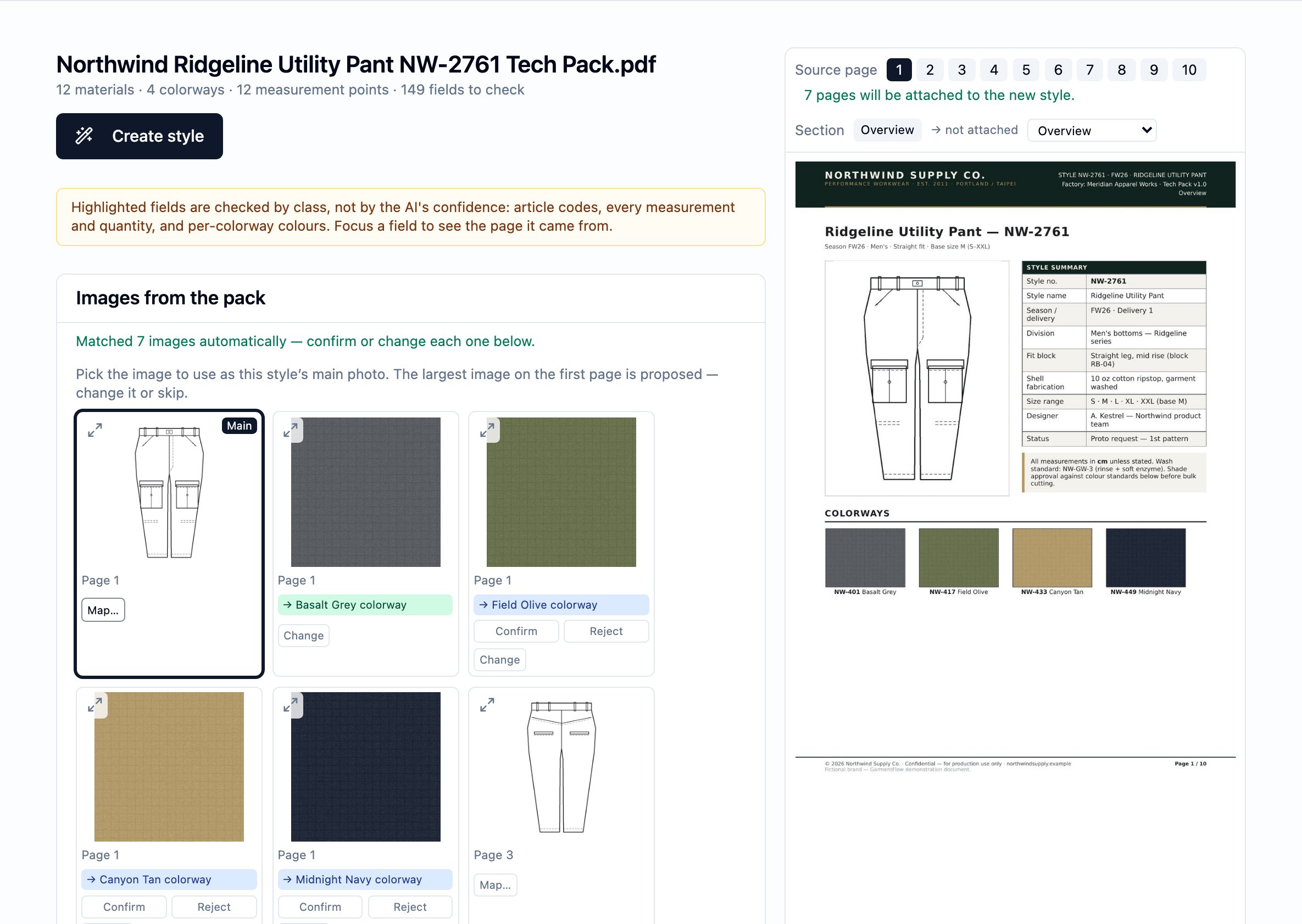
3. **You review the pack on its own pages.** Beside the pack's page renders,
you confirm the identity, the colorways, the BOM lines and their links to
your existing material masters, the size-specification points and
tolerances, which images are colorway swatches and which belong to BOM
rows, which instruction pages will attach to the new style's Packing and
Production Notes surfaces, and which proposed QC checks to keep. Nothing
lands until you confirm.
4. **You inject the pack.** The confirmed content is written as a new style:
its identity and colorways, its BOM, its style-level size specification
(the POM record on the style itself, seeded from the pack's tolerance
table — a separate surface from any per-order grading table), the
pack's own images (with your chosen main photo as the
style hero),
the classified instruction pages as attachments on the style's **Packing**
and **Production Notes** tabs, and the confirmed QC checklist on the
style's **QC** tab. From this point on, the pack's role is background —
the style is the working record.
5. **The style runs the ordinary path.** A
[sample](/modules/samples-and-fitting) is developed and fitted; a
[quotation](/modules/quotations) is priced; the customer places an
[order](/modules/orders); a
[manufacturing order](/modules/build-an-mo) is opened against a specific
order version. Nothing in this stretch differs because the style came from
a pack — the style is a style.
6. **You generate the factory work order.** From the MO on a
tech-pack-originated style, you produce a single A4 PDF: the OEM's cover
(order header, per-size × per-colorway quantity matrix, the confirmed QC
checklist) followed by the pack's own pages. This is the document the
factory works to. See
[Generate the factory work order](/modules/generate-the-factory-work-order).
## Where the reader encounters each hop
* **In the Tech Packs list.** The upload card and the pack list are the
entry point. Each pack's row shows a per-stage processing status —
processing pages and images, reading the pack, matching images to
colorways and BOM rows, classifying pages, building the QC checklist —
until the pack is ready to review, then injected.
* **On the review screen.** One long form, section by section, with the
pack's own pages open beside every field.
* **On the created style.** The style behaves like any other style. Its
origin is visible in the pack's images (the hero and the gallery), in the
attachments on the **Packing** and **Production Notes** tabs, and in the
imported checklist on the **QC** tab.
* **On the style's MO tab.** For an order-bound MO of a tech-pack-originated
style, a **Download PDF** action opens the work-order generate flow.
* **On the printed work order.** The cover carries the OEM's own header, the
quantity matrix, the destinations and the QC checklist; the body carries
the brand's authored pages.
## The two forms of the MO document
The manufacturing order carries two artifacts, both grounded on the same
confirmed data, and both can be produced for the same MO:
* **The 8-tab Excel workbook** — the multi-tab factory spec workbook that
every style has always been able to produce. See
[Build a manufacturing order (MO)](/modules/build-an-mo).
* **The A4 PDF work order (製造單)** — the second form, available only when
the MO is order-bound and the style originated from a tech pack. See
[Generate the factory work order](/modules/generate-the-factory-work-order).
Both read the same confirmed data, so they always agree. The PDF is
generated fresh from current data each time; nothing is stored between
generations.
## What does not change
The style-centric model does not change because a style came from a pack.
The style is still the reusable product record; the order still consumes it;
the MO still produces it; every artifact on it still versions independently.
See [the style-centric model](/concepts/style-centric-model) for the model
itself, and [style vs. order vs. MO](/concepts/style-vs-order-vs-mo) for
where the pack-originated content sits within it.
## Related pages
* [Tech Packs](/modules/tech-packs)
* [Import a tech pack](/modules/import-a-tech-pack)
* [Generate the factory work order](/modules/generate-the-factory-work-order)
* [The style-centric model](/concepts/style-centric-model)
* [Documents and the conversion chain](/concepts/documents-and-conversion-chain)
* [Build a manufacturing order (MO)](/modules/build-an-mo)
## The two halves
The commitment side of the chain is the same for every style your workspace
runs: a
[quotation](/reference/glossary#quotation)
becomes a customer
[order](/reference/glossary#order),
the order carries the per-colorway × per-size quantities and the destination,
and the order's
[manufacturing order (MO)](/reference/glossary#mo-manufacturing-order)
carries the per-run binding. [The commercial cycle](/concepts/documents-and-conversion-chain)
is the canonical page for the document chain that produces it.
The specification side, for a style that originated from a brand's authored
pack, is what this page adds. GarmentFlow's [Tech Packs](/modules/tech-packs)
module is the receiving side of that pack, and — together with the existing
[Style](/modules/styles) model — is where the specification is assembled.
When the two halves meet on the
[factory work order](/modules/generate-the-factory-work-order), the OEM
prints one document containing both.
## The chain, in order
1. **The brand sends a pack, or a `.tpv` export.** A PDF, an Illustrator
(`.ai`) file, or a Techpacker `.tpv` export lands in the merchandiser's
inbox. It is what the brand authored; it is not yet a style.
2. **The pack is uploaded to Tech Packs.** The file goes straight to secure
storage, and the system reads it. For a PDF or `.ai` file, fields, image
matches and QC checks are proposed; for a `.tpv` file, every field is read
from the file rather than inferred, and no proposal is made. See
[Import a tech pack](/modules/import-a-tech-pack).
3. **You review the pack on its own pages.** Beside the pack's page renders,
you confirm the identity, the colorways, the BOM lines and their links to
your existing material masters, the size-specification points and
tolerances, which images are colorway swatches and which belong to BOM
rows, which instruction pages will attach to the new style's Packing and
Production Notes surfaces, and which proposed QC checks to keep. Nothing
lands until you confirm.
4. **You inject the pack.** The confirmed content is written as a new style:
its identity and colorways, its BOM, its style-level size specification
(the POM record on the style itself, seeded from the pack's tolerance
table — a separate surface from any per-order grading table), the
pack's own images (with your chosen main photo as the
style hero),
the classified instruction pages as attachments on the style's **Packing**
and **Production Notes** tabs, and the confirmed QC checklist on the
style's **QC** tab. From this point on, the pack's role is background —
the style is the working record.
5. **The style runs the ordinary path.** A
[sample](/modules/samples-and-fitting) is developed and fitted; a
[quotation](/modules/quotations) is priced; the customer places an
[order](/modules/orders); a
[manufacturing order](/modules/build-an-mo) is opened against a specific
order version. Nothing in this stretch differs because the style came from
a pack — the style is a style.
6. **You generate the factory work order.** From the MO on a
tech-pack-originated style, you produce a single A4 PDF: the OEM's cover
(order header, per-size × per-colorway quantity matrix, the confirmed QC
checklist) followed by the pack's own pages. This is the document the
factory works to. See
[Generate the factory work order](/modules/generate-the-factory-work-order).
## Where the reader encounters each hop
* **In the Tech Packs list.** The upload card and the pack list are the
entry point. Each pack's row shows a per-stage processing status —
processing pages and images, reading the pack, matching images to
colorways and BOM rows, classifying pages, building the QC checklist —
until the pack is ready to review, then injected.
* **On the review screen.** One long form, section by section, with the
pack's own pages open beside every field.
* **On the created style.** The style behaves like any other style. Its
origin is visible in the pack's images (the hero and the gallery), in the
attachments on the **Packing** and **Production Notes** tabs, and in the
imported checklist on the **QC** tab.
* **On the style's MO tab.** For an order-bound MO of a tech-pack-originated
style, a **Download PDF** action opens the work-order generate flow.
* **On the printed work order.** The cover carries the OEM's own header, the
quantity matrix, the destinations and the QC checklist; the body carries
the brand's authored pages.
## The two forms of the MO document
The manufacturing order carries two artifacts, both grounded on the same
confirmed data, and both can be produced for the same MO:
* **The 8-tab Excel workbook** — the multi-tab factory spec workbook that
every style has always been able to produce. See
[Build a manufacturing order (MO)](/modules/build-an-mo).
* **The A4 PDF work order (製造單)** — the second form, available only when
the MO is order-bound and the style originated from a tech pack. See
[Generate the factory work order](/modules/generate-the-factory-work-order).
Both read the same confirmed data, so they always agree. The PDF is
generated fresh from current data each time; nothing is stored between
generations.
## What does not change
The style-centric model does not change because a style came from a pack.
The style is still the reusable product record; the order still consumes it;
the MO still produces it; every artifact on it still versions independently.
See [the style-centric model](/concepts/style-centric-model) for the model
itself, and [style vs. order vs. MO](/concepts/style-vs-order-vs-mo) for
where the pack-originated content sits within it.
## Related pages
* [Tech Packs](/modules/tech-packs)
* [Import a tech pack](/modules/import-a-tech-pack)
* [Generate the factory work order](/modules/generate-the-factory-work-order)
* [The style-centric model](/concepts/style-centric-model)
* [Documents and the conversion chain](/concepts/documents-and-conversion-chain)
* [Build a manufacturing order (MO)](/modules/build-an-mo)